What should you consider when choosing one?
First, check that the software, printer and screen are compatible with the specific version you’re considering. Then weigh up user account separation, desk space and whether everything you need is included.
| Consideration |
What to check before buying |
Who it matters most to |
| Software and workflow |
Does the installed operating system support the software you need? Check the RAM and storage actually included, not just the possible upgrade options. |
If I’m creating worksheets and researching online at the same time, I want a computer that suits my software and workflow. Around 29% of consumers prioritise software and smooth performance. |
| Separate accounts |
Check whether you can set up multiple user accounts and whether the school’s IT team requires a particular shared-device configuration. Windows accounts can have their own files and settings (Microsoft Support). |
At a shared desk, I want to use my own files and settings rather than mix workspaces. Around 29% of consumers prioritise separate accounts. |
| Connections and desk space |
Check that the video outputs, USB or network connections you need, and printer driver are compatible with your existing devices. A VESA mount must fit the screen and allow for cable routing. |
If I already have a screen and printer, I want to keep using them while leaving room for paperwork. Around 24% of consumers prioritise connections and desk space. |
| What’s included |
Before comparing options, check whether RAM, an SSD and an operating system are included, and whether you still need a screen, keyboard or mouse. |
I want to know in advance what else I’ll need for a complete workspace, rather than just compare the base units. Around 18% of consumers prioritise knowing exactly what’s included. |
Joybuy products for your workspace
The following Joybuy products are Windows mini PCs for a compact workspace. Before buying, check that the specific version is suitable for your printer, screen, required software and existing equipment.
 No image available
ACEMAGIC E3B Mini-PC
A good fit for a compact workspace if Windows 11 Pro and the connections are compatible with your existing equipment.
Ryzen 7 7735HS, 24 GB LPDDR5, 512 GB NVMe SSD, Windows 11 Pro; HDMI, DisplayPort and USB-C are listed in the product name.
The product name lists two M.2-2280 slots and support for up to 4 TB of storage.
View at Joybuy
 No image available
SOYO S5Air Mini-PC
A possible choice for a compact workspace, provided Windows 11 Pro and the connections you need are compatible with your existing devices.
Ryzen 5 7535HS, 16 GB LPDDR5, 512 GB NVMe SSD and Windows 11 Pro.
Listed in the product name: HDMI, DisplayPort, USB-C, Wi-Fi 6E and Bluetooth 5.2.
View at Joybuy
 No image available
SOYO M5 Mini-PC
Could suit a compact workspace if the software you need works with the stated version of Windows.
Ryzen 4300U, 16 GB LPDDR4, 512 GB SSD and Windows 11.
The product name lists HDMI, USB-C and DisplayPort connections for up to three screens.
View at Joybuy
 No image available
SOYO S4PLUS Mini-PC
Suitable for a workspace with several connected devices, provided the specific connections meet your needs.
Ryzen 7 H 255, 24 GB LPDDR5, 512 GB PCIe 3.0 SSD and Windows 11.
The product name lists six USB 3.2 ports, along with HDMI, DisplayPort and USB-C.
View at Joybuy
 No image available
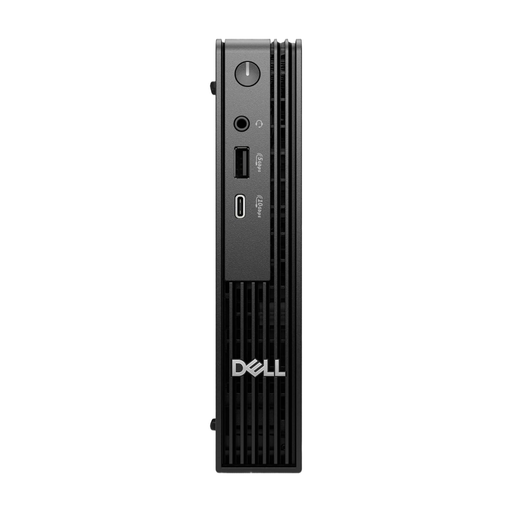
Dell Pro Micro QCM1250 MJ5TK TPM
A compact Windows 11 Pro version that could work well in a small office workspace if the connections are right.
Core i7-14700T, 16 GB DDR5, 512 GB NVMe SSD and Windows 11 Pro.
Listed in the product name: HDMI, DisplayPort, four USB 3.0 ports and Gigabit Ethernet.
View at Joybuy
Frequently asked questions
Can I keep using my existing printer for worksheets?
It depends on the printer model, how it connects and whether there’s a driver for the version of Windows you choose. Windows supports many printers by default (Microsoft Support). For your specific model, check which connection or network access it needs and, if necessary, find the right driver.
How do I set up the computer for several teachers?
Windows lets you set up multiple user accounts with their own files and settings (Microsoft Support). If the school’s IT team manages the PC, they should confirm whether and how to configure it for shared use (Microsoft Learn).
Can personal pupil data be stored on a shared mini PC?
Separate user accounts alone don’t make this permissible. For personal data, follow the instructions from the responsible authority and the requirements that apply to your school (Datenschutzkonferenz). Without details about the school and the data, it isn’t possible to assess whether this is generally permitted.
What should I check to make sure the mini PC is compliant?
Check the CE marking and conformity information for the specific device version. The Bundesnetzagentur lists checking the CE marking as part of its market surveillance. For devices with Wi-Fi or Bluetooth, you should also take the relevant radio equipment requirements into account.
Is a mini PC with Windows 10 still a good choice?
Standard support for Windows 10 ended on 14 October 2025 (Microsoft Support). Microsoft lists separate options for Extended Security Updates, so check whether the specific installation is covered and which system version is supported.


