
Lieferung heute & morgen

Qualitätsgarantie

Willkommens-Angebote freischalten: KOSTENLOSE Lieferung | Bis zu 80 % RABATT | Kostenlose 30-Tage-JoyPlus-Testphase
App herunterladen
A mini projector transforms nearly any surface into a screen for movies, presentations, or gaming. Technological advancements have made these devices more compact, powerful, and accessible. Moving beyond the limitations of traditional televisions, portable projectors provide a flexible solution for your home cinema, outdoor gatherings, or as a portable projector for use on the go. This guide breaks down the key technical specifications to consider when choosing a model for 2026 and showcases a selection of devices tailored to specific needs.
Selecting the right device depends on an objective assessment of its technical parameters. The following criteria are crucial for a mini projector's performance and ease of use.
Image quality is primarily determined by the native resolution and brightness.
Modern projectors are essentially network devices. A projector with Wi-Fi is standard today, but the specific version matters.
A smart projector with an integrated operating system like Android offers direct access to streaming services (e.g., Netflix, YouTube, Prime Video) without needing an external device like a laptop or TV stick. This significantly enhances convenience and portability. Pay attention to the OS version, as newer versions typically offer better app compatibility and performance.
Easy setup is a core feature of a good portable projector.
For a portable projector, weight, dimensions, and design are crucial. A small, lightweight projector is ideal for transport. Innovative design features, such as a 180° rotating stand, allow for flexible projection onto walls, ceilings, or other unconventional surfaces without the need for a separate tripod.
Based on the technical criteria mentioned above, we present two models that focus on different priorities.
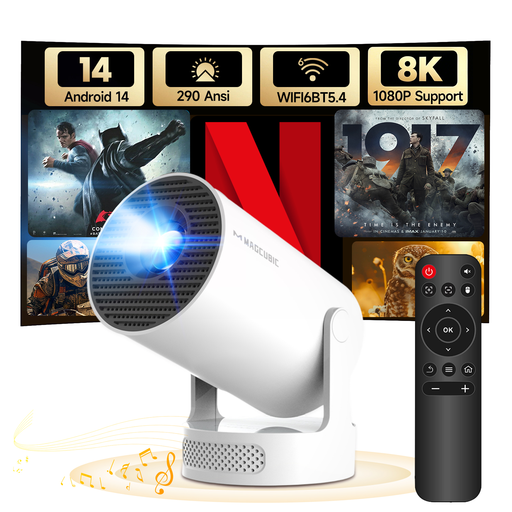
Why we recommend this product: The HY300Pro+ stands out for its up-to-date software and hardware. With Android 14 and WiFi 6, it is designed for fast performance and future-proof connectivity. Its standout feature is the 180° rotating stand, which allows for exceptional placement flexibility.
Advantages:
Who it's for: Users who value the latest software, fast wireless connections, and maximum setup flexibility. Ideal for those who want to use the projector in different rooms or even on the ceiling.
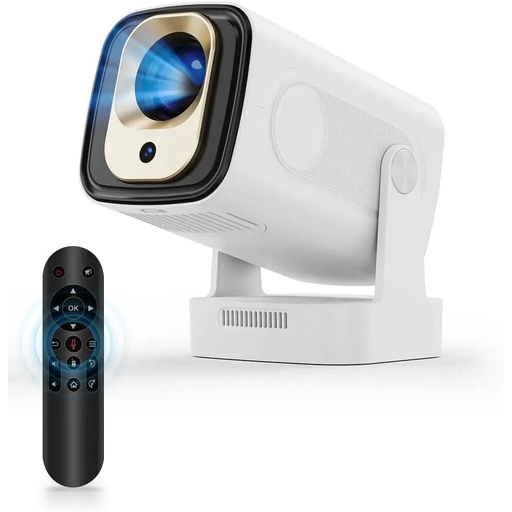
Why we recommend this product: The HY310 focuses on maximum ease of use. The combination of auto-focus and automatic vertical keystone correction reduces setup effort to a minimum. The included Air Mouse remote with voice control significantly simplifies navigation within the smart menu.
Advantages:
Who it's for: Users for whom a quick and straightforward setup is a top priority. Ideal for families, movie nights, or presentations where the device is frequently set up in new locations and needs to be ready for immediate use.
While the integrated speakers in the featured mini projectors are practical for spontaneous use, a dedicated audio system can significantly enhance the home cinema experience. The Bluetooth connection allows for a straightforward link to external sound systems. For an aesthetically pleasing and sonically impressive addition, high-quality white speakers could be a suitable option, fitting seamlessly into modern interior designs.
1. How many lumens does a mini projector need? For use in a well-darkened room, 200-300 ANSI lumens are often sufficient for a screen size of up to 100 inches. If you plan to use the projector in rooms with some ambient light or outdoors at dusk, models with a higher lumen count (400 ANSI lumens or more) are preferable.
2. Can you use a mini projector in daylight? Most mini projectors are designed for use in dark or dimly lit environments. In direct daylight, the projected image is usually too washed-out and low-contrast to provide a satisfactory viewing experience. Daylight viewing requires professional projectors with several thousand ANSI lumens, which fall into a different price and size category.
3. What does keystone correction mean on a projector? Keystone correction is a feature that corrects image distortion that occurs when the projector is not positioned perfectly perpendicular to the screen. Automatic vertical correction adjusts the image on its own when the projector is tilted up or down, which greatly simplifies setup.