
Lieferung heute & morgen

Qualitätsgarantie

Willkommens-Angebote freischalten: KOSTENLOSE Lieferung | Bis zu 80 % RABATT | Kostenlose 30-Tage-JoyPlus-Testphase
App herunterladen
A mini rotary tool with accessories can replace several individual hand tools for engraving, sanding, polishing and drilling. In practice, though, the number of attachments alone does not determine how useful it is. For DIYers, model-makers, jewellery designers and crafters, the key factors are the collet system, speed control, battery life and whether the attachments are actually suitable for the job.
A 77-piece tool set sounds comprehensive. But if the drill bits, sanding points and polishing attachments aren’t compatible with the collet, some of the accessories will go unused. Before buying, check:
For example, the Fanttik F2 Master is listed in the product description as having a collet that accepts 3/32 inch or 2.3 mm accessories. Keep this size in mind when buying additional accessories.
A high maximum speed isn’t automatically right for every application. When polishing, engraving plastic or working on small pieces, excessive speed can heat the material or damage the surface. That’s why an cordless rotary tool should offer several clearly defined speed settings.
According to the supplier, the HYCHIKA tool has three speed ranges, from around 5,000 to 15,000 revolutions per minute. The Fanttik F2 Master offers five speed settings and reaches up to 25,000 revolutions per minute, according to its product details. What matters is whether the settings suit the jobs you have in mind, not just the maximum speed.
A cordless precision tool is handy when a cable would get in the way of your work. At the same time, check the charging port, charging time and what’s included in the box. Some cordless tools don’t come with a battery or charger. This is often the case with larger systems designed to run on a compatible battery you already own.
A USB-C rotary tool can usually be charged flexibly using a suitable mains adapter, computer port or power bank. Even so, check the manufacturer’s charging specifications and use only suitable cables and power sources. For longer jobs, it’s also a good idea to take a short cooling break.
The collet must hold the accessory shank securely. A loose attachment may run unevenly or come free while you’re working. A tool-free collet system makes changing attachments easier, but you should still check everything is secure before switching the tool on.
For sanding and polishing, you’ll typically need grinding stones, sanding bands, felt discs and polishing pads. For drilling and engraving, you’ll need suitable drill bits and burrs. Only use attachments with materials and at speeds approved by the manufacturer.
Actual performance depends not only on speed, but also on how much pressure you apply, the material and the battery’s charge level.
A lightweight tool is an advantage for detailed work. The HYCHIKA 3.6 V mini rotary tool set is listed as weighing around 250 g. A non-slip grip can improve control. For longer jobs, also consider the grip position, switch and how easy it is to reach the speed control.
A mini rotary tool may not be the right choice for larger renovation jobs. An oscillating multi-tool such as the Greenworks MT332 is designed for cutting, scraping and sanding, but according to the product description, a 24 V battery and charger are sold separately.
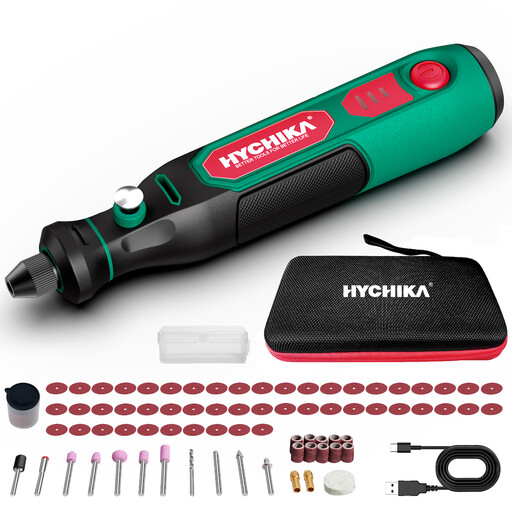
Why this product suits this type of user: According to the product details, this set combines a 3.6 V tool, USB-C charging and 77 accessories for small repairs, engraving, sanding and polishing.
The three speed ranges make it easier to adapt the tool to different materials. The accessories and storage bag are listed as included.
Around 250 g in weight, a USB-C charging cable, a tool-free collet system and a 77-piece accessory set, according to the supplier.
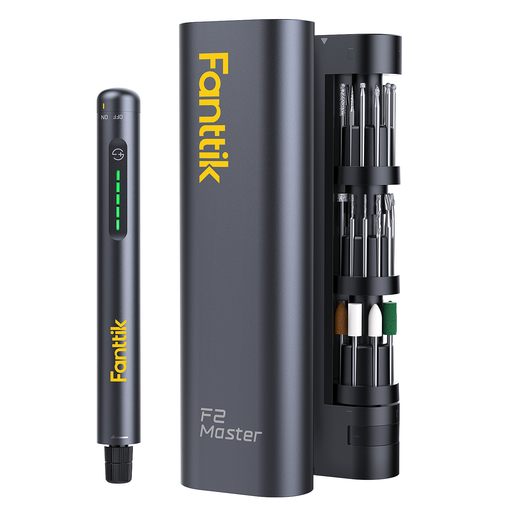
Why this product suits this type of user: According to the description, this tool is aimed at users who value multiple speed settings, a compact design and neatly organised accessories for model-making and detailed work.
The product description lists five speed settings and a defined 2.3 mm collet. This makes it easier to check accessory compatibility before buying.
Up to 25,000 revolutions per minute, USB-C charging and 35 accessories, according to the supplier.
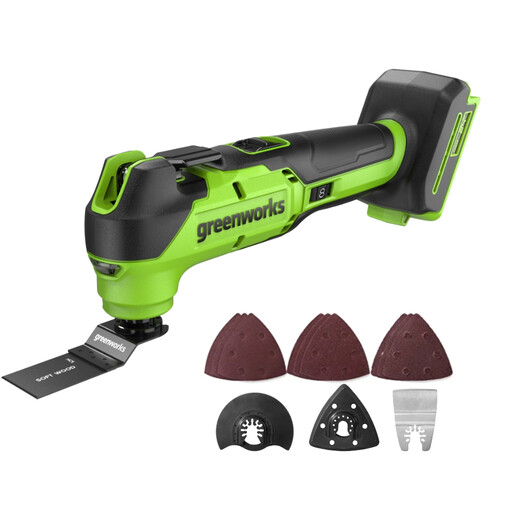
Why this product suits this type of user: This tool is designed for renovation and repair jobs such as cutting, scraping and sanding flat surfaces, making it an alternative to a precision engraving tool.
The product page clearly states that the battery and charger aren’t included. This helps you avoid underestimating your accessories budget.
Eight speed settings, up to 18,000 OPM, an LED work light and tool-free accessory changes, according to the product description.
We’ve put together a comprehensive, regularly updated list of products that meet these strict selection criteria and the safety requirements in force in the EU.
Before using the tool for the first time, read the instruction manual and wear suitable safety glasses when working with dust, splinters or sparks. For sanding, respiratory and hearing protection may also be advisable. Secure your workpieces firmly. Check the attachment for cracks, remove the battery or unplug the charging cable before changing accessories, and keep the tool dry.
For typical DIY jobs, you’ll initially need sanding points, sanding bands, small drill bits, engraving burrs, felt discs and polishing pads. Check the shank diameter and permitted speed. A large set is only useful if the attachments it contains are suitable for your materials and projects.
Battery life depends on speed, how much pressure you apply, the material and the battery’s condition. Manufacturer estimates should therefore be treated as a guide. For longer projects, start with a fully charged battery and take a break if the tool or battery gets warm.
Many tools can handle light metalworking, provided the manufacturer approves this and you use a suitable milling or sanding attachment. For thick metal, extended work or heavy material removal, a larger, more powerful tool is usually a better choice. Always check the speed range, accessories and safety instructions for the model you’re using.