Photographers of fine details
You want to show tiny painted features and equipment in close-up, so you compare the reproduction ratio of the specific lens. Nikon UK lists a 1:1 reproduction ratio for the NIKKOR Z MC 50 mm 1:2.8.


A suitable camera kit may be all you need to photograph a whole miniature figure, but tiny painted details call for a macro lens with the right magnification. For stationary figures with several depth planes, focus bracketing can help. Lighting, white balance and a stable setup also make a difference when you’re shooting against a white background.
You want to show tiny painted features and equipment in close-up, so you compare the reproduction ratio of the specific lens. Nikon UK lists a 1:1 reproduction ratio for the NIKKOR Z MC 50 mm 1:2.8.
You photograph whole figures or groups and want to keep the front and back in focus when your subject is stationary. Canon UK documents focus bracketing for the EOS R50.
You regularly take pictures against a white background and want to control the lighting and white balance for consistent paint colours. Canon UK explains that you can adjust the white balance to suit the light you’re using.
A good fit if: You want to take photos without changing lenses; the OM SYSTEM TG-7 offers a Microscope mode and in-camera Focus Stacking.
The trade-off: The lens can’t be changed, so check the framing and make sure there’s room for side lighting in your setup.
A good fit if: You mainly want to photograph whole figures or small groups and the specific kit lens gives you the framing you need.
The trade-off: The EOS R50 kit with the RF-S 18–45 mm isn’t a 1:1 macro system just because it’s a kit; very small details may call for an additional compatible macro lens.
A good fit if: You want tiny painted details to appear larger, or you’d like to tailor your lens choice and framing to your setup.
The trade-off: You’ll need to make sure the camera body and lens are compatible and factor in the cost of each separately. Focus bracketing requires a stable setup and, depending on the model, the images may need to be combined.
| What matters | What to look for when buying | Who it matters most to |
|---|---|---|
| Magnifying tiny details | Check the reproduction ratio, the framing you want, the working distance in front of the lens and compatibility with the camera body. Nikon UK lists a 1:1 ratio for the Z MC 50 mm 1:2.8; Canon UK lists 0.5x magnification for the RF 85 mm F2 Macro IS STM and confirms it’s compatible with the EOS R50. | If I want to show tiny painted details in close-up, the specific macro lens matters more to me than the camera body alone. Around 33% of consumers put detail magnification first. |
| Keeping multiple depth planes in focus | Check whether the camera offers focus bracketing or in-camera Focus Stacking, and how the images are combined. OM SYSTEM documents Focus Stacking for the TG-7 and OM-5 Mark II. | When I’m photographing a stationary figure with parts set at different distances, I want to keep as many areas in focus as possible. Around 25% of consumers prioritise sharpness across the figure’s depth. |
| Controlling white backgrounds and colours | Check the white balance and, where relevant, RAW shooting on the specific camera. Take test shots under the lighting you plan to use. Canon UK recommends adjusting the white balance to suit challenging lighting conditions. | If I regularly photograph against white, I want to be able to fine-tune the lighting and colour reproduction. Around 25% of consumers put control over the background and colours first. |
| Keeping the setup simple | Compare exactly what’s included and check whether a lens comes with the camera. A separate macro lens, lighting or a tripod can complete your setup; Nikon UK describes a tripod and lighting as useful aids for macro photography. | If I want to get started with as little extra equipment as possible, a straightforward setup matters to me. Around 17% of consumers prioritise an easy start. |
Focusing distance and reproduction ratio describe different things. Working very close can also leave you with less room for lighting and controlling shadows.
Compare the reproduction ratio of the specific lens, then test your desired framing and check how much space you have for lighting.
Focus bracketing first takes several shots at different focus distances. Whether and how those images are combined depends on the specific model and method.
Check whether the camera combines the images in-camera, and keep both the camera and figure still while shooting.
A focus-bracketed series takes time, as it involves multiple shots and may require the images to be combined afterwards. A tripod can help stabilise your setup.
The EOS R50 kit includes an RF-S standard zoom; the OM SYSTEM and Sony macro lenses mentioned here are sold separately. A camera body offer doesn’t automatically mean that a suitable lens is included.
Compare the full model name, lens mount and what’s included with the smallest detail you want to photograph.
The details below refer to the models and lenses mentioned, not to a brand’s entire range.
The EOS R50 with the RF-S 18–45 mm is a kit option for photographing whole figures; small details may call for a separate compatible RF macro lens.
The Z50II is a DX camera body; the separately available NIKKOR Z MC 50 mm 1:2.8 is a macro lens option for small details.
The TG-7 offers a fixed-lens close-up setup, while the OM-5 Mark II is an interchangeable-lens alternative.
The α6700 is an APS-C camera body with an E-mount; Sony says the FE 50 mm F2,8 Macro is also designed for APS-C E-mount cameras.
Joybuy’s selection of cameras for photographing miniature figures against a white background.
 No image available
For a white background, check before buying that the camera offers the white balance settings you need and can be set up securely.
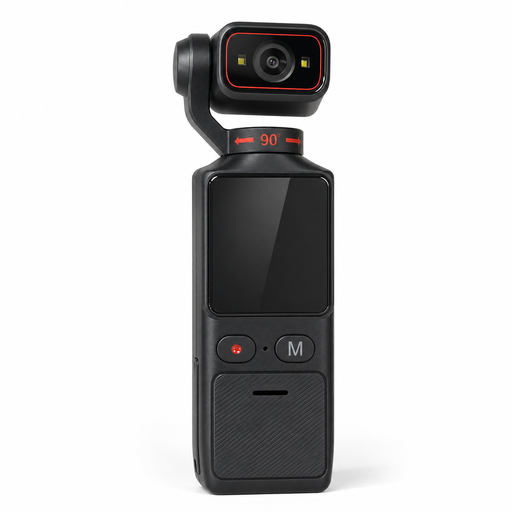
The product name lists 4K, electronic image stabilisation, a 180° swivel lens, Wi-Fi and a 1.69-inch touchscreen.
No. What matters is whether the specific lens gives you the framing you want at your shooting distance; 1:1 is mainly useful for showing small details at a larger size. Check the framing with the whole figure before buying an additional macro lens.
Focus bracketing can capture several depth planes of a stationary figure in a series of images. Check whether your specific camera model combines the images in-camera or whether you’ll need to combine them afterwards, and keep the camera and subject still while shooting.
Use a simple background, positionable lighting and a stable camera support. Set the white balance to match the light source you’re actually using and check a test shot. Canon UK explains how to adjust white balance in challenging lighting conditions.
Light sources have different colour tones, which can affect how a white background looks in a photo. Set the white balance to suit the light you’re using and check a test shot; shooting in RAW can give you more flexibility when correcting colours later.