Which camera is right for you?

Filming detailed tutorials

If you want to show how you apply paint and use the brush tip, check the size and focus of your subject from a position that still leaves you room to paint. IPEVO specifies autofocus from 10 cm for the V4K PRO 120; Sony gives a focus range starting at around 5 cm from the front of the lens for the ZV-1 II. These figures don’t replace checking the framing at your painting desk.

Streaming from your painting desk

If you record at a computer and want to show your hands and work surface regularly, check that the camera base, cable and mount fit on your limited desk space. IPEVO describes the V4K PRO 120 as a USB-UVC document camera with an articulated arm; Logitech says the MX Brio has a Show Mode for a downward-tilted view.

Recording painting stages from time to time

If you don’t want to record at a computer all the time, you could consider a camera that records on its own. Weigh the simple setup against the close-up framing you want: a short minimum focusing distance or a stand alone doesn’t prove that the miniature and brush will appear as you want them to in the video.

What should you look for when buying?

USB document camera

A good fit if: You mainly want to record a fixed view of your desk using a computer you already own, and can position an articulated arm beside your painting area.

Things to consider: You’ll need a computer and a compatible USB port; a wide capture area doesn’t guarantee that the miniature will fill the frame.

Webcam with desk mode

A good fit if: You film at a computer and want to switch between yourself and your work surface.

Things to consider: A presentation mode doesn’t guarantee a straight-down view or enough sharp detail to show miniatures clearly at your desk.

Compact camera with fixed lens

A good fit if: You want to record without a computer and keep your camera setup as simple as possible.

Things to consider: Neither the minimum focusing distance nor the stand guarantees the close-up framing you want or leaves your painting hand unobstructed.

Interchangeable-lens camera with macro lens

A good fit if: Close-up detail is your priority and you want to choose a body, compatible lens and mount to suit your painting desk.

Things to consider: The camera body and lens must be compatible; you’ll need to plan for the lens, mount and lighting separately.

What you’re looking for What to check when buying Who is it most relevant to?
Close-up detail and focus Record a video clip of a typical miniature from your planned camera height; check the size of the subject and how sharp it is. If I want to show how I apply paint and use the brush tip, the figure needs to be large enough and in focus in the finished video. Around 31% of consumers prioritise close-up detail.
Space and angle of view Check the camera’s footprint and range of movement against your desk space, lighting position and hand movements. If you paint in a small space, you need room for your painting hand and don’t want the camera or mount blocking your work area. Around 23% of consumers prioritise a clear painting desk.
Lighting and colour reproduction Film a painted test area under your usual room lighting and watch it on the screen you plan to use. If I want people to assess paint layers in my video, I want to know how they look under my lighting. Around 16% of consumers prioritise lighting and colour reproduction.
Recording method Decide whether you want to record to a computer or save footage on the camera; check the connections and accessories you’ll need. If you use a dedicated computer setup, you may prefer USB recording; if you don’t want to keep a computer running, recording directly to the camera is more important. Around 15% of consumers prioritise the recording method.
Ease of setup Plan the camera, compatible accessories and mount together. If I only want to set up and adjust a few things, the whole setup matters to me, not just the camera body. Around 15% of consumers prioritise a straightforward setup.

Common pitfalls

  • Assuming resolution or digital zoom will show brushstrokes clearly

    A camera may capture a large area of your desk, leaving a single figure looking small in the frame. IPEVO specifies 12x digital zoom for the V4K PRO 120, which requires its Visualizer software; this doesn’t guarantee that a miniature will appear large and detailed.

    Test the framing and focus in video mode with your own figure, from the camera height you intend to use.

  • Assuming a stand or Show Mode gives you a clear overhead view

    Canon lists a built-in stand for the PowerShot V10; Logitech describes the MX Brio’s Show Mode as a downward-tilted view. Neither proves that the camera will film straight down at your painting desk while leaving your painting hand free.

    Before buying, check the angle and leave space on your desk for your hand, camera and mount.

    You may need a suitable mount, depending on the angle you want.

  • Choosing only the camera body when buying an interchangeable-lens camera

    Close-up performance depends on the lens attached to the camera. OM SYSTEM’s M.Zuiko macro lens isn’t listed as compatible with the Canon RF system.

    Check the camera body, lens mount, shooting distance and mounting method as a complete setup.

    You may need to buy a suitable compatible lens separately.

Key brands at a glance

IPEVO

Document cameras for a fixed, computer-connected desk view; the V4K PRO 120 is one example.

  • IPEVO says the V4K PRO 120 has an articulated arm, USB-UVC, autofocus from 10 cm and a built-in LED.
  • Its 12x digital zoom requires Visualizer software and doesn’t, on its own, tell you how large a miniature will appear in the finished footage.

Logitech

Webcams for computer recording; the MX Brio has a desk presentation mode.

  • Logitech describes its Show Mode, along with adjustable exposure and white balance.
  • These features don’t guarantee a minimum focusing distance suitable for miniatures or a straight-down view.

Sony

Compact cameras with in-camera recording; the ZV-1 II has a fixed zoom lens.

  • Sony gives the ZV-1 II’s focal length as 18–50 mm equivalent in 35 mm terms, with focusing from around 5 cm from the front of the lens.
  • The focusing range doesn’t measure the miniature’s achievable size in the frame at your painting desk.

Canon

The PowerShot V10 is a compact camera with a fixed lens; the EOS R50 V lets you change lenses.

  • Canon lists a stand and 4K video for the V10, and interchangeable lenses and a microphone input for the R50 V.
  • Neither the V10’s stand nor an arbitrary lens for the R50 V guarantees a suitable overhead close-up.

OM SYSTEM

Macro lenses for compatible cameras in the same system, if you’re planning specifically for close-up detail.

  • OM SYSTEM describes the M.Zuiko Digital ED 30mm F3.5 Macro as offering up to 2.5x magnification in 35 mm equivalent terms.
  • You’ll need a compatible camera body; this figure doesn’t guarantee sharp video or leave you with enough room to work.

Joybuy products for video recording

These camera models are designed for recording from different angles. For miniature videos, pay particular attention to the framing at your painting desk and whether the camera or mount will get in the way of your painting hand.
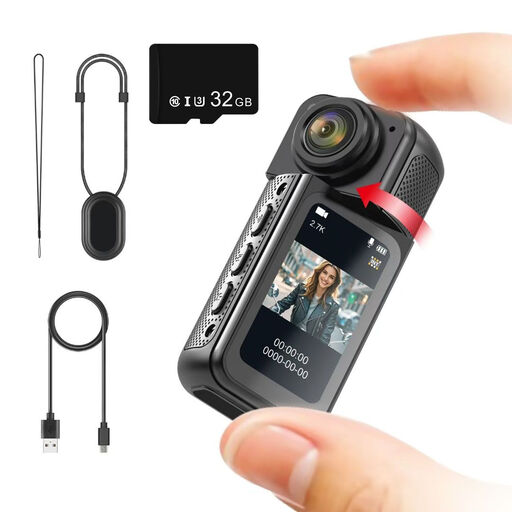
NAXSIR Mini Action Camera, 2.7K, 180° rotating lens

NAXSIR Mini Action Camera, 2.7K, 180° rotating lens

Could be worth considering for hands-free, first-person recording; for a fixed overhead view at your painting desk, check the mount and framing.

Features listed in the product name: 2.7K recording and a lens that rotates through 180°.

View at Joybuy

2K pocket vlogging camera with 360° rotating lens

2K pocket vlogging camera with 360° rotating lens

Described as a handheld POV camera; if you want a steady shot of your work surface, check how you can position it securely on your desk.

Features listed in the product name: 2K video and a lens that rotates through 360°.

View at Joybuy

Sony Alpha 6100 APS-C with 16–50 mm power zoom lens

Sony Alpha 6100 APS-C with 16–50 mm power zoom lens

The tilting screen can be useful when changing the camera angle; for miniatures, test the framing from the height you plan to use.

Features listed in the product name: mirrorless APS-C camera with a 16–50 mm power zoom lens and 4K video.

View at Joybuy

KOMERY X9 4K digital camera with autofocus and 18x zoom

KOMERY X9 4K digital camera

Described as offering autofocus for video recording; test it with your own figure to see whether the zoom and focus give you the framing you want at your chosen distance.

Features listed in the product name: 4K, 64 MP, autofocus and 18x zoom.

View at Joybuy

DJI Osmo Pocket 3 Creator Kit, gimbal camera with 4K/120fps and 1-inch sensor

DJI Osmo Pocket 3 Creator Kit

This compact gimbal camera could suit video recording from different positions; check whether you can set it up securely for the fixed desk view you want.

Features listed in the product name: 4K/120fps and a 1-inch sensor.

View at Joybuy

Frequently asked questions

Are 4K and digital zoom enough to show brushstrokes clearly?

No. These specifications alone don’t prove that brushstrokes will be visible. IPEVO lists 12x digital zoom for the V4K PRO 120 when used with Visualizer software; Canon also lists digital zoom for the PowerShot V10. Instead, check a test recording of your figure from the distance you plan to use.

What should I check when setting up a USB document camera?

Check that you have a compatible computer port, plan where the cable will go and leave room for the camera base beside your painting hand. IPEVO lists USB-UVC and a USB Type-A connection to a computer for the V4K PRO 120.

How can I deal with changing room light?

Record a short test under the lighting you actually use while painting, then watch it on the screen you plan to use. Logitech lists adjustable exposure and white balance for the MX Brio; IPEVO lists a built-in LED for the V4K PRO 120. Neither replaces testing your colours in your own setup.

What should I know about cancellations and faulty goods when shopping online?

According to Verbraucherzentrale, consumers who buy online generally have a 14-day right to cancel; when the period starts and whether any exceptions apply depend on the terms of the specific purchase. Your statutory rights if goods are faulty are separate from any voluntary guarantee.

Can I show people I live with in my painting videos?

As a general rule, consent is required under Section 22 of the German Art Copyright Act (KunstUrhG) to share or publicly display identifiable images of people; exceptions and the circumstances of each case may also be relevant. You should also check that you have an appropriate legal basis before recording identifiable people. Where possible, position the camera so that people you live with aren’t filmed unintentionally.