
Lieferung heute & morgen

Qualitätsgarantie

Willkommens-Angebote freischalten: KOSTENLOSE Lieferung | Bis zu 80 % RABATT | Kostenlose 30-Tage-JoyPlus-Testphase
App herunterladen
Whether you need to take mobile payments at a customer’s premises, transfer data quickly from a camera’s memory card or create a complete workstation on a train, mobile electronic devices and accessories need to be compatible, reliable and easy to carry. Marketing claims such as “up to 10 Gbit/s”, “14-in-1” or “8K” alone reveal little about whether a product is suitable for your smartphone, laptop or workflow.
The Joybuy Product Recommendation Officer therefore focuses on clear technical specifications and typical purchasing risks.
A stated transfer rate only applies when the host device, cable, memory card and target device all support the same standard. A USB-C card reader with a high theoretical speed may operate much more slowly with an older smartphone. Likewise, a USB-C hub with 4K output requires the laptop’s USB-C port to support video signals.
So don’t just check the product description. Also consider:
“14-in-1” sounds comprehensive, but the individual interfaces are what really matter. A hub may have numerous USB ports, yet only some of them may support high-speed operation. For a mobile office, HDMI, DisplayPort, Ethernet, USB-C Power Delivery and card readers are also important. For photo and video files, however, a compact SD card reader or microSD card reader is often sufficient.
Look at the combination of port type, speed and simultaneous use. Some devices share the available bandwidth when multiple drives and monitors are connected at the same time.
When buying a mobile card reader, don’t look only at the purchase price. Check transaction fees, any account requirements, app requirements and supported payment methods directly with the provider. For a laptop, the total cost may include not only the device but also the charger, docking station, protective case and, where applicable, an extended warranty.
Cameras may involve additional costs for memory cards, spare batteries, lens protection and fast data transfer. A bundle can be convenient, but you should check exactly which components are included.
A USB-C card reader is suitable for modern laptops, tablets and smartphones, provided the end device supports the relevant USB standard. Models with USB-A and USB-C offer greater flexibility in mixed-device environments. With a USB-C hub, you should also check whether Windows, macOS, Android or iPadOS is supported, and whether multiple monitors work in the desired mode.
The following connections are often important for business workstations:
With an SD card reader, the card format and capacity need to be compatible. Common formats include SD, SDHC, SDXC, as well as microSD, microSDHC and microSDXC. The stated maximum speed of up to 312 MB/s for the TP-Link UA440C applies to compatible UHS-II cards and suitable devices. In everyday use, the file system, computer and card may limit the actual speed.
For large video recordings, a fast card reader with a stable cable is a sensible choice. Photographers should also look for separate SD and microSD slots if both card types are used regularly.
A mobile device should be easy to access and robust enough for transport and daily use. Short, flexible cables are practical for card readers, while a hub with an aluminium housing can dissipate heat more effectively than a fully enclosed plastic construction. However, this is not a substitute for adequate ventilation.
For a card reader used for mobile payments, Bluetooth connectivity, battery operation, a display, NFC and compatibility with the associated app are key considerations. Devices with a charging dock are better suited to a fixed point of sale, while a compact model without a stand is easier to take to appointments away from the office.
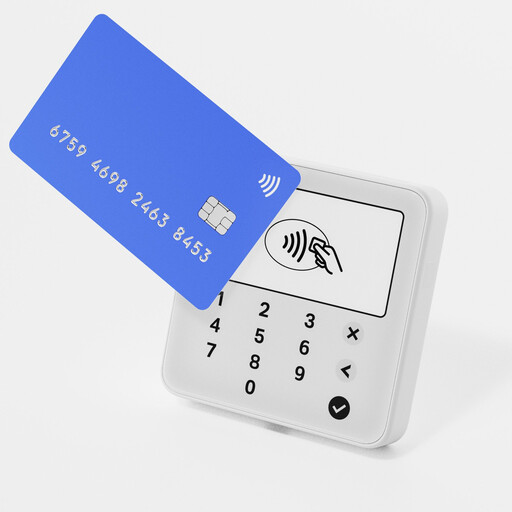
Why this product suits this profile: The card reader connects to a smartphone or tablet via Bluetooth and supports contactless cards, Google Pay and Apple Pay. It is ideal for self-employed professionals and small retailers who want to offer mobile payments without a fixed till system.
The supported payment methods and app connection are clearly specified. Fees and account requirements should be checked with the provider before purchase.
Bluetooth connectivity, integrated display, rechargeable battery and Corning Gorilla Glass protection.
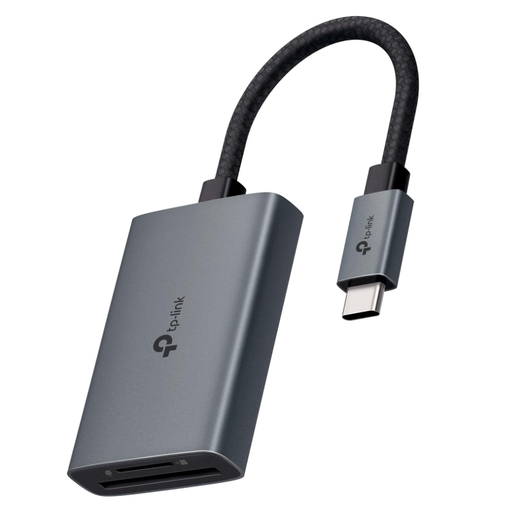
Why this product suits this profile: Photographers and videographers get separate SD and microSD slots, plus USB-C connectivity for compatible computers, tablets and smartphones.
The specifications list the card formats, capacity of up to 2 TB and UHS-II compatibility. Actual speed still depends on all the devices involved.
SD and microSD slots, simultaneous reading and writing, plus USB 3.0 Type-C with plug-and-play support.
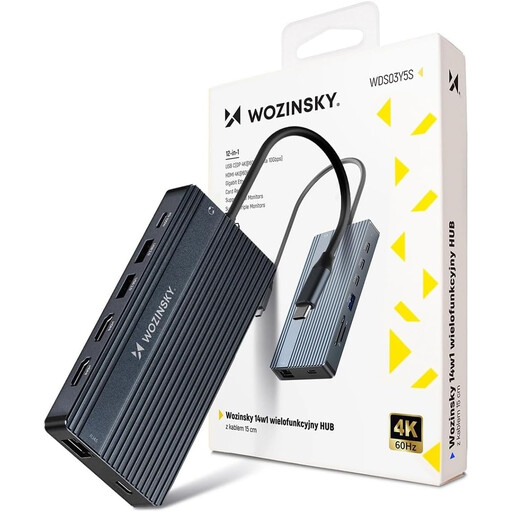
Why this product suits this profile: Ideal for mobile professionals and offices with multiple devices, this hub combines USB ports, monitor outputs, Ethernet, audio, and SD and TF card readers in a single accessory.
The port types and output standards are clearly specified. To use three monitors and MST on Windows, the connected system must support the required functions.
Up to 100 W USB-C Power Delivery, Gigabit Ethernet, two HDMI ports, DisplayPort and a 15-cm cable.
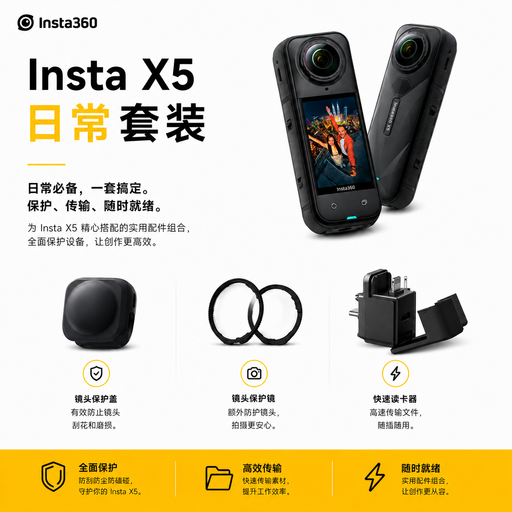
Why this product suits this profile: This bundle is designed for users who create 360-degree footage and need a camera, lens protection and a fast card reader in one package.
The contents list includes the camera, Lens Cap, Standard Lens Protector and Fast Card Reader. Suitable memory cards and sufficient storage space are still required for 8K files.
8K recording at 30 frames per second, 5.7K60 Active HDR, FlowState stabilisation and a stated waterproof rating of up to 15 metres without a dive case.
If you create quotes on the go, prepare for customer meetings or connect several peripherals, you will often need more than a smartphone. According to the product specifications, the Dell Pro 13 Plus PB13250 combines a 13.3-inch FHD+ display, 16 GB DDR5 RAM, a 512 GB NVMe SSD, Windows 11 Pro, Thunderbolt 4, HDMI and USB-A.
For business users, TPM 2.0, a fingerprint reader, a QWERTZ keyboard and vPro support are also relevant. Nevertheless, check the exact configuration offered before buying, as the processor, RAM, camera and battery-life specifications may vary between versions.
We have put together a complete, regularly updated list of products that fully meet these strict selection criteria and the safety regulations applicable in the EU.
Important considerations include the supported payment methods, connection to a smartphone or tablet, battery life, app compatibility and ongoing transaction costs. For business use, you should also check data protection, receipt management and refund functions.
No. USB-C initially only describes the shape of the connector. Transfer speed, video output and power delivery depend on the end device’s particular standard. Check the technical specifications of your smartphone, tablet or laptop and use a suitable cable.
Their service life depends on the battery, mechanical strain, heat, moisture and software support. Store devices in a dry place, avoid strong impacts and use the recommended chargers. With memory cards and readers, safely ejecting the device also helps prevent unnecessary data errors.