Teachers with a tablet
If you take lesson notes on a tablet, start by weighing up a universal keyboard against a case made for your exact device model.


If you switch between a laptop, tablet and mobile phone, or want to type on your laptop too, a separate compact keyboard is the obvious place to start. Check the operating system, German layout and connection options. A keyboard case is a better fit if it’s specifically made for your exact tablet model and you also want a stand. A keyboard cover on its own doesn’t automatically double as a tablet stand.
If you take lesson notes on a tablet, start by weighing up a universal keyboard against a case made for your exact device model.
If you switch between a laptop, tablet and mobile phone, it’s important to have the right connection options. A case designed for just one tablet isn’t automatically the right choice.
If you work at a small café table, consider how easy the keyboard is to carry and how noisy it is to type on, as well as what will hold your tablet or mobile phone in place while you write.
| What to consider | What to look for | Who is it most important to? |
|---|---|---|
| Fit and compatibility | For a case, check the model name and device generation. For a separate keyboard, check the operating system, connection options and German layout. | If you want to keep using your existing tablet, the key thing is finding a keyboard that works with your device and fits your workflow. Compatibility is the top priority for around 25% of consumers. |
| Portability and desk space | Consider the design and key protection for travelling, as well as whether there’s a suitable way to prop up your writing device. | If you travel light and need space at a café table for your tablet and papers, a compact design that’s easy to carry is especially important. Around 25% of consumers prioritise this. |
| Typing noise | If possible, assess the noise made by the specific model. The design and marketing claims are no substitute for a like-for-like noise measurement. | If you’re working in a shared space, you’ll want to disturb other customers as little as possible. Around 20% of consumers say considerate typing is their top priority. |
| Longer typing sessions | Check the German layout, along with the position and size of the special and function keys you need. | When writing worksheets or lesson plans, a key layout that makes it comfortable to type longer German texts is important. This is the main consideration for around 15% of consumers. |
| Connection and power | Check the connection and power source you need, the charging port and whether the connector is compatible with your device. | If your keyboard needs to be ready for a specific lesson-planning session, test the connection in advance and make sure you have the right power source. Around 15% of consumers prioritise this. |
A similar screen size doesn’t mean the case will attach to your tablet. Apple and Samsung list the device models supported by their respective keyboard cases.
Before you buy, check the full model name and device generation against the details for the specific case.
An ill-fitting case could mean you have to buy another one.
Logitech says the integrated cover on the Logitech Keys-To-Go 2 protects the keys. COMPUTER BILD’s review notes that you’ll need an additional case to prop up the tablet.
Before you buy, check what will keep your screen steady in a comfortable typing position at a café table.
Depending on what you already have, you may also need a stand.
A manufacturer’s description doesn’t prove that a particular keyboard is quieter than another. You can’t determine how noisy it will be from the switch type alone either.
If possible, try the specific model before choosing it for a quiet working environment.
Logitech offers separate mobile keyboards, including compact models and ultra-slim options with a keyboard cover.
The KW 9200 MINI is a separate compact keyboard with several connection options.
Magic Keyboard models combine a keyboard, trackpad and protective case for specific supported iPad models.
Book Cover Keyboard models are case solutions for specific Galaxy Tab models.
The K3 Pro range is designed for anyone looking for a low-profile mechanical keyboard with customisable keys.
The Joybuy options below include separate mobile keyboards and keyboard cases for specific iPad models. If you’re considering a case, check that your device is listed before you buy.
 No image available
A separate foldable keyboard with a touchpad, ideal for typing at a small café table.
QWERTZ layout, three Bluetooth channels and support for Windows, iPadOS and Android. Dimensions are listed as 7.1 × 4.5 × 0.7 inches and weight as 228 g.
 No image available
This foldable keyboard is a separate option for typing on the go. According to the product details, a mouse is also included.
Features listed include scissor keys, USB-C charging, Bluetooth and 2.4 GHz connectivity, plus connections to up to three devices. Supported operating systems are listed as Windows, Android and iOS.
 No image available
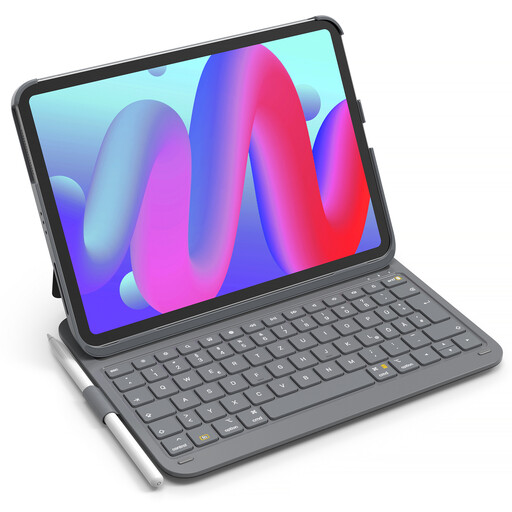
A keyboard case with an adjustable stand for the iPad models listed in the product name. Check your exact model before you buy.
Features listed include QWERTZ, Bluetooth 5.3, a touchpad, a stylus holder and a detachable keyboard.
 No image available
A keyboard case for the iPad models specifically listed. Check your device generation before choosing this case.
Details list QWERTZ, a stylus holder, portrait and landscape orientations, and a total weight of 434 g.
 No image available
A separate slim keyboard with a touchpad for typing on the go with compatible tablets, laptops or PCs.
Features listed include a QWERTZ layout, three Bluetooth connections and support for iPadOS, Android and Windows. The product details give a thickness of 5 mm and a weight of 228 g.
Make a note of the full model name and compare it with the compatibility list for the specific case. A separate Bluetooth keyboard may be a better option if you also want to type on another supported device.
It depends on whether your tablet or mobile phone already sits securely at a suitable typing angle. Logitech describes the Keys-To-Go 2 cover as protection for the keys; COMPUTER BILD’s review notes that an additional case is needed to prop it up.
Pair it with your writing device and test the connection in advance, then check that you have the power supply you need. The CHERRY KW 9200 MINI offers Bluetooth, a wireless receiver and a cable as different connection options. Choose the one that works with your device.
The German Federal Office for Information Security recommends avoiding access to confidential data over public Wi-Fi where possible. If you have no alternative, it recommends using a VPN. This is IT security advice, not a claim about the protection offered by any particular keyboard.