Entering figures frequently
If you enter lots of amounts when balancing your household accounts, weigh up the convenience of a separate number pad against the extra space it takes up on the table and in your bag.


For quick entries and limited space on a café table, a compact or foldable keyboard is a natural choice. If you regularly enter lots of figures, you may want to prioritise a number pad, but it will take up more room. The specific key layout, connection to your device and a separate stand also matter, especially if the keyboard and screen can’t sit together. A keyboard won’t protect your financial details from prying eyes or secure your internet connection on public Wi-Fi.
If you enter lots of amounts when balancing your household accounts, weigh up the convenience of a separate number pad against the extra space it takes up on the table and in your bag.
If you mainly check accounts and receipts while you’re out and only add a few short notes, a portable design and enough space beside your device and paperwork are key.
If you switch between a tablet and a laptop, check that the connection options and key layout work with both devices.
First, compare the space you need for typing with how often you enter figures. Then check that the layout and connection are compatible with your specific device.
| Consideration | What to check when buying | Who should consider this? |
|---|---|---|
| Numbers and desk space | Check whether there’s a number pad, and compare the space needed for the full setup with the room available for your device and receipts. | If you enter lots of individual amounts, a separate number pad may matter more than the smallest possible design. Around 29% of consumers put number entry first. |
| Packed size and table space | Compare the packed size with the space the keyboard needs when unfolded or ready to use; also check how your device will be positioned. | If you use the keyboard in a café alongside your screen and receipts, and want it to be easy to pack away, both factors matter. Around 29% of consumers prioritise packed size and usable space. |
| Connection and layout | Check Bluetooth, any receiver connections and the specific key layout, especially DE/QWERTZ if that’s what you need. Test important characters in your application. | If you switch between devices or need to type using a particular layout, the connection and layout should suit your setup. Around 24% of consumers prioritise this compatibility. |
| Typing noise | Check the stated key construction and, if possible, judge the noise for yourself; a manufacturer’s description such as “quiet” isn’t an independent sound-level comparison. | If you’re typing alongside other customers, quieter keys may matter more than extra connection options. Around 18% of consumers prioritise quiet use. |
Logitech describes the Keys-To-Go 2 cover as protection for the keys. That’s not the same as a dedicated stand for the screen.
Check separately how the keyboard and device will sit on your café table.
You may also need a suitable stand for your device.
For the Trust Lyra, the manufacturer lists two Bluetooth connections and a USB receiver. CHERRY also distinguishes between Bluetooth, wireless and wired channels for the KW 9200 MINI.
Count the connection types separately and check that your device has the port you need.
A wireless receiver needs a suitable free port on your device.
The Trust Lyra version referred to here is labelled as the US version; a German QWERTZ version of the iClever BK08 mentioned here has not been confirmed.
Before buying, check the specific version on offer and the arrangement of the numbers, umlauts and special characters.
A keyboard doesn’t secure your internet connection or shield your screen from view. The Federal Office for Information Security advises against carrying out banking or other sensitive tasks over public Wi-Fi.
Consider your choice of keyboard separately from whether you should access financial details in a café. Put the task off, or use a suitably secure connection and shield your screen from prying eyes.
The Keys-To-Go 2 and Pebble Keys 2 K380s take different approaches to portability and switching between devices.
The KW 9200 MINI is aimed at buyers who want several connection options in a compact keyboard.
The Lyra is a compact keyboard with several connection options and low-profile keys.
The BK08 is described as a foldable keyboard with a touchpad. It may suit buyers who want a small design when folded.
The Magic Keyboard Folio is a keyboard case with a stand for specific compatible iPads, not a universal Bluetooth keyboard.
Here you’ll find compact and foldable mobile keyboards for quick entries on the go, including models with a separate number pad for frequent number entry.
 No image available
For using on the go if you’re looking for a compact keyboard with a German QWERTZ layout and the option to switch between devices.
Bluetooth 5.3; switches between up to three devices; 217 g; 285 mm wide; powered by AAA batteries.
 No image available
For using on the go if you prefer a foldable keyboard with an integrated touchpad and a German QWERTZ layout.
228 g; folded size 7,1 × 4,5 × 0,7 Zoll; three Bluetooth channels; described as compatible with iPadOS, Android and Windows. The keyboard is described as quiet.
 No image available
For mobile typing if you’re looking for a foldable keyboard with a stand for a mobile phone or tablet.
Rechargeable battery; the keys are described as quiet. Before buying, check that the key layout on offer suits the way you use it.
 No image available
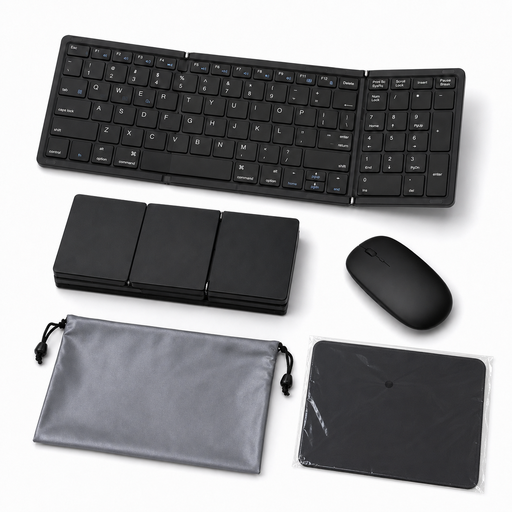
For entering figures frequently while out and about, if you need a separate number pad despite the foldable design.
81 keys; QWERTY layout; Bluetooth 5.1 for up to three devices; USB-C rechargeable battery. A mouse mat and carry case are listed in the title as included. Check that QWERTY suits how you enter umlauts and special characters.
 No image available
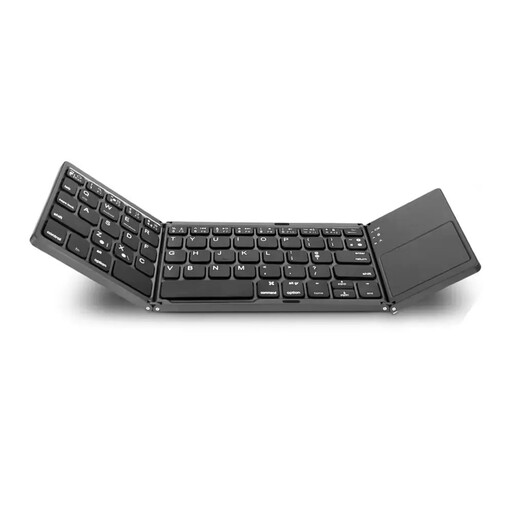
For entering figures on the go if you want to combine a number pad and touchpad in a foldable keyboard.
63 keys; folded size 152 × 97 × 12 mm. Check the specific key layout for your application.
The keyboard itself doesn’t secure your internet connection. The Federal Office for Information Security advises against carrying out banking or other sensitive tasks over public Wi-Fi. Put the task off, or use a suitably secure connection and shield your screen from prying eyes.
Pair the keyboard with the device you’ll actually be using, then test numbers, decimal separators, special characters and navigation in your application. If you’re using a wireless receiver or cable, make sure the port is compatible. Also check that the specific version has the key layout you want.
No, the connection options may include different types. For the Lyra, Trust lists two Bluetooth connections and a USB receiver; for the KW 9200 MINI, CHERRY describes two Bluetooth channels, plus one wireless and one wired channel. Check which connections your device supports.
It depends on the model: Trust describes the Lyra as having a rechargeable battery, while Logitech lists two AAA batteries for the Pebble Keys 2 K380s. Check the details for the specific version on offer and plan for charging or replacement batteries accordingly.