For working in a quiet reading area
If you edit comments at a quiet desk, check how noisy the specific keyboard is when you type. A manufacturer’s claim that it’s ‘quiet’ won’t tell you how it will sound in your reading room.


For editing contracts at a library desk, a slim, compact keyboard is a sensible starting point when there’s little room for your documents and tablet. Check how noisy it is when you actually type, and make sure it has a German keyboard layout; a manufacturer’s claim that it’s ‘quiet’ is no substitute for trying it out at your own desk. A standalone Bluetooth keyboard gives you more flexibility across different devices. An iPad keyboard case can also provide a stand and trackpad, but it will only work with certain models and system versions.
If you edit comments at a quiet desk, check how noisy the specific keyboard is when you type. A manufacturer’s claim that it’s ‘quiet’ won’t tell you how it will sound in your reading room.
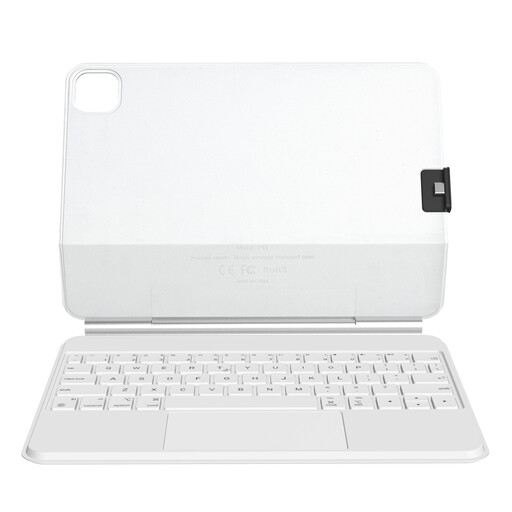
If you need room on the desk for both your contract and tablet, a compact design could be important. A standalone keyboard may need a separate tablet stand; the Magic Keyboard Folio for iPad (A16) combines a keyboard, stand and trackpad.
A familiar German keyboard layout can help when entering names, clauses and punctuation. Also check that the connection and the keys you need work with the device you’ll be using.
A good fit if: you switch between devices or want to type alongside paper documents.
The trade-off: Unlike a keyboard case, it won’t automatically support your tablet. The receiver and connectors also need to work with your device.
A good fit if: you have a specifically compatible iPad and want to prop it up while typing.
The trade-off: Apple specifies iPadOS 18.3 or later for the Magic Keyboard Folio for iPad (A16). It isn’t a universal Bluetooth keyboard.
A good fit if: you’re entering longer edits and have plenty of room on your desk and in your bag.
The trade-off: According to the manufacturer, the HP 975 is 42,97 cm wide, so it takes up more space than a compact model. The manufacturer’s ‘quiet’ claim is not an independent noise test.
First compare noise levels and space requirements at your place of work, then check the layout and connection type against your device. With a keyboard case, you’ll also need to make sure the iPad model and system version are compatible.
The figures below relate to consumers considering a portable keyboard for editing contracts in a German library. Each person’s main purchasing concern is shown.
| Priority | What to check before buying | Who is this important to? |
|---|---|---|
| Typing noise | Try the keys yourself in a quiet setting if possible; don’t treat advertising claims as measured results. | When I’m editing at a quiet reading desk, I want to disturb others as little as possible. Around 31% of consumers prioritise a quiet typing experience. |
| Portability and space | Compare the keyboard’s external dimensions and packed size with your workspace; check whether you’ll need a tablet stand. | When I need to fit my contract and tablet on the desk as well as my keyboard, a portable option matters to me. Around 25% of consumers prioritise size and portability. |
| German layout | Check that the specific version has a German QWERTZ layout, umlaut keys and the navigation or function keys you need. | When I’m entering lots of names and clauses, I want to rely on a familiar keyboard layout. Around 25% of consumers focus mainly on layout and accurate typing. |
| Device connection | Check Bluetooth support, the operating system and, if required, that you have a suitable free USB port. | If I want to use the keyboard with several work devices, it needs to connect to each of them. Around 19% of consumers prioritise switching between devices. |
Physical keyboard layouts can vary. The Trust Lyra version reviewed is labelled ‘US’; a German-language product page alone doesn’t confirm that it has a German QWERTZ layout.
Check the specific version and the keys shown in the product images, especially if you often enter umlauts, punctuation or contract details.
HP’s claim that the keys are quiet is not based on an independent measurement, and won’t tell you how the keyboard will sound at your particular reading desk.
Try the keyboard before buying if you can, and follow the rules of the reading room you’ll be using.
Apple’s Magic Keyboard Folio is designed for iPad (A16) and iPadOS 18.3 or later. It isn’t a standalone keyboard for use with multiple devices.
Before buying, check the exact iPad model name and system version. If you regularly switch between devices, consider a standalone keyboard instead.
The examples below relate to the specific product lines named. They are not a general assessment of every product from each brand.
The KW 9200 MINI is a standalone compact keyboard for switching between several work devices.
With compact scissor keys and the ability to switch between devices, the Lyra is designed for typing on the go.
The MX Keys Mini for Business is a compact option for use with multiple devices, with German QWERTZ versions clearly listed.
The Magic Keyboard Folio combines a keyboard, stand and trackpad for iPad (A16).
The HP 975 is a larger office keyboard option if longer typing sessions matter more to you than keeping your bag as compact as possible.
This selection mainly includes foldable, standalone Bluetooth keyboards for mobile working, as well as an iPad keyboard case with a trackpad. Check the exact iPad compatibility of the case.
 No image available
This foldable Bluetooth keyboard is an option if you’re looking for something to use on the go.
 No image available
If you’re looking for a foldable keyboard and mouse, this set includes both.
 No image available
The listed German QWERTZ layout could be useful if you enter lots of contract details and prefer a familiar keyboard layout.
 No image available
If you’re looking for a foldable Bluetooth keyboard to use on the go, the Forio is one option in this category.
 No image available
This case combines a keyboard and trackpad for working with a compatible iPad propped up in a stand.
On a Windows device, check that Bluetooth is available and switched on, then put the keyboard into pairing mode by following its instructions. If you’re connecting via a wireless receiver, you’ll need a suitable free port instead. Test the connection before your visit.
A keyboard alone won’t protect the contents of your contracts. If you work for an organisation, check its rules on which information can be handled outside the organisation; the Federal Office for Information Security recommends setting out such rules and protective measures. Also check the rules of the specific library you’re visiting: the user regulations of the Berlin State Library do not apply across Germany.
Check that the model and the manufacturer’s information match the keyboard being offered. The Federal Network Agency carries out random checks on electrical and electronic products, including products with built-in Bluetooth. This doesn’t mean that a particular online listing has already been checked.
If goods are faulty, § 439 BGB provides for the seller to remedy the issue. For ordinary goods, § 438 BGB generally sets a two-year limitation period from delivery for the specified claims relating to defects. Under § 443 BGB, a voluntary guarantee is in addition to statutory liability for defects. This information relates to German law.
Before your visit, check the charge level or the batteries you’ll need, and take the right receiver with you if required. CHERRY lists wired operation as one of the connection options for the KW 9200 MINI. Check which connection and accessories are intended for your specific model.