Who is a mobile keyboard right for?

People reviewing plans on the move

If you open drawings while you’re out and about, your keyboard should fit beside your device on a café table and be easy to carry. Logitech lists the Keys-To-Go 2 as weighing 222 g; check the dimensions and key cover of the specific version too.

Shortcut users

If you often control your drawing software from the keyboard, check which function keys, arrow keys and key combinations you actually need. Autodesk, for example, documents keyboard shortcuts for AutoCAD; which ones you need will depend on your software and how you work.

People working across multiple devices

If you switch between a laptop, tablet or second computer while reviewing drawings, make sure the keyboard supports the right pairing and connection options. CHERRY lists Bluetooth, receiver and wired modes for the KW 9200 MINI; Logitech says the Pebble Keys 2 K380s lets you switch between three devices.

What should you look for when choosing one?

What to consider What to check before buying Who should pay particular attention?
Size and table space The dimensions and weight of the specific version, plus room for any other input devices. If I open drawings while I’m out and have little space beside my laptop or tablet, a small footprint matters most to me. Around 25% of consumers put size at the top of their list.
Shortcuts and keys Compare the layout with the commands you use most, the function keys, arrow keys and Fn key assignments. If I regularly use my drawing software with a keyboard, I want to reach the commands I need without awkward key combinations. Around 25% of consumers give shortcuts their highest priority.
Connection and switching between devices Check Bluetooth support and how many devices you need to connect; if you plan to use a receiver or cable, check the ports too. If I review drawings on several devices, I want to switch between them without being stuck with an unsuitable connection. Around 20% of consumers put switching between devices first.
Typing noise Try the keys and listen to them yourself if possible; manufacturers’ descriptions are not independent noise measurements. If I type longer notes in a café, I want to disturb other people as little as possible. Around 15% of consumers make typing noise their top priority when choosing a keyboard.
Power supply Check the battery type or charging port for the specific version, and whether you have the batteries and cables you need. If I use my keyboard while I’m out, I want to know whether I’ll need to replace the batteries or pack a charging cable. Around 15% of consumers prioritise the power supply and how easy it is to manage.

Pitfalls to avoid when buying a mobile keyboard

  • Compact doesn’t always mean every shortcut is easy to access

    Depending on the software and key assignments, function keys and key combinations may be accessed differently. Autodesk, for example, documents function keys and keyboard shortcuts for AutoCAD.

    Compare the commands you use most with the actual layout and Fn key assignments of the specific keyboard.

  • Don’t assume the product page shows a German layout

    The CHERRY KW 7100 MINI BT is listed in a US International QWERTY layout.

    Check the layout of the specific version on sale before deciding on a brand and model.

  • Don’t assume wireless connectivity means the right ports are included

    According to CHERRY, the KW 9200 MINI supports Bluetooth, a 2.4 GHz receiver and wired use. The right connection will also depend on the ports on your device.

    Decide which connection you want to use before buying, then check the available ports and what’s included in the box.

    You may need a suitable USB port for your chosen connection. If you’re buying a battery-powered model, remember to think about spare batteries too.

Key keyboard brands at a glance

Logitech

The Keys-To-Go 2 and Pebble Keys 2 K380s offer different compact options: one is light to carry, while the other lets you switch between several Bluetooth devices.

  • Logitech lists the Keys-To-Go 2 as weighing 222 g and describes it as having an integrated key cover.
  • The description of the Pebble keys as quiet comes from the manufacturer; it isn’t based on independent noise testing. For both models, check the layout and the programme keys you need on the specific version.

CHERRY

The KW 9200 MINI offers several connection options, while the KW 7100 MINI BT is a compact Bluetooth keyboard with three channels.

  • According to CHERRY, the KW 9200 MINI supports Bluetooth, receiver and wired modes. For the KW 7100 MINI BT, the manufacturer lists three Bluetooth channels and a carry case.
  • These features apply to the models listed, not the entire range. Before buying, check the layout version you need and the ports on your device.

Rapoo

The E9310M is a slim option with a number pad for anyone with enough room for more keys on their café table.

  • Rapoo lists Bluetooth, a 2.4 GHz receiver and two AAA batteries for this model.
  • Allow for the space taken up by the number pad. The manufacturer’s battery life claims are not an independent measurement of how long it will last with your usage.

Joybuy keyboards for working in a café

This selection includes compact keyboards for working on the move, including models with device switching or an integrated touchpad. Before buying, pay particular attention to the layout and connection options of the version you’re considering.

Inateck Foldable Mini Keyboard with touchpad, QWERTZ, N0153BK

Inateck Foldable Mini Keyboard with AI Function and touchpad, QWERTZ, N0153BK

A foldable option if you want a touchpad built into your keyboard when working on the move.

The product name lists three Bluetooth channels, a touchpad and a QWERTZ layout, as well as compatibility with iPadOS, Android and Windows.

View at Joybuy

CHERRY KW 9200 MINI with four connection channels, rechargeable battery and UK English QWERTY layout

CHERRY KW 9200 MINI, 4 connection channels, UK English QWERTY layout

An option if you want to use a receiver or cable as well as Bluetooth, and your device supports the connection you choose.

The product name lists four connection channels and a rechargeable battery. This version is listed with a UK English QWERTY layout.

View at Joybuy
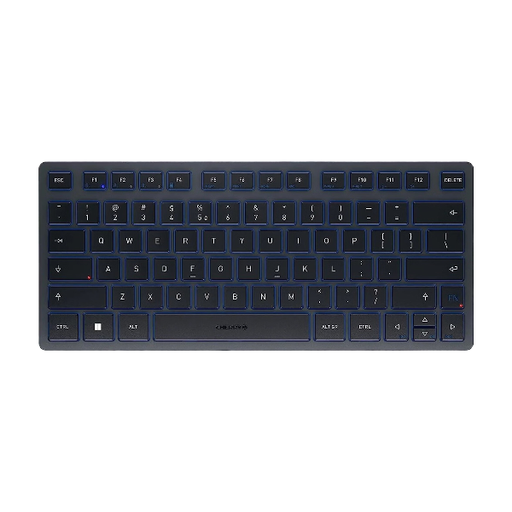
CHERRY KW 7100 MINI BT with three Bluetooth channels, carry case and US International QWERTY layout

CHERRY KW 7100 MINI BT, 3 Bluetooth channels, US International QWERTY layout

A compact Bluetooth option if you want to switch between devices and the listed layout suits you.

The product name lists three channels and a carry case. This version is listed with a US International QWERTY layout.

View at Joybuy

Inateck tablet keyboard with touchpad, German QWERTZ layout, model KB01105

Inateck tablet keyboard with touchpad, German QWERTZ layout, KB01105

An option for a tight workspace if you’d like to control the cursor using an integrated touchpad.

The product name lists a German QWERTZ layout and compatibility with iPad, Android tablets, Windows, laptops and PCs.

View at Joybuy

Rapoo E9050L 75% wireless membrane keyboard with 78 keys and US QWERTY layout

Rapoo E9050L 75% wireless membrane keyboard, 78 keys, US QWERTY

A compact option for using multiple devices if the available connection and US QWERTY layout suit your devices and drawing software.

The product name lists 78 keys and Bluetooth and 2.4 GHz connections for up to four devices.

View at Joybuy

Frequently asked questions about mobile keyboards

Do I need a number pad to review drawings?

No, not necessarily. First, check which commands and number entries you use in your particular programme. Autodesk documents numerous function keys and keyboard shortcuts for AutoCAD; that doesn’t mean every drawing programme or review task requires a number pad.

How do I connect a keyboard to a laptop and tablet?

Check Bluetooth support and the operating system on both devices. With a multi-device model, you’ll first need to pair the devices, then select the relevant channel. According to the manufacturer, the Rapoo E9310M has Bluetooth channels, while CHERRY lists receiver and wired modes as additional options for the KW 9200 MINI.

What should I consider when it comes to power and carrying my keyboard?

Before heading out, check the power supply for the specific version and pack batteries or the right cable if needed. According to Rapoo, the E9310M uses two AAA batteries; CHERRY says the KW 9200 MINI charges via USB-C. A key cover or carry case can be useful when packing, if one is included with the model you choose.

What are my rights in Germany if the keyboard develops a fault after purchase?

For purchases made by consumers, the seller is generally responsible for statutory consumer rights, which are separate from any voluntary guarantee. The Verbraucherzentrale states that rights relating to defects generally apply for two years from delivery. For a typical online purchase, you’ll also usually have a 14-day right to cancel; conditions and exceptions depend on the circumstances.

Do EU rules about charging apply to keyboards?

EU rules on a common charging connection have included keyboards since 28 December 2024. The USB-C requirement depends on whether the specific device is charged via a cable. So check how the version you’re considering is powered; the absence of a charging port alone doesn’t indicate whether a battery-powered model complies.