If you switch between compatible devices, a separate Bluetooth keyboard with replaceable batteries or a pre-charged battery is likely to be the better option. For a specific, explicitly supported tablet, a compatible keyboard case can combine typing with a stand. A case powered by the tablet will still rely on the tablet’s battery during longer sessions. Before you buy, check compatibility with your exact device and software, the German keyboard layout, and typing and navigation in your practice app.
Who practises on the go?
Learners without access to a power socket
If you’re practising for a while away from a power socket, it’s important to know whether your keyboard and screen have enough power to last the session. Keyboards with their own batteries or rechargeable battery, and models powered by the tablet, require different preparations.
Learners writing longer free-text answers
If you’re writing answers rather than just tapping multiple-choice options, a familiar layout and enough space for a stable typing position are important. A compact keyboard doesn’t automatically mean the screen will be well supported, too.
Learners with a dedicated tablet
If you mainly use a particular iPad or Galaxy Tab, it’s worth checking compatibility carefully. A compatible keyboard case can combine typing with a stand; with a separate keyboard, positioning the screen is a separate consideration.
What should you look for when buying?
Separate keyboard with replaceable batteries
A good fit if: you want to switch between compatible devices while out and about, and can’t charge your keyboard before a session. Logitech specifies two CR2032 coin cell batteries for the Keys-To-Go 2.
Bear in mind: you’ll need to plan separately for a screen stand and somewhere to place it. Logitech specifies a T5 screwdriver for changing the batteries.
Separate rechargeable keyboard
A good fit if: you can charge it before studying and would rather avoid replaceable batteries. CHERRY specifies a lithium battery for the KW 9200 MINI, with Bluetooth, wireless and wired connections.
Bear in mind: if it isn’t sufficiently charged before you leave, its charging function won’t help during a session without access to a power socket.
Keyboard case designed for your tablet
A good fit if: you mainly study on a specifically supported tablet and want an integrated stand. Logitech says the Combo Touch is powered through the iPad’s Smart Connector.
Bear in mind: the case is designed for specific tablet models. If it’s powered by the tablet, the tablet’s battery level remains important.
| Buying priority |
What to look for |
Who is it most important for? |
| Use without mains power |
Check the power source for the exact model and the tablet’s remaining battery. Logitech specifies two CR2032 cells for the Keys-To-Go 2; the Combo Touch is powered by the iPad through the Smart Connector. |
If I’m practising for a while without a power socket, I want to know whether the keyboard and screen will last. Around 31% of consumers put available power supply first. |
| Writing longer answers |
Check the German layout and key arrangement of the exact model. Also make sure there’s enough room for a separate screen stand. |
If I’m typing detailed answers, I need the right layout and a typing position where I can see the screen clearly. Typing comfort is a priority for around 25% of consumers. |
| Fit with your study device |
Check the full tablet model name and, where relevant, the software version. For the Magic Keyboard for 11-inch iPad Pro models M4 and M5, Apple specifies iPadOS 17.4 or later. |
If I want to keep using my existing tablet, the keyboard needs to be an exact match. Around 25% of consumers prioritise device compatibility. |
| Portability and space for a stand |
Check the packed dimensions and how much room you’ll need for the keyboard and screen. A keyboard cover won’t necessarily replace a separate screen stand; Logitech describes the Keys-To-Go 2 as having an integrated cover. |
If I study in different places, I want my set-up to fit in my bag and be easy to set up. Space is the main concern for around 19% of consumers. |
Common buying mistakes
-
Don’t mistake no separate keyboard charging for independent power
A keyboard case powered by the tablet doesn’t need to be charged separately, but it may still depend on the tablet’s available battery power.
Before a longer session, think of your keyboard and study device as one combined power set-up.
-
Don’t choose a case based on the tablet brand alone
Manufacturers list specific compatible tablet models. For the Apple Magic Keyboard for the iPad Pro models mentioned, a minimum iPadOS version is also required.
Check the full device name and, where relevant, the software version against the exact case model.
-
Don’t overlook screen positioning with a separate keyboard
Logitech says the Keys-To-Go 2’s keyboard cover protects the keys, but that doesn’t mean it also holds the screen upright.
Check whether the keyboard and screen can both sit securely at your intended study spot.
Relevant brands and product ranges
Logitech
The Keys-To-Go 2 and Pebble Keys 2 K380s are separate portable keyboards. Combo Touch and Flip Folio are keyboard cases for iPad, designed for different stand and handling preferences.
- Logitech specifies replaceable CR2032 coin cell batteries and an integrated keyboard cover for the Keys-To-Go 2. The Combo Touch is powered by the Smart Connector on a compatible iPad.
- Power options vary by model: Flip Folio uses coin cell batteries for its detachable keyboard. Information about one product range doesn’t automatically apply to other Logitech keyboards.
CHERRY
The KW 7100 MINI BT is a compact Bluetooth keyboard for multiple devices; the KW 9200 MINI is the rechargeable option, with several connection types.
- CHERRY specifies three Bluetooth channels and a carry case for the KW 7100 MINI BT. The KW 9200 MINI has a lithium battery, plus wireless and wired connections.
- The KW 9200 MINI needs to be sufficiently charged before a session without access to a power socket.
Apple
A Magic Keyboard may suit you if you have a specifically supported iPad model and want to combine a keyboard, cover and trackpad.
- Apple specifies a trackpad and backlit keys for the Magic Keyboard for 11-inch iPad Pro models M4 and M5.
- These details apply to the model listed; Apple specifies iPadOS 17.4 or later as a requirement.
Samsung
Book Cover Keyboards are designed for specific Galaxy Tab models, with differences between Slim and trackpad versions.
- Samsung specifies a QWERTZ keyboard, a POGO connector and compatibility with four Galaxy Tab models for the Slim model EF-DX720BBGGDE.
- The separately documented Book Cover Keyboard EF-DX725BWGGDE has a touchpad. Features listed for one version don’t confirm that another has them.
Joybuy products for mobile study
The Joybuy products below include separate foldable Bluetooth keyboards and a keyboard case for iPad, designed for typing on the go. Check that each model is compatible with your study device and suits the space you have available.
 No image available
Inateck N0153BK foldable mini keyboard with touchpad
May suit you if you want to switch between several compatible devices while out and about, and use a touchpad.
Features listed in the product name: foldable, QWERTZ, three Bluetooth channels, touchpad and an AI feature; described as compatible with iPadOS, Android and Windows.
View at Joybuy
 No image available
NAXSIR foldable Bluetooth keyboard with magnetic stand
May suit you if you want to position the keyboard and screen together, and can charge the keyboard before use.
Features listed in the product name: rechargeable, foldable, with magnetic stand, aluminium casing and quiet keys; Grey colour option.
View at Joybuy
 No image available
Foldable Bluetooth keyboard with wireless mouse
May suit you if you want to carry a foldable keyboard and mouse together.
Features listed in the product name: quiet scissor keys, three connection modes, USB-C charging and connection to up to three devices; described as compatible with Windows, Android and iOS. Silver-white colour option.
View at Joybuy
 No image available
Inateck KB01105 tablet keyboard with touchpad and QWERTZ
May suit you if you write longer answers in German and want a touchpad built into your keyboard.
Features listed in the product name: German QWERTZ layout and touchpad; described as compatible with iPad, Android tablets, Windows, laptops and PCs.
View at Joybuy
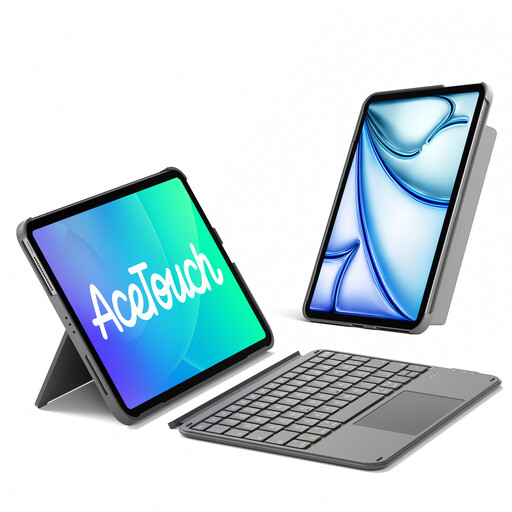 No image available
Inateck AceTouch KB04122 QWERTZ keyboard case for iPad
May suit you if you have one of the specifically listed iPad models and want to combine a keyboard case with a touchpad.
Features listed in the product name: detachable keyboard with touchpad and QWERTZ layout. Listed models include iPad 11 (A16, 2025) and 10th generation, iPad Air 11-inch M4/M3/M2 (2026/2025/2024), iPad Air 5/4, and iPad Pro 11-inch 4th/3rd/2nd/1st generation.
View at Joybuy
Frequently asked questions
Does a keyboard case without its own battery need a power socket when you’re out and about?
Not necessarily: Logitech says the Combo Touch connects to a compatible iPad through the Smart Connector and is powered by it. So, for a session without access to a power socket, the iPad also needs enough charge. This doesn’t give us a general battery life estimate.
Can I use a separate keyboard with my tablet straight away?
Before you buy, check the operating system and connection type supported by the specific model. Pair the keyboard before your study session and test typing and navigation in the exact practice app you plan to use.
How do I prepare a keyboard for a session without a power socket?
If you have a rechargeable model, check its charge level before you leave. Logitech specifies two CR2032 coin cell batteries for the Keys-To-Go 2 and a T5 screwdriver to open the battery compartment, so you may need the right tool to change the batteries.


