Commuters with a tablet and limited space
You want to check your spending at your seat, but need to fit both your screen and keyboard on a small table. Deutsche Bahn notes that tables are available at many, but not all, ICE seats.


Start by choosing a keyboard for your device, then consider how much space you can actually use at your seat. A separate Bluetooth keyboard can be used with several devices, while a keyboard case brings your tablet and keyboard closer together. If you’ll be entering lots of figures, check the key layout and how well it works with your app. For account details, also consider screen privacy and choose your connection carefully.
You want to check your spending at your seat, but need to fit both your screen and keyboard on a small table. Deutsche Bahn notes that tables are available at many, but not all, ICE seats.
You use more than one device for accounts or spreadsheets and want to keep using the same keyboard. A separate Bluetooth keyboard and a device-specific case differ in how easily you can use them with different devices.
You compare lots of amounts and transactions, and want to know whether a compact keyboard without a number pad will meet your needs.
A good choice if: you switch between a mobile phone, tablet or laptop and can set up the keyboard and screen separately.
The trade-off: You’ll need a suitable surface and, if necessary, a separate stand for your device.
A good choice if: a compact design for carrying matters to you and you’re happy with a smaller keyboard.
The trade-off: Check the key arrangement and layout carefully, especially if you regularly enter figures.
A good choice if: you own a specific compatible tablet and want to use the case, stand and keyboard together.
The trade-off: The fit ties the case to specific device models, making it less convenient to switch devices.
| What to consider | What to check before buying | Who is it most important for? |
|---|---|---|
| Device and app compatibility | Check your tablet’s exact model number, the connection and how the keyboard works in your app. Samsung lists the EF-DX715 for the Galaxy Tab S9 and Tab S9 FE. | If I switch between devices, the keyboard needs to work with each one and with the app. Around 31% of consumers put this compatibility first. |
| Space and portability | Consider the packed size and set-up together. Deutsche Bahn says that tables are available at many, but not all, ICE seats, so check whether you can fit both your screen and keyboard at your seat. | If I have little table space at my seat, the whole set-up needs to work and be easy to carry. Around 25% of consumers focus on the space available. |
| Number entry and navigation | Check the German keyboard layout, number and symbol keys, and how easily you can navigate your app. The CHERRY KW 9200 MINI does not have a number pad. | When entering lots of transactions, I want to type amounts quickly and move between fields easily. Around 25% of consumers prioritise number entry. |
| Privacy on the go | Before opening sensitive information, consider how visible your screen is and what connection you’re using. Deutsche Bahn describes its onboard Wi-Fi as public Wi-Fi, and the Federal Office for Information Security warns of particular risks when using mobile banking. | When checking account details on the go, I want to decide for myself whether my surroundings and connection are suitable. Around 13% of consumers put privacy first. |
| Power | Check the power source for the specific version, and plan when to charge it or replace the batteries. Logitech says the Keys-To-Go 2 uses two CR2032 coin cell batteries. | Before setting off, I want to know how to keep the keyboard ready to use. Around 6% of consumers prioritise power. |
A keyboard case is made for specific tablet models; a Bluetooth keyboard and a case are not interchangeable.
Compare your tablet’s full model name with the case’s compatibility information.
On the train, you need to be able to use your screen and keyboard at the same time. Deutsche Bahn says that tables are available at many, but not all, ICE seats.
Plan the whole set-up as it will be when in use. In its test of the Logitech Keys-To-Go 2, COMPUTER BILD noted that you need an additional case to prop it up.
The CHERRY KW 9200 MINI does not have a number pad; the manufacturer says the foldable IC-BK08 has smaller keys.
Check the number and symbol keys, as well as navigation, using the kinds of entries you typically make in your app.
A keyboard can’t stop other people from seeing your screen or protect your connection to your online account.
Consider your surroundings and network separately from your choice of keyboard. Deutsche Bahn describes its onboard Wi-Fi as a public network, while the Federal Office for Information Security identifies mobile banking as an area with particular security risks.
The Keys-To-Go 2 Universal is a separate mobile keyboard, while Combo Touch and Flip Folio are device-specific cases.
The KW 9200 MINI is a separate compact keyboard for people who want to switch between devices and connection types.
The Book Cover Keyboard EF-DX715 is designed for the Galaxy Tab models listed by Samsung.
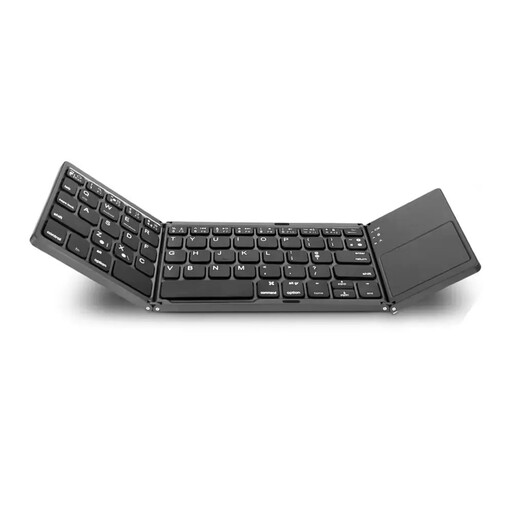
The IC-BK08 is a foldable Bluetooth keyboard with a touchpad.
This selection includes foldable Bluetooth keyboards for typing on the go, including options with a touchpad and a choice of key layouts.
 No image available
A foldable option for travelling, if you want a German QWERTZ layout and a touchpad.
The product name specifies QWERTZ and a touchpad; the description lists 15 mm keys, Bluetooth connections to three devices, and support for iPadOS, Android and Windows.
 No image available
A mobile keyboard for switching between devices, if the listed connection options work with yours.
The product name lists scissor keys, USB-C charging, three connection modes and connections to up to three devices. It also includes a wireless mouse in the name; the compatible systems listed are Windows, Android and iOS.
 No image available
A foldable Bluetooth option that’s easy to carry in a bag and use with different mobile devices.
The description lists 65 keys, USB-C charging, a weight of 175 g and folded dimensions of 167 × 105 × 13 mm. Compatible systems listed are iOS, Windows, macOS and Android.
 No image available
A foldable option for entering lots of figures, if you want a number pad and a touchpad.
The product name lists a number pad; the description lists 63 keys, a touchpad, folded dimensions of 152 × 97 × 12 mm and support for iOS, Android and Windows.
 No image available
A foldable keyboard for mobile use, if you prefer an integrated touchpad.
The description lists 64 keys, a touchpad, folded dimensions of 157.5 × 98 × 15.8 mm and support for iOS, Android and Windows.
Compare your tablet’s full model name with the compatibility information for the specific case. Samsung lists the EF-DX715 for the Galaxy Tab S9 and Tab S9 FE; that does not mean it will fit other tablets.
Not necessarily. It depends on how many figures you need to enter and how your app works. A compact keyboard without a number pad can save space; check that the number row and navigation keys are enough for your transactions.
A keyboard cannot make public Wi-Fi secure. Deutsche Bahn describes its onboard Wi-Fi as a public network, and the Federal Office for Information Security warns of particular risks when using mobile banking. Assess the connection separately and put off sensitive tasks if you can’t protect them adequately while travelling.
Faulty goods are generally covered by a two-year statutory warranty from the seller; a voluntary manufacturer’s guarantee does not replace it. Distance contracts generally come with a 14-day right to cancel, subject to legal requirements and exceptions. The European Union’s Your Europe website and the German federal portal explain these consumer rights.