What should you look for when buying?
Compact keyboard for a fixed workspace
A good fit if: you usually edit longer notes at one desk and have limited space.
Things to weigh up: A manufacturer’s description such as ‘quiet’ is no substitute for a comparable noise test. Check the layout and navigation keys, too.
Mobile keyboard with a cover
A good fit if: you often move between a meeting room and your workspace, and carry your keyboard in a bag.
Things to weigh up: Check the exact model and make sure the smaller keyboard has all the keys you need for editing.
Keyboard with multiple connection options
A good fit if: one of your work devices needs a USB wireless receiver rather than Bluetooth.
Things to weigh up: The receiver needs a suitable port. Also check which wireless connections are permitted in your workplace.
| Consideration |
What to check before buying |
Who is it important to? |
| Typing noise |
Assess the typing feel and noise in similar conditions where possible. Don’t treat manufacturers’ descriptions as measured results. |
If you make lots of corrections at a shared table within earshot of others, you’ll want to keep disruption to a minimum. Around 36% of consumers prioritise quiet typing when buying. |
| Layout and text navigation |
Check that it has a German layout, along with the arrow, Delete, Home and End keys and the Fn shortcuts you need. |
If you edit German-language interview notes, the key layout and commonly used editing commands should suit the way you work. Around 27% of consumers prioritise layout and text navigation. |
| Carrying it between workspaces |
Check whether the specific model comes with a cover or carry case, and whether the keyboard is large enough for your work. |
If you often move between rooms, you’ll want to carry your keyboard safely and still be able to edit comfortably. Around 19% of consumers prioritise portability. |
| Switching between devices |
Check supported operating systems, permitted Bluetooth connections and, if needed, the USB port and receiver. |
If you switch between a work computer and a tablet while editing, the keyboard should connect to the devices you actually use. Around 18% of consumers prioritise switching between devices and connectivity. |
Wireless keyboards sold in Germany must also meet requirements for radio equipment. The Federal Network Agency lists CE marking, identifiable manufacturer details and the required instructions for use and safety information in German among the points to check.
Joybuy keyboards for working on the go
The Joybuy options below include compact and foldable keyboards for working with text on the go. Check the layout, navigation keys and connections for each version individually.
 No image available
Inateck Bluetooth Keyboard KB01003G, QWERTZ
Designed for German-language text and switching between devices. Before tackling longer editing sessions, check that the navigation keys suit the way you work.
The product title specifies a German QWERTZ layout and connections to three Bluetooth devices. Compatible systems listed include iPad, Windows, Android and iOS.
View at Joybuy
 No image available
Inateck Foldable Mini Keyboard N0153BK, QWERTZ
The foldable design is made for mobile use. Check whether the key layout works for the corrections you make most often.
The product title specifies QWERTZ, three Bluetooth channels and an integrated touchpad. Compatible systems listed include iPadOS, Android and Windows.
View at Joybuy
 No image available
NAXSIR Foldable Bluetooth Keyboard, rechargeable
This foldable model with a magnetic stand is designed for mobile use with a smartphone or tablet. Check that the stand suits your workspace.
The product title describes a rechargeable model with an aluminium case and scissor keys, which are described as quiet. Compare the typing noise if it’s an important consideration when working at a shared table.
View at Joybuy
 No image available
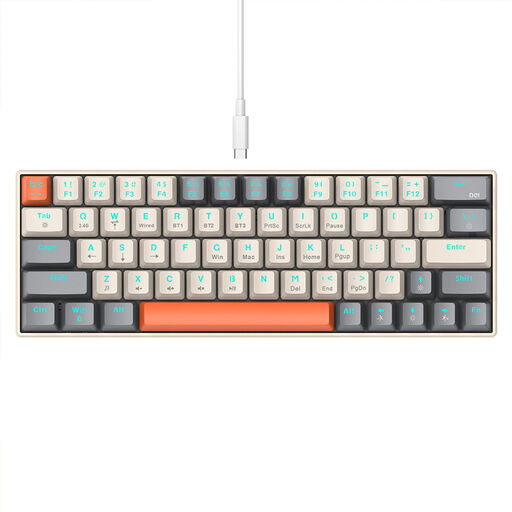
KINSI Compact Gaming Keyboard, 63 keys
The compact keyboard may be useful if you have limited desk space. Before doing longer stints of text work, check that the layout and mechanical keys suit your navigation habits and shared workspace.
The product title specifies 63 mechanical keys, RGB lighting, Bluetooth and 2.4 GHz wireless connectivity. It doesn’t specify a German layout.
View at Joybuy
 No image available
Foldable Bluetooth Keyboard with Wireless Mouse
This foldable keyboard and mouse set is an option if you want something to take between workspaces. Before buying, check the layout and whether you can use your most important text shortcuts easily.
The product title specifies scissor keys, three connection modes, connections to up to three devices and USB-C charging. Compatible systems listed include Windows, Android and iOS.
View at Joybuy
Frequently asked questions
How can I tell whether a compact keyboard is suitable for longer editing sessions?
Check the arrow, Delete, Home and End keys, along with the Fn shortcuts you need, on the exact layout you’re considering. A compact case alone won’t tell you how quickly you can reach your usual editing commands.
How do I set up a keyboard for a laptop and tablet?
First check which operating systems are supported and which wireless connections are permitted in your workplace. Logitech says the Pebble Keys 2 K380s can switch between up to three devices; CHERRY lists three Bluetooth channels for the KW 7100 MINI BT. Follow the pairing instructions for the specific model.
What should I check about power when I’m on the go?
Check whether the model you’ve chosen uses batteries or a rechargeable battery, and what’s included in the box. Kensington lists two AAA batteries included with the K75502DE. This doesn’t tell you how long other models will last.
What are my rights if an online purchase is faulty?
When you buy goods from a trader, the statutory guarantee is generally valid for at least two years from the date you receive them, as Your Europe explains. An additional manufacturer’s warranty does not replace these rights. Distance purchases generally come with a 14-day right to cancel, starting from delivery. Exceptions and any return costs should be checked separately.
What labelling matters for a Bluetooth keyboard sold in Germany?
For radio equipment, the Federal Network Agency lists correct CE marking, identifiable product and manufacturer details, and the required instructions for use and safety information in German among the things to check. A claim in a product description alone doesn’t confirm that the specific product on offer complies.


