Choose based on what you’ll mainly be doing. If you’re entering lots of figures, a number pad may be worth considering. In a reading room, check how noisy the specific model is when typing – the F.A.Z. rated the Logitech POP Icon Keys as quiet. A foldable model may suit you if you’re often on the move. A keyboard case is only an option if it’s compatible with your device: for example, Apple specifies certain iPad models and an iPadOS version for the Magic Keyboard Folio.
Which type is right for you?
Quiet work in the reading room
If you’re checking household paperwork alongside other people, it’s worth considering how noisy the specific model is when typing. The F.A.Z. rated the Logitech POP Icon Keys as quiet; that assessment doesn’t automatically apply to other keyboards.
Entering lots of figures
If you regularly transfer figures into spreadsheets, you can weigh up the benefits of a number pad against the extra space it takes up. CHERRY says the KW 9200 MINI has no number pad, while the German product page for the Rapoo E9310M lists one.
Taking a tablet with you
If you want to carry as little as possible, you can choose between a separate keyboard and a case designed for a specific device. The Logitech Keys-To-Go 2 Universal is described as having a key cover; Apple says the Magic Keyboard Folio is compatible only with selected iPad models.
What should you look for when buying?
Start by checking the key layout and typing noise, then consider the packed size, device connection and power supply. This will help you choose a keyboard that suits the way you work at a library table.
| What matters |
What to check before buying |
Who is this important to? |
| Typing noise |
An assessment of the specific model and its key type; check the library’s rules on noise. |
If I’m working alongside others in a reading room, I want to be considerate when typing. Around 36% of consumers put a quiet typing experience first. |
| Numbers and layout |
Whether it has a number pad, a UK layout and enough desk space. |
If I’m transferring lots of figures into a spreadsheet, the right key layout matters to me. Around 29% of consumers prioritise number entry and layout. |
| Portability and set-up |
The dimensions of the specific version, and whether it has a screen stand or needs a separate one. |
If I take my keyboard with me often, I want it to be easy to pack away and position the screen comfortably. Around 21% of consumers put a compact packed size first. |
| Connection and power |
Whether your device supports the connection, whether it has the right USB port, and what charging or batteries are required. |
If I want to use the keyboard with a device I already own, the connection and power supply need to be compatible. Around 14% of consumers prioritise these requirements. |
Common misconceptions
-
“Compact” means it comes with a number pad
That’s not always the case: CHERRY specifically says the KW 9200 MINI has no number pad, while the German product page for the Rapoo E9310M lists one. If you enter figures repeatedly, using the top row of numbers may mean more individual keystrokes.
Think about the spreadsheets you usually work with and compare the keyboard layout with the space you have, rather than relying on the word “mobile”.
-
A key cover also works as a tablet stand
Logitech describes the cover on the Keys-To-Go 2 as protecting the keys. This doesn’t mean it works as a stand; Apple, by contrast, specifically lists an adjustable stand for the compatible Magic Keyboard Folio.
Before buying, think about where you’ll place the screen and keyboard at the same time. Depending on your set-up, you may need a separate stand.
-
Bluetooth and USB wireless use the same connection
A connection via a USB receiver requires a compatible port on your device. CHERRY and Rapoo list wireless connections via a USB receiver as well as Bluetooth.
Check which ports your device has and whether the parts you need are included with the version you’ve chosen.
-
A quiet rating applies to every model from the same brand
The F.A.Z. rated the Logitech POP Icon Keys as quiet. This assessment applies to this model, not to the entire Logitech range or to other keyboards.
Look for an assessment of the specific model and take your library’s rules on noise into account.
Key brands to consider
Logitech
The Keys-To-Go 2 Universal is described as a separate mobile keyboard with a key cover; the POP Icon Keys is a different, compact model.
- Logitech says the Keys-To-Go 2 Universal has a key cover and supports several operating systems.
- The F.A.Z. assessment of it as quiet applies to the POP Icon Keys. The lack of a number pad on this model may be a consideration if you enter lots of figures.
CHERRY
The KW 9200 MINI is a compact, rechargeable keyboard with several connection options.
- CHERRY lists two Bluetooth channels, as well as one wireless and one wired channel, for the KW 9200 MINI.
- This specific model has no number pad. This doesn’t tell you anything about other CHERRY keyboards or how noisy this model is.
Rapoo
The E9310M is a slim keyboard with a number pad, if you have room for a larger keyboard.
- Rapoo lists 99 scissor keys, Bluetooth and a 2.4 GHz receiver for the E9310M; the German product page shows a number pad.
- The battery life of up to twelve months is a manufacturer’s estimate, not a measurement based on individual use.
Apple
The Magic Keyboard Folio is a keyboard case for specifically supported iPads, not a universal separate keyboard.
- Apple lists a trackpad, a detachable keyboard and an adjustable stand.
- Apple lists the iPad (A16) and 10th-generation iPad with iPadOS 18.3 or later as compatible devices.
Mobile keyboards at Joybuy
The Joybuy products below are foldable, separate keyboards for mobile use. Some versions list a number pad, a touchpad or a screen stand.
 No image available
Inateck N0153BK Foldable Mini Keyboard with Touchpad
The foldable mini design is a good option if you often carry a separate keyboard with you.
QWERTZ layout; three Bluetooth channels; touchpad; AI Function; compatible with iPadOS, Android and Windows.
View at Joybuy
 No image available
Inateck N0158BK Foldable Bluetooth 5.3 Keyboard and Tri-Mode Mouse Set
The number pad mentioned in the product name may come in handy for entering figures; remember to allow space for the keyboard and screen stand.
QWERTZ layout; number pad; adjustable stand and carry case; compatible with tablets, phones and laptops.
View at Joybuy
 No image available
NAXSIR Foldable Bluetooth Keyboard, Grey
The foldable design and magnetic stand are useful if you want to set up your keyboard and screen together while you’re out and about.
Rechargeable; magnetic stand for a mobile phone or tablet; described as having quiet keys in the product name.
View at Joybuy
 No image available
Foldable Bluetooth Keyboard with Wireless Mouse
The foldable design makes it easy to carry; check that the listed connections are compatible with your device.
Quiet scissor keys; Bluetooth 5.0; 2.4 GHz receiver; USB-C charging; switches between up to three devices according to the product description.
View at Joybuy
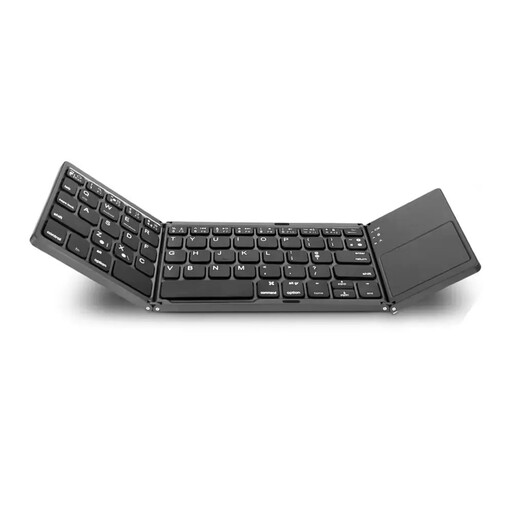 No image available
VoxorAI B033 Foldable Bluetooth Keyboard with Touchpad
The product name mentions both a number pad and a touchpad; check that this key layout will work for your desk.
Foldable; Bluetooth; number pad; touchpad; black case.
View at Joybuy
Frequently asked questions
Do I need a number pad to manage my household finances?
No. If you enter lots of figures one after another, compare the layout of a version with a number pad with that of a more compact model: CHERRY specifically says the KW 9200 MINI has no number pad, while the German product page for the Rapoo E9310M lists one.
How should I prepare my keyboard for a trip to the library?
Pair the keyboard with your actual device and test it in advance, and check the power supply. CHERRY says the KW 9200 MINI has a rechargeable battery; Rapoo lists two AAA batteries for the E9310M. For a USB wireless connection, you’ll also need a compatible port.
Will the Magic Keyboard Folio fit every iPad?
No. Apple lists the iPad (A16) and 10th-generation iPad, as well as iPadOS 18.3 or later, as requirements for the Magic Keyboard Folio covered in its documentation. Before buying, check your device model and software version against these requirements.
Does using a keyboard make it safe to access account details over the library’s Wi-Fi?
No. The Federal Office for Information Security (BSI) recommends avoiding access to confidential data over public Wi-Fi wherever possible. If you have no alternative, the BSI recommends using a VPN where possible. This concerns your device’s network connection, not a security feature of the keyboard.


