What should you look for when buying?
First check the key feel and layout, then make sure the keyboard connects to your device. After that, weigh up its packed size and power supply for your library visit.
| What matters |
What to check before buying |
Who should consider this? |
| Typing noise |
Manufacturer information about key feel; noise at your usual typing speed and the rules for the specific area. |
If I’m writing in a quiet area, I want to judge the key feel for myself and know the local rules. Around 28% of consumers focus primarily on typing noise and whether the keyboard is suitable for their workspace. |
| German layout |
DE-QWERTZ marking on the specific version; check it against your operating system’s keyboard settings. |
When writing a job application, I want to type umlauts, ß and punctuation without any workarounds. Around 22% of consumers prioritise the German layout and text entry. |
| Device connection |
Supported devices and Bluetooth; the ports needed for a receiver or cable. |
If I’m using my existing tablet, smartphone or laptop, the keyboard needs to connect to it. Around 22% of consumers prioritise compatibility with their writing device. |
| Packed size |
Rigid or foldable design; space needed in your bag and on the desk you plan to use. |
If I take my keyboard with me regularly, I want it to fit away neatly without overlooking any compromises to the typing surface. Around 17% of consumers focus primarily on packed size and typing surface. |
| Power supply |
Batteries or rechargeable battery; whether it needs charging or replacement batteries before your visit. |
Before a long writing session, I want to know whether the keyboard needs batteries or charging. Around 11% of consumers prioritise the power supply before their visit. |
Joybuy products for mobile typing
The following Joybuy products are portable keyboards for typing on mobile devices. Depending on the model, you’ll find rigid or foldable designs, as well as individual keyboards and sets.
 No image available
Inateck Bluetooth keyboard, QWERTZ
A good option if you’re looking for a portable QWERTZ keyboard that can connect to multiple devices.
Three Bluetooth connections; according to the product name, suitable for iPad Pro, iPad Air, iPad mini, Windows, Android and iOS.
View at Joybuy
 No image available
Inateck Foldable Mini Keyboard N0153BK
The foldable design is worth considering if you want to save space when carrying your keyboard.
QWERTZ layout, touchpad and three Bluetooth channels; according to the product name, compatible with iPadOS, Android and Windows.
View at Joybuy
 No image available
Inateck Foldable Bluetooth keyboard and Tri-Mode mouse, N0158BK
This set is a good option if you want to carry a foldable keyboard and a mouse together.
QWERTZ layout with number pad; according to the product name, it comes with an adjustable stand and carry case. The product name lists tablets, smartphones, laptops and PCs running Windows, iOS or Android as compatible devices.
View at Joybuy
 No image available
NAXSIR foldable Bluetooth keyboard
This foldable keyboard with magnetic stand may suit you if you write on a smartphone or tablet.
Rechargeable, with an aluminium casing and magnetic stand; the product name lists mobile phones and tablets as the intended devices.
If typing noise matters in the reading room, try the keys before using the keyboard there.
View at Joybuy
 No image available
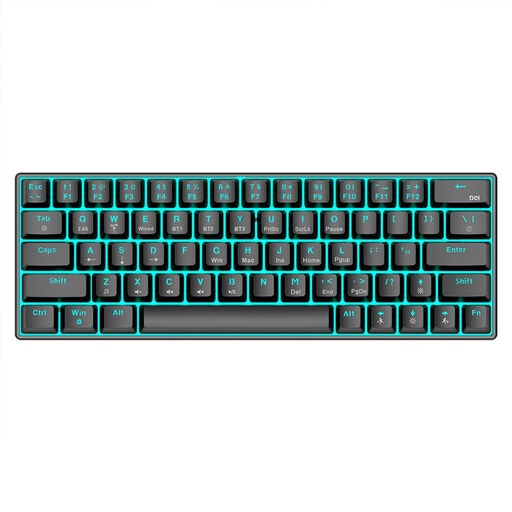
KINSI 63-key wireless mechanical keyboard
Worth considering if you’re looking for a compact keyboard with several connection options. If you’ll be working somewhere quiet, check the noise level first.
Bluetooth 5.0, 2.4 GHz wireless and USB cable; 1,450-mAh battery and RGB lighting according to the product name.
View at Joybuy
Frequently asked questions
Can I use an external keyboard in every library reading room?
There’s no single answer that applies to every library. Some areas may have specific rules for visitors; the Berlin State Library explicitly mentions such rules for its “Venice” research reading room. Check the rules for the area you plan to use or ask staff when you arrive.
How do I set up the keyboard for writing on a tablet or laptop?
Check that the supported operating system and connection mode work with your device, then test pairing and typing German special characters before your visit. If you want to use a wireless receiver or cable, check that you have the right port too.
Should I bring batteries or charge the keyboard?
It depends on the model: Logitech lists two AAA batteries for the Pebble Keys 2 K380s, while CHERRY lists a rechargeable battery for the KW 9200 MINI. The German Environment Agency advises that used batteries must not be put in household waste.
Who should I contact if there’s a fault after purchase?
For statutory rights relating to faulty goods, contact the seller; a voluntary guarantee is a separate matter. The German consumer advice centre describes repair or replacement as possible remedies.
What should I check when buying a wireless keyboard?
For the specific product version, look for clear product identification, manufacturer information, markings and the accompanying guidance. The German Federal Network Agency lists CE marking, German-language instructions and safety warnings, and the declaration of conformity among the aspects covered by its market surveillance.


