Choose a keyboard that suits your writing device and the space available at your library desk. A separate Bluetooth keyboard gives you flexibility, but you may need a stand for your tablet or mobile phone. If you’re sitting in a quiet study area, check how noisy the specific model is when typing, and pay attention to the key layout if you’ll be writing for longer periods. A keyboard case makes setup easier only if it’s specifically designed for your tablet model.
Who are mobile keyboards for?
Writers in quiet study areas
If you’re writing near other people, check how noisy the specific model is when typing rather than assuming that a slim design means it will be quiet. Logitech describes the Pebble keys as quiet; this is a manufacturer’s claim, not the result of a comparative noise test.
Writers using a tablet or mobile phone on the go
If you want your keyboard to fit in your bag and work with your writing device, remember to allow for the screen stand and desk space too. A separate keyboard won’t prop up your device.
Writers with a specific iPad model
If you usually use the same iPad and want to combine a keyboard with a stand, check the exact model name against the case’s compatibility information. Belkin’s BBZ002de-V3 version lists specific iPad models and weighs 0.66 kg, according to the manufacturer.
What should you look for?
For a writing session in the library, it’s not just the packed size and connection that matter. Noise, key layout and how everything fits on your desk can all affect your choice.
| What to consider |
What to look for |
Who should pay particular attention? |
| Typing noise |
If possible, try the specific model at your usual typing speed. Descriptions such as ‘quiet’ from manufacturers aren’t comparable test results. |
If I’m writing right next to other people, I want to judge the typing noise for myself rather than rely on the design. Around 28% of consumers are likely to prioritise a quiet workspace. |
| Device and layout compatibility |
Check the operating system, exact tablet generation and physical QWERTZ layout of the version on offer. |
If you switch between writing devices or are looking for a case for a specific tablet, check the connection and key layout before buying. Around 22% of consumers are likely to make device and layout compatibility their top priority. |
| Packed size and setup |
Compare the folded or unfolded measurements with your bag, and allow space on your desk for the screen, keyboard and papers. |
If space in my bag or on my desk is limited, my entire writing setup needs to fit; a separate keyboard may also need an additional stand. Around 22% of consumers are likely to prioritise packed size and desk space. |
| Typing comfort |
Check the edge, Enter, Tab, Shift and arrow keys against the way you type. |
When I’m planning for longer periods, I want to make frequent corrections without small edge or function keys getting in the way. Around 17% of consumers are likely to value typing comfort more than the smallest packed size. |
| Power |
For the specific version, check the power source, how to change the batteries or recharge it, and whether you’ll need any tools. |
If I want to write without stopping to recharge, it’s important to know how the keyboard is powered and what’s involved in changing the batteries. Around 11% of consumers are likely to prioritise readiness to use and ongoing costs. |
Avoid common buying mistakes
-
Assuming ‘slim’ or ‘quiet’ means it’s suitable for the library
A manufacturer’s description doesn’t prove that a keyboard will be quieter than comparable models in your own workspace. An independent review of the Keys-To-Go 2 notes that its small edge keys may take some getting used to.
If possible, try the specific model at your usual typing speed and see how comfortable it feels to use.
-
Considering only the keyboard’s packed size
A separate keyboard won’t prop up your mobile phone or tablet. An independent review of the Keys-To-Go 2 specifically notes that it doesn’t include a stand.
Plan how the screen, keyboard and papers will fit together in your workspace. You may need a separate stand for your writing device.
-
Choosing a keyboard case based only on screen size
A case may only fit certain tablet generations, and isn’t automatically a universal Bluetooth keyboard. Belkin lists specific compatible iPad models for the BBZ002de-V3 version.
Check your tablet’s model name against the compatibility list for the exact version of the case.
If the case doesn’t fit, you may need to buy a different version.
-
Confusing coin-cell batteries with rechargeable power
Logitech says the Keys-To-Go 2 uses two CR2032 coin-cell batteries, which require a T5 screwdriver to replace.
Check the power source and any tools you’ll need before buying. According to the German Environment Agency, used batteries shouldn’t go in household waste; they should be collected separately.
You may need replacement CR2032 batteries and, if you don’t already have one, a T5 screwdriver.
Brands to consider
Logitech
The Keys-To-Go 2 and Pebble Keys 2 K380s are designed for different mobile writing needs.
- Logitech says the Pebble Keys 2 can switch between three devices. According to the manufacturer, the Keys-To-Go 2 has an integrated key cover.
- ‘Quiet’ is the manufacturer’s description of the Pebble, not the result of a comparative test. An independent review of the Keys-To-Go 2 notes its small edge keys and lack of a screen stand. Be sure to distinguish between the universal and iPad versions of the Keys-To-Go 2.
CHERRY
The KW 7100 MINI BT is a separate compact keyboard for writers who want to use several Bluetooth devices.
- CHERRY lists three Bluetooth 5.1 channels, SX scissor-switch keys and a carry case.
- These model specifications don’t tell you how noisy the keyboard is or how comfortable it will feel to type on. Check the layout of the version on offer.
Belkin
The BBZ002de-V3 keyboard case combines a QWERTZ keyboard with a case and stand for specific iPad models.
- Belkin lists the 10th-generation 10.9-inch iPad and the 11-inch iPad (A16) as compatible models.
- The case is designed for the models listed, and the manufacturer gives its weight as 0.66 kg.
iClever
The BK05 is a foldable Bluetooth keyboard for writers who need to keep their packed size small.
- iClever lists the BK05’s folded dimensions as 166 × 120 × 14,8 mm and says it supports iOS, Windows and Android.
- The specifications listed don’t confirm that it has a German keyboard layout. Check the key layout of the specific version before using it for longer writing sessions.
Joybuy products for mobile writing
The models below include foldable Bluetooth keyboards for writing on the go, as well as a tailored iPad keyboard case for mobile writing.
 No image available
Inateck N0153BK Foldable Mini Keyboard with Touchpad, QWERTZ
Its foldable design and integrated touchpad make this a good fit if you’re looking for a compact keyboard that’s easy to pack for travel.
- QWERTZ
- Three Bluetooth channels
- Compatible with iPadOS, Android and Windows
View at Joybuy
 No image available
Inateck N0158BK Foldable Keyboard and Mouse Set, QWERTZ
This set is a good choice if you want to carry a keyboard, mouse and stand together.
- Bluetooth 5.3
- QWERTZ keyboard with number pad
- Adjustable stand, carry case and mouse included
- Compatible with Windows, iOS and Android
View at Joybuy
 No image available
Foldable Bluetooth Keyboard with Mouse, USB-C, Black
This foldable keyboard comes with a mouse, making it an option if you want to carry both together.
- Scissor keys
- Connects to up to three devices
- USB-C charging
- Compatible with Windows, Android and iOS
View at Joybuy
 No image available
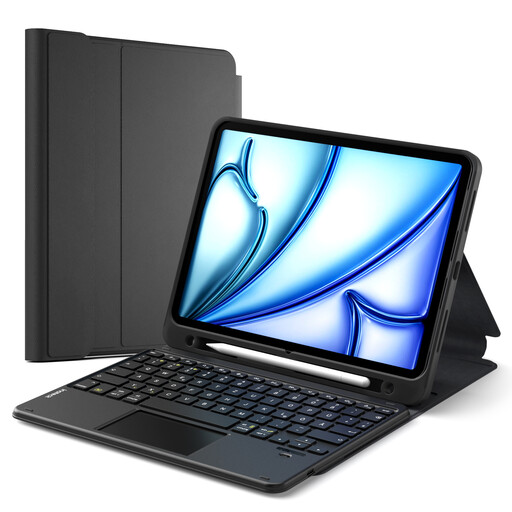
Inateck Classic N0001 iPad Keyboard Case, QWERTZ
This case could suit your setup if you use one of the specifically listed iPad models and want to combine a keyboard with a touchpad.
- QWERTZ, touchpad and stylus holder
- Compatibility according to the product description: iPad 11 (A16 2025), 10th-generation iPad, iPad Air 11-inch M4/M3/M2 (2026/2025/2024), iPad Air 5/4 and 11-inch iPad Pro
- Check the exact iPad generation against the compatibility information before buying
View at Joybuy
 No image available
Inateck KB01105 Bluetooth Keyboard with Touchpad, QWERTZ
This separate keyboard with touchpad is an option if you’re looking for a German QWERTZ layout and support for different writing devices.
- German QWERTZ
- Touchpad
- Compatible with iPad, Android tablet, Windows, laptop and PC
View at Joybuy
Frequently asked questions
Do I need a tablet stand for a separate keyboard?
If your tablet or mobile phone can’t stand securely on its own, allow for a stand and the extra space it will take up on your desk. An independent review of the Logitech Keys-To-Go 2 specifically notes that it doesn’t include physical support for a mobile phone or tablet.
What should I check about the connection and layout before a writing session?
Check that your writing device supports the connection and the layout you’ve chosen, and test any special characters you’ll need before you start writing. If you’re buying a keyboard case, also check the exact generation of your tablet.
How is the Keys-To-Go 2 powered?
Logitech says the Keys-To-Go 2 uses two CR2032 coin-cell batteries; according to the manufacturer, you’ll need a T5 screwdriver to replace them. Remember to have spare batteries and the right tool to hand.
How should you dispose of used keyboard batteries?
Used batteries and rechargeable batteries shouldn’t go in household waste. The German Environment Agency recommends taking them to a separate collection point, such as a retailer or local authority facility.


