What should you look for when choosing one?
Start by checking the drawing commands you need and the keyboard’s actual key layout. Then make sure its connectivity and footprint suit your devices and workspace.
| Consideration |
What to look for when buying |
Who it matters most to |
| Drawing commands |
Check which commands you need, as well as the F-key mode, arrow keys and other navigation keys in your application. |
If I want quick access to the drawing commands I’m used to, I’ll test the specific key layout; around 29% of consumers prioritise easy access to drawing commands. |
| Footprint and packed size |
Measure the free desk space with your device set up, then compare the width, depth and travel accessories of the version you’re considering. |
If space is tight and I need the keyboard to fit in my luggage, I’ll compare its footprint and storage options; around 24% of consumers prioritise this aspect of the design. |
| Device connectivity |
Check Bluetooth support, available ports, the number of device connections you need and what’s included in the box. |
If I want to use the same keyboard with my laptop and tablet, I’ll check their ports against the available connection options; around 23% of consumers prioritise switching between devices. |
| Keys in low light |
Check whether the specific version is backlit and how its brightness and power supply work. |
If I work in a dimly lit hotel room, I want to be able to read the key legends easily; around 12% of consumers prioritise visibility in low light. |
| Power on the go |
Check whether the version you’ve chosen uses a rechargeable battery, replaceable batteries or a cable, and what accessories are included. |
If I want to know how to keep the keyboard ready to use before I travel, I’ll check how it’s charged or powered by batteries; around 12% of consumers prioritise power supply. |
Keyboards at Joybuy
These Joybuy products offer different features in terms of compact design, layout and device connectivity. Before buying, check that you can access the drawing commands you need on the keyboard you’ve chosen.
 No image available
Inateck KB01003G Bluetooth keyboard, QWERTZ
A good choice if you want to connect a QWERTZ keyboard to several devices and switch between them.
The product details list support for up to three Bluetooth devices, a 285 mm body and a weight of 217 g.
According to the description, two AAA batteries are included. Compatible systems listed include Windows, iPadOS, Android and iOS.
View at Joybuy
 No image available
Inateck N0153BK, folding QWERTZ mini keyboard with touchpad
An option if you’re looking for a folding keyboard with a touchpad and several Bluetooth channels.
The product details list a QWERTZ layout, three Bluetooth channels and an additional row of function keys.
When folded, it weighs around 228 g and measures approximately 7.1 × 4.5 × 0.7 inches.
View at Joybuy
 No image available
Akko 3084B Plus, 75%, ISO-DE, V3 Pro Cream Blue Switch
A good fit if you’re looking for a German ISO layout and several connection options.
The product details list Bluetooth, 2.4 GHz wireless and USB-C wired connections, with support for up to three devices.
This model is described as a 75% keyboard with RGB backlighting. It measures 315 × 126 × 38 mm and weighs around 0.73 kg.
View at Joybuy
 No image available
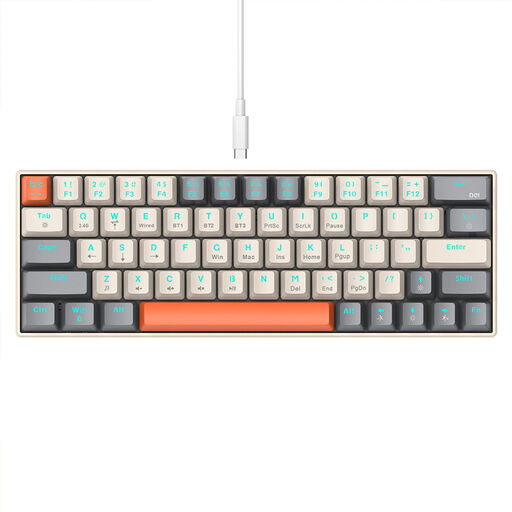
KINSI mechanical keyboard, 63 keys, RGB
A compact option if you want to use Bluetooth or a 2.4 GHz wireless connection.
The product title lists 63 keys and RGB backlighting; the product description also mentions USB-C wired connectivity.
Compatible devices listed include PCs, laptops and tablets. Check that the reduced number of keys covers the commands you need.
View at Joybuy
 No image available
Folding Bluetooth keyboard with mouse, silver and white
A handy option if you want to pack a folding keyboard and mouse together.
The product title lists scissor keys, USB-C charging and three connection modes, with support for up to three devices.
Compatible systems listed include Windows, Android and iOS.
View at Joybuy
Frequently asked questions
Do I need a dedicated row of F keys for drawing commands?
What matters is whether you can reliably access the commands you need on the specific keyboard. In AutoCAD, for example, F3 is assigned to object snap. Autodesk also describes cases where multimedia mode changes the expected function key input. So make sure you test the Fn setting too.
How can I check whether a keyboard works with my laptop and tablet?
Compare the keyboard’s connection options with the features and available ports on both devices. According to CHERRY, the KW 9200 MINI offers two Bluetooth channels, plus one wireless and one wired channel. For wireless use, connect the supplied receiver to a free USB port. Test switching between devices before you travel.
Is a backlit keyboard worth it in a hotel room?
Backlighting can make keys easier to see in low light. Logitech describes the MX Keys Mini as having automatically adjusted backlighting and gives different battery life figures for the MX Keys Mini for Business depending on the backlighting setting. So be sure to check the information for the version you buy.
What cancellation and warranty rights apply to online purchases?
The European Union’s Your Europe website states that consumers generally have a 14-day cancellation period for distance purchases and at least two years of legal protection if goods are faulty, starting from the date they’re received. These consumer rights don’t automatically apply to purchases made by a business; check who the contracting party is and which terms apply to your specific purchase.


