Frequent recipe editors
If you often correct ingredient quantities, punctuation and special characters, a familiar keyboard layout and a typing feel you find comfortable matter more than the smallest possible size when packed away.


For longer recipe edits, first check that the German keyboard layout, typing feel and connection work with your existing device. A separate compact keyboard can be positioned independently of the screen, a folding keyboard can save packing space, and a keyboard case is only worth considering if it explicitly supports your tablet model. Manufacturer claims such as “quiet” are no substitute for comparing the noise yourself.
If you often correct ingredient quantities, punctuation and special characters, a familiar keyboard layout and a typing feel you find comfortable matter more than the smallest possible size when packed away.
With limited seat space, you need room for both your screen and keyboard. It’s also worth considering how well the keyboard can be protected when packed away.
If you switch between a tablet and mobile phone while editing, make sure the Bluetooth channels and operating system support are compatible with your devices.
Check the layout and device compatibility first, then decide whether a separate, folding or tablet-specific option is best for your train seat.
| What you need | What to check before buying | Who is this important to? |
|---|---|---|
| Edit recipe text quickly | Check for a physical German QWERTZ layout, punctuation and navigation keys, and a comfortable typing feel for longer texts. | If you often correct ingredients and instructions, familiar keys matter more than an especially small casing. Around 29 % of consumers prioritise being able to write longer recipe texts. |
| Find space for the screen and keyboard | Check the packed size and the space needed when open separately, and allow for positioning the screen. | If you have little space at your seat, you need an arrangement that lets you use both the screen and keyboard at the same time and pack them away afterwards. Around 23 % of consumers prioritise desk space and packed size. |
| Connect to your existing device | Check the operating system, number of Bluetooth channels and, for a case, the exact tablet model name. | If you switch between a tablet and mobile phone while writing, the connection and compatibility need to work with both devices. Around 18 % of consumers prioritise device compatibility. |
| Be considerate of fellow passengers | If possible, check the typing noise yourself during normal use, and be especially considerate in quiet areas. | If you’re writing near other passengers, a discreet typing sound may matter more to you than extra features. Around 18 % of consumers pay particular attention to typing noise. |
| Be ready to use throughout your journey | Check the power source for the exact version, the charge level and whether you’ll need a charging cable or spare batteries. | If you want to write during your journey without an unexpected battery change or charging break, make sure the power supply suits how you prepare. Around 12 % of consumers prioritise being ready to use. |
A separate keyboard won’t hold your screen up. Even if your seat has a table, you’ll still need space for both devices at the same time.
Before buying, check how the screen and open keyboard will fit together. A case with a stand is only an option if it’s compatible with your tablet.
The CHERRY KW 7100 MINI BT models listed on Joybuy in Slate Blue and Agave Green have US layouts. CHERRY also makes a separate German version.
The model name alone isn’t enough: check the exact listing for the model, colour, physical layout and, where applicable, MPN.
Of the four connection methods on the CHERRY KW 9200 MINI, only two are Bluetooth channels; the others are a wireless receiver and a cable.
Count only the connection types supported by the devices you’ll actually use for writing.
Logitech describes the keys on the Pebble Keys 2 as quiet. This isn’t an independent noise measurement, and it doesn’t tell you how loud your own typing will sound on the train.
If possible, try the keyboard yourself and take the situation into account when using it in a quiet area. Deutsche Bahn notes that other noisy activities are not welcome there.
Worth considering are separate mobile keyboards with different approaches to carrying and switching between devices, as well as the Flip Folio case for selected iPads.
The KW 7100 MINI BT and KW 9200 MINI are separate compact keyboards, with different connection and power options.
The folding Nomad Ergo KB603 is a QWERTZ option for anyone considering a folding design.
The Smart Keyboard Trio 500 is a separate Bluetooth option for compatible mobile devices.
This selection includes folding keyboards, compact keyboards and a keyboard case with a stand. Before buying, check that the layout, connection and, where applicable, tablet fit are right for the device you’ll be writing on.
 No image available
The folding design may suit you if you’re looking for a keyboard to take on the go and need to save packing space.
The product is described as a QWERTZ keyboard with a touchpad and three Bluetooth channels. The product name lists iPadOS, Android and Windows as compatible operating systems.
 No image available
This set may suit you when travelling if you’re looking for a folding keyboard with a mouse and a way to prop up your screen.
According to the product name, it includes a QWERTZ keyboard with Bluetooth 5.3, a number pad, adjustable stand and carry case, as well as a mouse. Windows, iOS and Android are listed as compatible systems.
 No image available
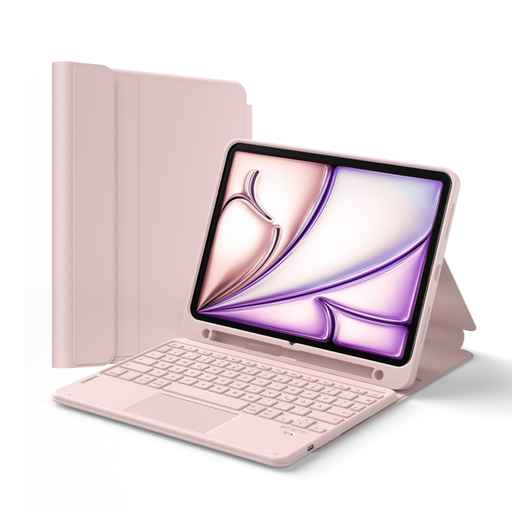
A case with a stand may suit you if you want to carry your screen and keyboard together and own the exact iPad model it supports.
The product name lists a detachable QWERTZ keyboard with a touchpad and pen holder. Compatible models include the 10th-generation iPad, iPad (A16, 2025), iPad Air 4 and 5, iPad Air 11-inch M2, M3 and M4, and iPad Pro 11-inch. The case is only designed for the models listed.
 No image available
The folding design and magnetic stand may suit you if you’re looking for a keyboard with a way to prop up your screen while travelling.
The product name lists Bluetooth, a rechargeable battery and an aluminium casing. The colour is listed as black.
 No image available
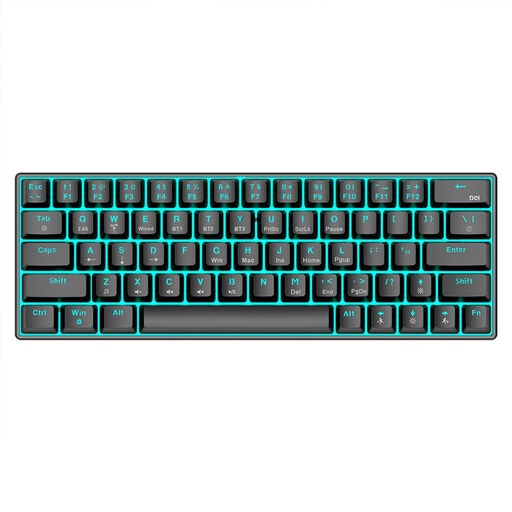
The compact 63-key layout may suit you if you’re considering a portable keyboard with multiple connection options.
The product name lists Bluetooth 5.0, 2.4 GHz wireless and USB wired operation, as well as RGB lighting and a 1,450 mAh battery. Compatible devices listed include PCs, laptops and tablets.
Check that your operating system is listed as compatible with the exact keyboard model, then pair the keyboard before you travel. Samsung describes Bluetooth pairing for the Smart Keyboard Trio 500 using a PIN displayed on the connected device; the process may vary depending on the device. If you’re buying a keyboard case, you’ll also need to check your tablet’s exact model name against the supported models.
Plan how you’ll prop up the screen securely, as a separate keyboard won’t hold your tablet up. COMPUTER BILD noted the need for a separate stand as a drawback of the Keys-To-Go 2; Flip Folio has an adjustable stand, but only fits selected iPads. Check that the screen and keyboard will fit together in the space you usually have at your seat.
For Germany, the Federal Environment Agency recommends returning used batteries and rechargeable batteries to collection boxes in shops or local collection points, rather than putting them in household waste. Check the battery type for your specific model before buying replacements.
According to the European Union’s consumer information, when you buy as a consumer from a business seller in the EU, you have a legal guarantee of at least two years from receipt of the goods. The rights that apply in a particular case depend on the fault and the circumstances of the purchase; a separate manufacturer’s warranty is not the same thing.