What should you look for?
Compact Bluetooth keyboard
A good fit if: you type on compatible devices and can set up your keyboard and screen separately. Logitech says the Pebble Keys 2 K380s can switch between three devices.
Bear in mind: Depending on your setup, you may also need a stand for your device.
Foldable Bluetooth keyboard
A good fit if: you’re mainly looking for something compact to carry and have a flat surface for the unfolded keyboard. The iClever BK08 is a tri-fold model with a touchpad.
Bear in mind: iClever describes the BK08’s keys as smaller than standard keys; also check the layout of the specific version.
Device-specific keyboard case
A good fit if: you have a specifically supported tablet and want to use the keyboard and stand together. Apple says the Magic Keyboard Folio uses the Smart Connector.
Bear in mind: The case must fit your exact tablet model; Bluetooth models such as Logitech’s Flip Folio also need batteries.
Deutsche Bahn says fixed or folding tables are available at many ICE seats. So consider the keyboard, your propped-up device and the space actually available together.
| What matters |
What to check before buying |
Who it matters most to |
| Pack size and table space |
Dimensions when unfolded, plus room for your device and, if needed, a stand. |
If I want to read and write in a confined space, the whole setup matters more than just the folded size. Around 36% of consumers put pack size and table space first. |
| Device compatibility |
Exact device model, supported operating system and connection type: Bluetooth or Smart Connector. |
If I switch between a smartphone and tablet, or want a case for a particular tablet, the connection needs to work with my devices. Around 29% of consumers put compatibility first. |
| Typing feel and noise |
Key size and layout; manufacturers’ claims about quiet typing are not independent noise measurements. |
If I’m writing longer notes or want to avoid disturbing other passengers, I look for keys that feel comfortable to use. Around 21% of consumers prioritise typing feel and consideration for others. |
| Power |
Batteries, charging or power through the tablet connector, and whether you’ll need any extra accessories. |
If I want to avoid unexpected interruptions while travelling, I need to know how the keyboard is powered and whether I might need spare batteries. Around 14% of consumers prioritise power and ongoing costs. |
Joybuy products
The following Joybuy products are mobile keyboards for taking notes on the go, including foldable models and compact Bluetooth options for smartphones and tablets.
 No image available
Inateck N0153BK Foldable Mini Keyboard
A foldable option for quick notes on compatible devices, with a touchpad and QWERTZ layout.
QWERTZ; three Bluetooth channels; touchpad; listed in the product name as compatible with iPadOS, Android and Windows.
View on Joybuy
 No image available
NAXSIR Foldable Wireless Bluetooth Keyboard, Grey
A foldable keyboard for taking notes on the go, with a stand for using your smartphone or tablet alongside it.
Bluetooth; magnetic stand for smartphone or tablet; rechargeable; aluminium casing.
View on Joybuy
 No image available
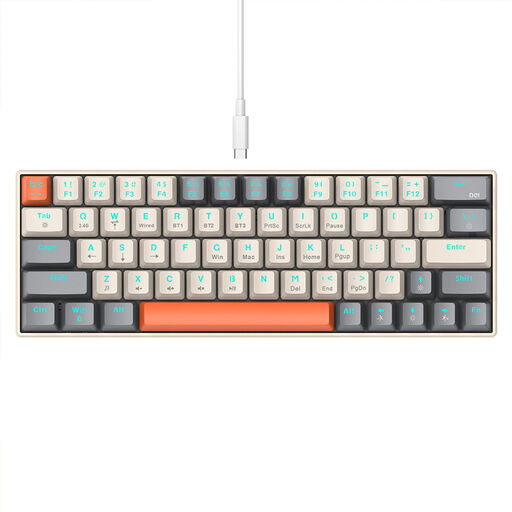
KINSI Compact Gaming Keyboard, 63 Keys
A compact keyboard for mobile use, with Bluetooth and 2.4 GHz connectivity as options.
63 keys; mechanical keyboard; Bluetooth and 2.4 GHz wireless connection.
View on Joybuy
 No image available
Foldable Bluetooth Keyboard with Wireless Mouse, Silver White
A foldable option for taking notes on the go, with a choice of connection types.
Quiet scissor keys according to the product name; Bluetooth and 2.4 GHz dongle; USB-C charging; connects to up to three devices.
View on Joybuy
 No image available
UNIQ Forio Foldable Bluetooth Keyboard, Green/Braided Green
A foldable Bluetooth keyboard for taking notes on the go when you want something compact to carry.
Foldable Bluetooth keyboard; Green/Braided Green version.
View on Joybuy
Frequently asked questions
Do I need a keyboard case for taking quick notes on the train?
No, a case isn’t essential. If you switch between devices, a separate compatible Bluetooth keyboard may be more flexible. A case is mainly worth considering if you have a specifically supported tablet that you want to use with a keyboard and stand. Make sure you have room for the whole setup.
How do I connect a Bluetooth keyboard?
Turn on Bluetooth on your compatible device and follow the instructions for your keyboard model. To start pairing mode on the Samsung Smart Keyboard Trio 500, press F7, F8 or F9 for three seconds, then confirm the code shown on your device. Apple’s Magic Keyboard Folio for iPad (10th generation), on the other hand, connects via the Smart Connector.
What should I check before buying a keyboard case?
Compare your tablet’s exact model name with the case’s compatibility details, and check that there’s enough room to set it up on the available table. If an Apple Connector keyboard isn’t responding, Apple recommends, among other things, cleaning the contacts with a soft, lint-free cloth and removing any other cases.
What ongoing costs might come with a mobile keyboard?
Battery-powered models may need replacement batteries; depending on your setup, you might also need a stand for a separate keyboard. As Verbraucherzentrale explains, your statutory rights if a product is faulty are different from a voluntary warranty.
How can I check that a Bluetooth keyboard meets the relevant product requirements?
Products covered by relevant EU harmonisation legislation and placed on the EU market must carry the CE marking, as the Bundesnetzagentur explains. It indicates the manufacturer’s declaration of conformity and is not an independent quality mark.


