Joybuy products for typing on the go
These Joybuy keyboards are designed for typing on the go. The selection includes foldable models and a compact 63-key option.
 No image available
Inateck Foldable Mini Keyboard N0153BK
Worth considering if you’re looking for a foldable keyboard with a touchpad for typing on the go.
- QWERTZ; three Bluetooth channels.
- Compatibility according to the product name: iPadOS, Android and Windows.
- Includes a touchpad and AI Function.
View at Joybuy
 No image available
Inateck Foldable Bluetooth 5.3 Keyboard and Tri-Mode Mouse Set N0158BK
Could be a good fit if you want to carry a foldable keyboard and mouse with you.
- QWERTZ; Bluetooth 5.3.
- Includes a number pad, adjustable stand and carry case.
- Compatibility according to the product name: tablets, phones and laptops, as well as PCs running Windows, iOS or Android.
View at Joybuy
 No image available
NAXSIR Foldable Wireless Bluetooth Keyboard with magnetic stand, grey
Worth considering if you’re looking for a foldable keyboard with a magnetic stand for a mobile device.
- Rechargeable.
- Includes a magnetic stand and aluminium casing.
- Colour: grey.
View at Joybuy
 No image available
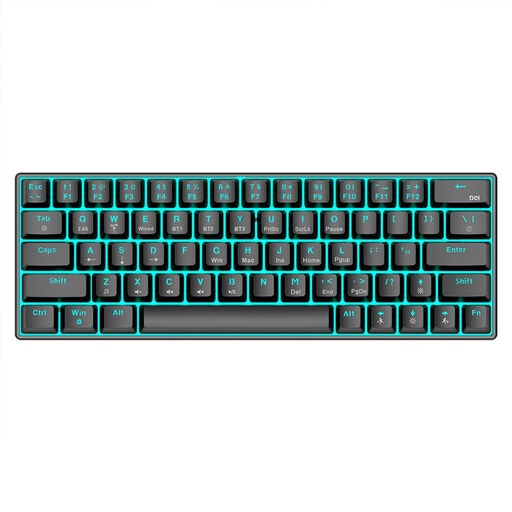
KINSI Compact Mechanical Gaming Keyboard, 63 keys
This compact 63-key model could suit you if you don’t need a foldable design.
- Bluetooth 5.0, 2.4 GHz wireless and USB cable connection.
- RGB backlighting; 1450 mAh battery.
- Compatibility according to the product name: PC, laptop and tablet.
View at Joybuy
 No image available
Foldable Bluetooth Keyboard with wireless mouse, silver and white
Could be a good fit if you’re looking for a foldable keyboard and mouse set for typing on the go.
- Scissor keys; three connection modes and connection to up to three devices.
- USB-C charging.
- Compatibility according to the product name: Windows, Android and iOS.
View at Joybuy
Frequently asked questions
Can I use the same keyboard with a tablet and laptop?
It depends on the keyboard and both devices. Logitech lists support for several operating systems and switching between three devices for the Pebble Keys 2 K380s; CHERRY lists three Bluetooth channels for the KW 7100 MINI BT. Before you buy, check your devices’ operating system versions, Bluetooth support and key layouts.
How should I prepare my keyboard for the journey?
Pair the keyboard with the device you plan to use and test it before you set off. Charge a rechargeable model or check the batteries in a battery-powered one. If you’re working on a tablet, also check that you can prop up the screen securely.
Can I plan online with others throughout the train journey?
A Bluetooth keyboard doesn’t need the train’s Wi-Fi for typing, but a shared online file does. Deutsche Bahn notes that factors affecting Wi-Fi speed include the mobile network connection and the number of passengers browsing at the same time. Have an offline option ready for important notes, and test it in advance.
What should I know about returning a keyboard or dealing with a fault after buying it online in Germany?
Verbraucherzentrale explains that online purchases generally come with a right to cancel within 14 days of concluding the contract or receiving the goods. For faulty goods, statutory consumer rights should be distinguished from a voluntary guarantee. Check the terms of your specific purchase, and remember that a guarantee does not replace your statutory rights relating to faulty goods.
Can I hold a group meeting in an ICE quiet zone?
Deutsche Bahn notes that mobile phone calls and other noisy activities, among other things, are not welcome in ICE quiet zones. This means they’re not suitable for a conversation that others can hear. This is a request to keep noise down on board, not a statement that using a keyboard is prohibited by law.


