People writing longer texts
If you want to write several sections of a grant application while travelling, easy-to-reach keys and a comfortable typing feel may matter more than the smallest folded size.


For longer stretches of writing, check the keyboard layout, how it feels to type and the space available next to your device first – the smallest folded size isn’t the only thing that matters. A foldable keyboard saves space in your luggage, a slim tablet keyboard is quick to set up, and a compact multi-device keyboard gives you several ways to connect. The right choice depends on whether typing comfort, travelling light or switching between devices matters most to you.
If you want to write several sections of a grant application while travelling, easy-to-reach keys and a comfortable typing feel may matter more than the smallest folded size.
If you’re typing on a tablet or mobile phone, you’ll need to fit your keyboard, device and documents onto the available table space.
If you edit your application on more than one device, the connection options and the way you switch between devices should suit your workflow.
When choosing a mobile keyboard for longer writing sessions on the train, the best option depends on what matters most to you.
A good fit if: you travel with a tablet or mobile phone and want a keyboard that takes up as little space as possible when packed away.
Consider: A small folded size doesn’t necessarily mean a comfortable typing experience when writing a longer application. Check the key layout and the surface it rests on, too.
A good fit if: you prefer a lightweight, full-width keyboard and it’s compatible with your device.
Consider: It doesn’t fold up, so check before buying that you find the layout and keys comfortable for longer texts.
A good fit if: you switch between a laptop and tablet, or want connection options in addition to Bluetooth.
Consider: A wireless receiver and cable may mean extra luggage. Check how much room the keyboard will take up at your seat, too.
| Priority | What to check when buying | Who is this important to? |
|---|---|---|
| Typing feel and layout | Check the layout variant and key arrangement; if possible, try typing a longer paragraph and making corrections. | When I write longer passages, I want the keys to be easy to reach and corrections to be simple to make. Around 33 % of consumers prioritise typing feel and layout. |
| Folded size and table space | Consider the keyboard set up and ready to use alongside your device and stand on the available surface. | When there’s little room at my seat, I want to set up my device and keyboard together without carrying unnecessary extra luggage. Around 27 % of consumers prioritise folded size and usable space. |
| Connectivity and compatibility | Check the operating system, Bluetooth support, required ports and layout variant against the specific model. | When I switch between devices, I need a connection that works with the device I’m using to write. Around 20 % of consumers prioritise this. |
| Power | Check the charge level, whether you have suitable spare batteries and which ports you’ll need before your journey. | When I’m writing for a long time while travelling, I don’t want to be interrupted by a flat battery or no spare batteries. Around 20 % of consumers prioritise reliable power. |
You’ll need space for both the keyboard and screen when you’re writing. Deutsche Bahn notes that many, but not all, seats on ICE trains have fixed or fold-down tables.
Compare the set-up ready to use – with your device, stand and keyboard – rather than looking only at the packed size.
The key layout can affect how easy it is to type longer German texts. A QWERTZ layout listed in a product description applies only to the specific variant named.
Check the full model and layout details in the listing.
Having a Wi-Fi connection available doesn’t tell you whether confidential application data will be adequately protected when transmitted.
Follow the security recommendations of the Federal Office for Information Security and, where possible, plan your writing and saving so that you don’t need a network connection for every step.
The Travel 450 is a foldable option for typing on the go; the Travel 600 connects to several Bluetooth devices and its case doubles as a tablet stand.
The Keys-To-Go 2 is a slim tablet keyboard with a cover; the Pebble Keys 2 K380s is a compact keyboard for switching between devices.
The KW 9200 MINI is aimed at people looking for a compact keyboard with several connection options.
This selection includes foldable Bluetooth keyboards, a compact multi-device keyboard and an iPad keyboard case for typing on the go.
 No image available
For travelling, if you’re looking for a foldable keyboard with a German QWERTZ layout and number pad.
99 keys with a separate number pad; three Bluetooth channels. The product description says it’s compatible with iPadOS, Android and Windows.
 No image available
For working on the go, if you’d like to use a wireless mouse alongside a foldable keyboard.
The product description lists quiet scissor-switch keys, Bluetooth and a wireless receiver, plus the ability to switch between up to three devices. USB-C charging; compatible systems listed include Windows, Android and iOS.
 No image available
For travelling, if you’re looking for a compact design with a German QWERTZ layout and several ways to connect.
65% layout with low-profile switches and a rechargeable battery. Connectivity options listed include Bluetooth, 2.4 GHz wireless and USB-C, as well as connections to up to three Bluetooth devices.
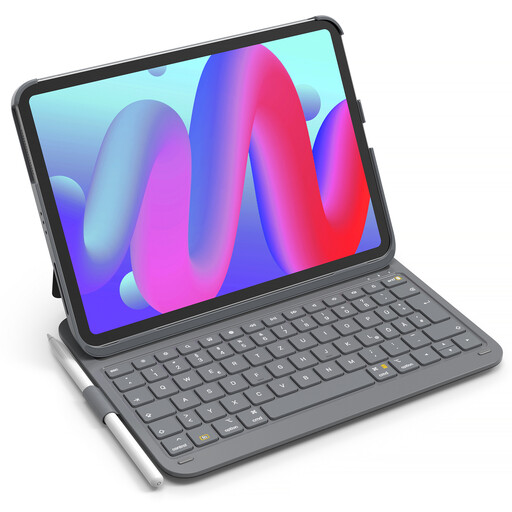 No image available
For writing on the go, if you use an iPad listed in the product description and want to carry your keyboard and device together.
The description lists a thickness of 0.7 cm and a total weight of 434 g. According to the product details, it supports iPad 11 (A16), iPad 10th Generation, iPad Air 11″ M4/M3/M2, iPad Air 5/4 and iPad Pro 11, among other models. Check exact model compatibility before buying.
Check that the operating system and connection type match the specific keyboard variant, and pair it before you travel. Logitech lists separate minimum requirements for the Keys-To-Go 2 for Windows, macOS, iPadOS, iOS and Android; CHERRY lists several connection options for the KW 9200 MINI.
Don’t count on having a particular workspace or connection. Deutsche Bahn says that many ICE seats have tables, while power sockets depend on the class and train model. Wi-Fi is available across the ICE fleet, but speeds depend on factors including the mobile network connection and the number of other passengers. Get your device ready and charge its battery rather than relying on a socket or a stable connection.
The Federal Office for Information Security advises against sending confidential data over public Wi-Fi unless it has first been encrypted locally or is sent via a VPN. This is a security recommendation, not a feature of any particular keyboard.
According to Your Europe, goods bought from a business seller in the EU are generally covered by a statutory guarantee of at least two years from the date you receive them. The seller is your point of contact if there’s a fault; a voluntary manufacturer’s warranty is separate. This does not apply to private sales.