Note-takers with limited table space
You get your notes out at a small café table and want to set up your keyboard and screen side by side. A compact design and a suitable screen stand matter more to you than extra features.


If you write on a smartphone or switch between devices, a separate, compact Bluetooth keyboard is a good place to start. For longer note-taking sessions, the feel of the keys matters too, as does having enough room to set up the screen and keyboard side by side. A keyboard case may be a better fit if it supports your specific tablet and you want a built-in stand: Apple’s Magic Keyboard Folio for iPad (A16) requires iPadOS 18.3 or later.
You get your notes out at a small café table and want to set up your keyboard and screen side by side. A compact design and a suitable screen stand matter more to you than extra features.
You’re typing up longer observations and want keys that are comfortable to use, without automatically opting for a full-size model.
You switch between a smartphone, tablet and computer when taking or editing notes, so you need a connection and key layout that suit each device.
First, check that the keyboard and screen will fit on the available table space. Then consider typing comfort, device connectivity and layout. A keyboard case is an option mainly if it’s compatible with your specific tablet.
| What matters to you | What to check before buying | Who it matters most to |
|---|---|---|
| Space and portability | Check the packed size and make sure there’s room to set up the keyboard and screen together. | At a small café table, you’ll need space for the screen as well as the keyboard. Around 26% of consumers prioritise space and portability. |
| Keys for longer note-taking sessions | Check the key size, mechanism and any special keys you need on the specific model; try the typing feel for yourself if possible. | For longer note-taking sessions, I want to be able to type comfortably. Around 26% of consumers prioritise comfortable typing over longer periods. |
| Devices and German layout | Check the operating system, connection type and DE-QWERTZ layout for the specific model. For keyboard cases, check the exact tablet model. | When switching between a smartphone and tablet, the connection and key layout need to suit the model. Around 21% of consumers prioritise compatibility with their devices and preferred layout. |
| Typing noise | If possible, listen to the key action for yourself; don’t treat claims about quiet typing as measured results. | In a shared café, I want to disturb others as little as possible. Around 16% of consumers prioritise quiet keys. |
| Power | Check how the keyboard is powered, how it charges or whether it needs replacement batteries, and whether it can be used with a cable. | When I’m out and about, I don’t want a flat keyboard to interrupt my note-taking. Around 11% of consumers prioritise power. |
A separate keyboard won’t hold your screen upright. In its review of the Logitech Keys-To-Go 2, COMPUTER BILD notes that you’ll also need a way to prop up the screen.
Before buying, think about how the screen and keyboard will fit together on the table space you actually have.
On a small table, you may need to allow extra room for a screen stand.
A keyboard may have a different layout from the one you want. And a device-specific case won’t necessarily fit every tablet. Apple’s Magic Keyboard Folio for iPad (A16) requires iPadOS 18.3 or later.
Before ordering, check the full model number, the DE-QWERTZ layout and, for a case, the exact tablet model.
If you choose the wrong version, you may need to exchange or return it.
Logitech’s noise-reduction claim relates to the MX Keys Mini and isn’t backed by a comparable sound measurement.
If key noise is important to you, listen to it for yourself if possible, and don’t assume the claim applies to other models.
The Keys-To-Go 2 is an especially slim standalone keyboard. The MX Keys Mini is designed for different priorities, including backlit keys.
The KW 9200 MINI is a compact keyboard for small workspaces and switching between supported connections.
The Magic Keyboard Folio is a keyboard case for the specifically supported iPad (A16).
The Smart Keyboard Trio 500 is a standalone Bluetooth keyboard for switching between compatible mobile devices.
Trust describes the Lyra as a compact keyboard with scissor keys and several connection options.
This selection includes standalone portable keyboards for café tables, plus a keyboard case designed for iPad. Key considerations are portability, a suitable connection and, for the case, compatibility with your specific iPad.
 No image available
The foldable design and three Bluetooth channels make it suitable for writing on the go and switching between compatible devices.
QWERTZ; three Bluetooth channels; touchpad; 15 mm keys; 1.5 mm key travel; 228 g. Listed compatibility: Windows, iPadOS and Android.
 No image available
The foldable design is made for mobile use and comes with a wireless mouse.
Scissor keys; USB-C charging; three connection modes; connects to up to three devices. The description lists Windows, Android and iOS as compatible systems. The advertised quiet key action is a manufacturer claim, not an independent measurement.
 No image available
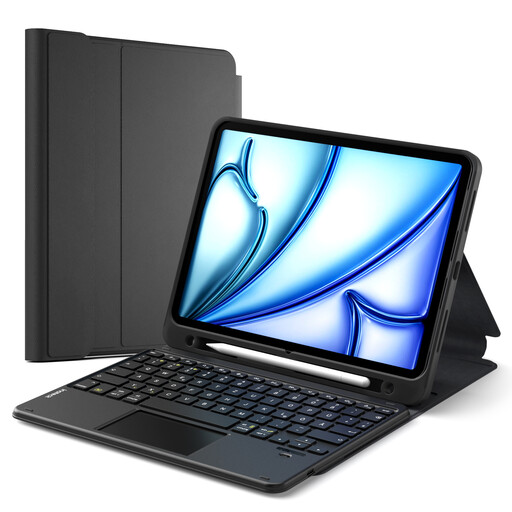
The case combines a keyboard and stand for use on the go, as long as your iPad is one of the listed models.
Detachable keyboard; QWERTZ; Bluetooth 5.3; touchpad; three-position stand. Designed only for the iPad models listed in the product description.
 No image available
This standalone keyboard is designed for writing on the go, combining a slim profile with an integrated touchpad.
5 mm thick; 228 g; 1.5 mm key travel; QWERTZ; three Bluetooth channels. Listed compatibility: Windows and iPadOS.
 No image available
Its foldable design and stated weight of 175 g make it a handy option if you want to take a keyboard with you.
65 keys; folded dimensions 167 × 105 × 13 mm; 175 g. Listed compatibility: iOS, Windows, macOS and Android. USB-C charging.
Pair it with the device you’ll be using beforehand, then test it in your notes app. For the Smart Keyboard Trio 500, Samsung explains how to enter pairing mode using F7, F8 or F9, then confirm by entering the PIN shown on screen. The process may differ for other models.
Only if you don’t already have a suitable way to prop up your screen. In its review of the Logitech Keys-To-Go 2, COMPUTER BILD notes that you’ll need an additional screen stand. Apple’s Magic Keyboard Folio, by contrast, has an adjustable stand for the supported iPad (A16).
Before a long note-taking session, check how the specific keyboard charges or gets its power. CHERRY says the KW 9200 MINI comes with a cable for charging and wired use, provided your device has a suitable port.
If a product is faulty, your statutory rights are generally against the seller; a voluntary guarantee is separate. According to the Verbraucherzentrale, consumers generally have a 14-day right to cancel contracts made online. The conditions and exceptions depend on the circumstances.
When monitoring radio equipment on the market, the Bundesnetzagentur checks, among other things, CE marking, product traceability, manufacturer information and German-language instructions with the required usage and safety warnings. CE marking is not an independent practical test of the keyboard.