Annotators short on space
If you read PDFs at small café tables, you’ll want room for your screen and keyboard without carrying lots of extra kit. Logitech and ProtoArc describe separate and foldable keyboard solutions for mobile devices.


If you switch between compatible devices and have limited room in your bag, a separate Bluetooth keyboard is a natural place to start. A foldable model saves even more packing space. If you write longer comments or want to set up your tablet and keyboard together, check the layout and, where relevant, make sure the keyboard case is designed for your exact tablet model. You’ll also need to test separately whether your PDF app supports the annotation actions you want to carry out using a keyboard.
If you read PDFs at small café tables, you’ll want room for your screen and keyboard without carrying lots of extra kit. Logitech and ProtoArc describe separate and foldable keyboard solutions for mobile devices.
If you write longer notes, a comfortable key layout may matter more to you than the smallest possible folded size. ProtoArc and CHERRY offer different compact keyboard styles.
If you switch between a tablet, smartphone or laptop while reading and annotating, you’ll need a connection that works with each device. Logitech, ProtoArc and CHERRY describe keyboards with different connectivity options.
A good fit if: you type on several supported devices and want to use the keyboard independently of a particular tablet case.
The trade-off: You’ll need space for both your screen and keyboard; a slim keyboard isn’t necessarily foldable.
A good fit if: a compact folded size is your priority and you often type short texts while out and about.
The trade-off: Check the size when opened and the key layout. According to ProtoArc, USB-C on the ProtoArc XK04 is for charging only, not data transfer.
A good fit if: a full, continuous keyboard and several connection options matter more to you than a particularly compact size.
The trade-off: CHERRY says the KW 9200 MINI supports Bluetooth, receiver and wired connections. Check which connection your tablet actually supports.
A good fit if: you use a particular tablet and want to set up the screen and keyboard together.
The trade-off: Apple makes its Magic Keyboards for specific iPad models, so this model-specific fit may be limiting if you change devices.
For annotating in a café, the right choice depends on what matters most for your own setup. The figures below group consumers by their main purchasing priority.
| Priority | What to check before buying | Who it matters most to |
|---|---|---|
| Folded size and desk space | Compare the folded and open dimensions, as well as the space needed for your screen and keyboard. | If I work at small café tables and want to take my keyboard with me regularly, I look at its packed size and how much space it needs. Around 33% of consumers put size and desk space first. |
| Writing longer comments | Check the German layout, punctuation and the navigation and editing keys you use most. | If I write longer comments, I want a key layout that makes it easy to carry out my usual tasks. This writing priority comes first for around 27% of consumers. |
| Device and app compatibility | Check your exact device model, connection and operating system, along with the features you need in your PDF app. | If I use several devices or want to carry out specific tasks in my PDF app using the keyboard, I check the connection and the exact workflow. Around 27% of consumers prioritise device and app compatibility. |
| Power on the move | Check the charging options and cable type; charging and data transfer aren’t the same thing. | If I work without a socket close at hand, I want to know how to charge the keyboard and whether I can use it while it’s connected by cable. Around 13% of consumers prioritise power. |
Apple makes different Magic Keyboards for specific iPad models. A case that isn’t the right fit may therefore be unsuitable for your particular device.
Find the exact model name of your iPad and compare it with the compatibility list for the keyboard case you’re considering.
ProtoArc describes USB-C on the XK04 as a charging port with no keyboard data transfer. By contrast, CHERRY also lists a wired data connection for the KW 9200 MINI.
For the exact model you’re considering, check separately whether the port charges the keyboard and whether it transmits keystrokes.
According to ProtoArc, the unfolded ProtoArc XK04 measures around 27.3 × 10.3 cm. You’ll also need room on the table for your screen and, if needed, a separate tablet stand.
Plan where to put your screen and open keyboard based on the table space available.
The German Inateck product listing for the Nomad Ergo gives different weight figures. You can’t use this to draw a clear conclusion about its weight advantage.
Before buying, check which figure applies to the specific version rather than treating the figures as a precise basis for comparison.
The Keys-To-Go 2 is a separate, slim keyboard for supported tablets, smartphones and laptops. It’s an option if you don’t want a keyboard tied to a tablet case.
The XK04 with German layout is a foldable option if a compact size and switching between Bluetooth devices matter to you.
The KW 9200 MINI is a compact, non-foldable alternative if you want a choice of several supported connection types.
Apple’s Magic Keyboard ranges are designed for people buying a specific, explicitly supported iPad and looking for a device-specific solution.
The foldable Nomad Ergo with German QWERTZ layout is an option if you’d like to consider an alternative key arrangement.
This selection includes foldable Bluetooth keyboards for use on the move, as well as keyboard cases for specific iPad models. For each case, check the compatible devices listed; for each keyboard, check that it has the connection you need.
 No image available
A foldable Bluetooth keyboard for a mobile setup with several devices.
QWERTZ; three Bluetooth channels; compatible with iPadOS, Android and Windows. The model is listed as weighing 228 g, with folded dimensions of 7.1 × 4.5 × 0.7 inches.
 No image available
A mobile set if you’d like to use a foldable keyboard with a stand and carry case.
QWERTZ keyboard with 99 keys and a number pad; according to the product description, the set includes a mouse, adjustable stand and carry case. Three Bluetooth channels; listed as compatible with Windows, iOS and Android.
 No image available
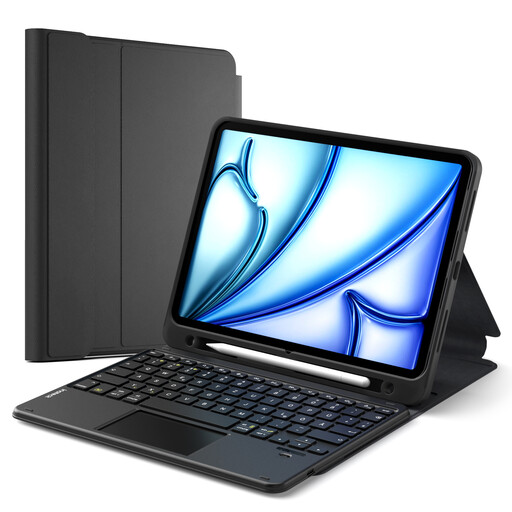
A device-specific option if you want to set up your iPad and keyboard together.
The product name lists the 10th-generation iPad, iPad Air 11 M4/M3/M2 (2026/2025/2024), Air 5/4 and iPad Pro 11 as compatible models. QWERTZ, a detachable magnetic keyboard, a multi-gesture touchpad and a three-position stand are listed. Check your iPad’s exact model name.
 No image available
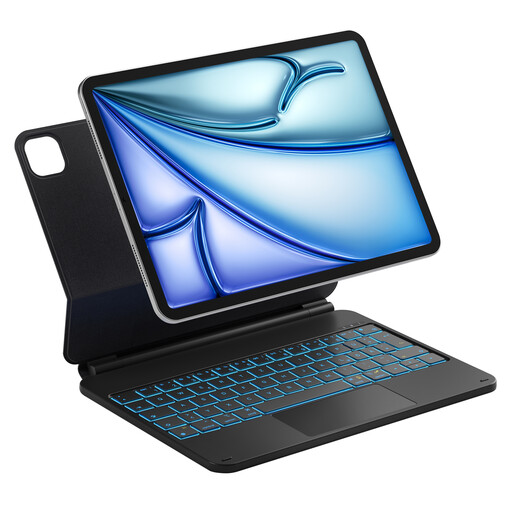
A keyboard case for a freestanding iPad setup while reading and annotating.
Designed for specific iPad Air and iPad Pro models. The product description lists a stand adjustable to 130 degrees, seven-colour backlighting, trackpad gestures and iPadOS keyboard shortcuts. Check your tablet’s model name against the compatibility details.
 No image available
A foldable Bluetooth keyboard if you’re looking for a compact typing solution for different devices.
65 keys; 175 g; folded dimensions of 167 × 105 × 13 mm. Listed as compatible with iOS, Windows, macOS and Android; the product description states that it offers up to 26 hours of use.
First, check that your laptop supports Bluetooth and that it’s switched on. Turn on the keyboard, follow its instructions to activate pairing mode, then select it in Windows Bluetooth settings. Microsoft explains that Bluetooth is required for pairing.
First, find your exact iPad model name under “Settings” > “General” > “About”, then compare it with the compatibility list for the specific case. Apple explicitly distinguishes which iPad models its Magic Keyboards support.
It depends on the model: ProtoArc says USB-C on the XK04 is for charging only, while CHERRY also describes a wired data connection for the KW 9200 MINI. So check the details for your exact keyboard.
When carrying out market surveillance of radio equipment, the Federal Network Agency checks things including CE marking, product and manufacturer information, and German-language instructions with the required safety information. This doesn’t mean that a particular product listing has already been checked.
If a product is faulty, statutory rights against the seller should be distinguished from a voluntary guarantee. The consumer advice centre explains that the first step may be to request a repair or replacement; what applies in an individual case depends on the circumstances.