People reviewing plans on a tablet
If you review drawings on site, using a keyboard can help you search and write notes. Autodesk says you can access current design files online or offline; the types of input available depend on your plan app.


If you need to add brief notes to plans while you’re out and about, and switch between several devices, a separate Bluetooth keyboard gives you flexibility. If you use the same tablet at a fixed workstation, a compatible keyboard case with a stand and touchpad may be more practical. Before buying, check your exact device model, how your plan app works and whether you can position the screen and keyboard securely where you’ll be using them. A keyboard on its own won’t prop up the screen or make an app work offline.
If you review drawings on site, using a keyboard can help you search and write notes. Autodesk says you can access current design files online or offline; the types of input available depend on your plan app.
If you switch between a tablet and a computer, the layout and connection need to work with both. CHERRY lists several connection options for the KW 9200 MINI; still, check which ones your devices support.
If you carry your keyboard around often, its packed size and key protection matter. You’ll also need a suitable surface or a compatible case with a stand when you use it.
First, check that your plan app supports the input you need and that the keyboard works with your device. Then consider how to position the screen and keyboard, as well as the size and power supply you’ll need for your work.
| What matters | What to check before buying | Who should consider this? |
|---|---|---|
| Navigating and entering information in plans | Check the keys you need, the keyboard layout and, where applicable, touchpad gestures in your app. | If you enter search terms and brief notes while reviewing plans, the controls should suit your workflow. Around 29% of consumers put navigation and input first. |
| Device and operating system compatibility | Check the full device model, operating system and connection against the manufacturer’s specifications. | If you’re buying a case, the exact tablet version matters; with a separate keyboard, the connection needs to work with every device you use. Around 29% of consumers prioritise compatibility with their device and operating system. |
| Positioning and workspace | Consider how much space the keyboard takes up when open, and whether a stand is included or needs to be bought separately. | If you want to view the plan beside the keyboard, you’ll need a stable position for the screen and enough room to type. Around 24% of consumers pay particular attention to positioning and workspace. |
| Portability and power | Check the packed size, battery or charging type, and whether you may need spare batteries or a charging cable. | A compact keyboard can be easier to carry if you often work away from the office; make sure its power supply suits how you plan to use it. Around 18% of consumers put portability and power first. |
A standalone keyboard won’t automatically position your tablet screen. You may therefore need an additional stand or a suitable case to view plans.
Plan where you’ll position the screen and how much desk space you’ll need, as well as choosing a keyboard.
Cases are made for specific tablet models. For the Magic Keyboard for the 11-inch iPad Air, Apple specifies iPadOS 18.3 or later as a requirement; other cases may also have their own model or system requirements.
Check the full model name and, where applicable, the required software version against the manufacturer’s specifications.
A folding keyboard needs a suitable work surface when open. ProtoArc recommends using the XK01 on a stable surface rather than on your lap.
Check both its packed dimensions and how much room the keyboard and screen will need where you plan to use them.
A key cover doesn’t automatically mean a keyboard has a stated weather or dust protection rating.
If you work in these conditions, look for protection features explicitly listed for the specific model.
The range includes separate keyboards such as Keys-To-Go 2, as well as keyboard cases made for specific models, such as Flip Folio and Combo Touch.
The KW 9200 MINI is a compact standalone keyboard with several connection options.
The Book Cover Keyboard EF-DX725BBGGDE is designed for the specific Galaxy Tab models listed.
The Magic Keyboard for the 11-inch iPad Air is a device-specific option with a trackpad and adjustable viewing angle.
The XK01 is available with a German keyboard layout and folds away for transport.
These products include folding Bluetooth keyboards, standalone keyboards and an iPad keyboard case for typing and navigating on the go. If you’re choosing a case, check that it fits your exact model; standalone keyboards don’t prop up the screen.
 No image available
A folding standalone keyboard with a touchpad could be a good choice if you type while out and about and can arrange the screen position separately.
The listing specifies a QWERTZ layout, three Bluetooth channels and a weight of 228 g. The keyboard doesn’t prop up the tablet.
 No image available
This set may suit you if you want to carry a keyboard and mouse and position the screen using a separate stand.
The product title lists a number pad, a carry case and an adjustable stand. According to the product details, the keyboard has three Bluetooth channels and is compatible with iOS, iPadOS and Android.
 No image available
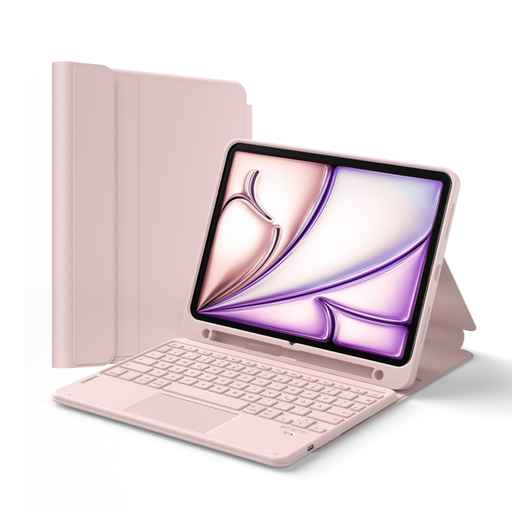
A case with a touchpad and stand can create a mobile workstation for a compatible iPad, letting you use the screen and keyboard together.
The product details list a detachable keyboard, a three-stage stand and a stylus holder. Compatible versions include the 10th-generation iPad and A16, iPad Air 4 and 5, 11-inch iPad Air (M2, M3 and M4), and 11-inch iPad Pro. Check your exact model before buying.
 No image available
This compact standalone keyboard may suit you if you want to switch between Bluetooth, wireless and wired connections and have a separate place for your tablet.
The product title lists a 65% layout, 68 keys and Bluetooth, 2.4 GHz and wired connections. A detachable wrist rest is also listed in the title.
 No image available
A standalone keyboard with an integrated touchpad may suit you if you want to type and navigate on compatible devices and can position the screen separately.
The product details list a weight of 228 g, a thickness of 5 mm and connections with up to three Bluetooth devices. The listing describes it as compatible with iPad, Android tablets and Windows devices.
No, a keyboard on its own won’t make drawings available offline. That depends on the app you use and whether the files have been made available in advance. Autodesk describes online and offline access for its drawing software, but this doesn’t automatically apply to other apps.
Compare your full model name with the compatibility list for the specific case and check any stated system requirements. For the Magic Keyboard for the 11-inch iPad Air reviewed here, Apple requires iPadOS 18.3 or later; Samsung lists specific Galaxy Tab models for EF-DX725BBGGDE.
If you want the screen propped up while you type, you’ll need a suitable stand. A separate keyboard won’t do this; if you’re considering a keyboard case, check that it has a stand for your exact tablet model.
Set the keyboard on a stable, level surface, then check that the connection and layout work with your device. ProtoArc recommends using the XK01 on a stable surface rather than on your lap.
A key cover on its own doesn’t prove that a keyboard is protected from rain or dust. If you plan to use it in these conditions, check whether the specific model is explicitly described as having the relevant protection.