Start by choosing a keyboard that works with your existing device and plan app. A separate Bluetooth model is ideal for typing, while a compatible keyboard case with a trackpad adds cursor control. If you move between locations often, consider its size when packed and how it’s powered. For longer notes, the layout and usable typing area matter. A keyboard won’t replace your plan app or provide the permissions needed to add annotations.
Which keyboard is right for you?
Plan reviewers using multiple devices
If you switch between a tablet and a laptop, make sure the connection and layout work with both devices. Logitech describes Keys-To-Go 2 Universal as compatible with multiple operating systems, while CHERRY lists several connection channels for the KW 9200 MINI.
iPad users who need cursor control
If you want to view drawings on your iPad and add notes using a cursor, check that the case is compatible and that your plan app has the features you need. Apple lists specific iPad models for the 13-inch Magic Keyboard, while Autodesk describes how to add annotations in its mobile app.
Frequent travellers with limited bag space
If you need to take your keyboard to appointments with clients, its packed size and usable typing area are important. Inateck describes the Nomad Ergo KB603 as a foldable QWERTZ keyboard, while Logitech says the Keys-To-Go 2 Universal has an integrated key cover.
What should you look for when buying?
| What matters |
What to check |
Who is this important to? |
| Device and app compatibility |
Check the operating system and connection for each device you use, as well as the features and permissions available in your plan app. |
If I switch between a tablet and a laptop, the keyboard needs to work with both devices and my plan app. Around 29% of consumers prioritise compatibility. |
| Navigating and annotating drawings |
Check whether the app supports cursor, touch or stylus input, and what permissions you need to share annotations. |
If I want to navigate plans precisely or share annotations, I need the right app features and possibly a cursor. Around 22% of consumers prioritise how they interact with plans. |
| Packed size and workspace |
For foldable models, compare the folded and unfolded sizes. Make sure there’s room for the screen and keyboard where you’ll be working. |
Between appointments, I want to carry as little as possible but still have enough space to work when typing. Around 21% of consumers put portability and usable workspace first. |
| Typing comfort and layout |
Check the specific language variant and key layout. If possible, try the keyboard before typing longer notes. |
For longer review notes, the right key labelling and layout matter more to me than the smallest possible packed size. Around 14% of consumers put typing comfort first. |
| Power on the go |
Check whether the model needs charging or batteries, and whether you’ll have access to the right charging option. |
If I can’t count on charging between appointments, I want to know whether I’ll need to recharge the battery or replace batteries. Around 14% of consumers prioritise power. |
Avoid common buying mistakes
-
Assuming a keyboard can edit plans
A keyboard lets you type, but it doesn’t provide a plan app or the permissions needed to publish annotations.
Before choosing your hardware, check what input methods and sharing options your specific plan app supports.
-
Assuming a keyboard case will fit any iPad
The Apple Magic Keyboard for the 13-inch iPad Air is designed for specific iPad models and requires iPadOS 18.3 or later.
Compare your iPad’s exact model name and software version with the compatibility list.
If the case doesn’t fit your tablet, you may need a different one.
-
Comparing only the folded size, not the typing area
A foldable keyboard can take up very little space when packed away, but when unfolded it needs a suitable surface next to your screen.
Consider the space available where you’ll actually use it, and check that you’re comfortable with the key layout.
-
Comparing weights without checking the exact variant
When comparing models, make sure the stated weight applies to the exact version you’re planning to buy.
Check the model and variant before using weight to help you decide.
Brands and models to consider
Logitech
The Keys-To-Go 2 Universal is described as a separate mobile keyboard that works with several supported operating systems.
- According to Logitech, the Universal version has an integrated key cover.
- The Universal and Apple versions differ, so check the model and layout before buying. This doesn’t provide any information about drawing navigation or typing quality.
CHERRY
The KW 9200 MINI is a compact keyboard for switching between mobile devices and a workstation.
- CHERRY lists two Bluetooth channels, one 2.4 GHz channel and one wired channel, as well as a rechargeable battery and a carry case.
- For receiver use, the device needs a suitable port. The manufacturer’s information doesn’t include an independent comparison of typing quality.
Inateck
The Nomad Ergo KB603 is listed as a foldable keyboard with a QWERTZ layout.
- Its foldable design is a specific feature of this model.
- Check that you’re comfortable typing on the split key layout, and that the unfolded keyboard will fit on your workspace.
Apple
The Magic Keyboard with trackpad is designed for specific 13-inch iPad Air models.
- Apple lists a trackpad, protective cover and USB-C pass-through for the specified model.
- The stated compatibility doesn’t apply to every iPad and requires iPadOS 18.3 or later.
Samsung
The Smart Keyboard EJ-B7800 is described as a separate multi-device keyboard with Galaxy-specific shortcuts.
- Samsung says it can pair with up to three compatible devices and weighs 218 g, including two button cell batteries.
- The shortcuts won’t automatically be available on other devices. Check the layout of the specific version too.
Joybuy products for reviewing plans on the go
The options below include separate and foldable Bluetooth keyboards, as well as a keyboard case for specific iPad models. Before choosing, check that the device, layout and controls you need are right for the version you’re considering.
 No image available
Inateck Bluetooth keyboard KB01003G, QWERTZ
A separate keyboard for review notes when you switch between compatible devices.
QWERTZ layout; up to three Bluetooth connections; 217 g according to the product information; supports Windows, iPadOS, Android and iOS.
View at Joybuy
 No image available
Inateck Foldable Mini Keyboard N0153BK with touchpad, QWERTZ
A foldable keyboard with a touchpad for typing in a confined space and controlling a cursor too.
QWERTZ layout; three Bluetooth channels; 228 g according to the product information; supports iPadOS, Android and Windows.
View at Joybuy
 No image available
Inateck Foldable Bluetooth 5.3 keyboard and mouse set N0158BK, QWERTZ
A foldable set for typing on the go, with a mouse and device stand included alongside the keyboard.
QWERTZ keyboard; number pad; mouse, adjustable stand and carry case; switches between three devices; supports Windows, iOS and Android.
View at Joybuy
 No image available
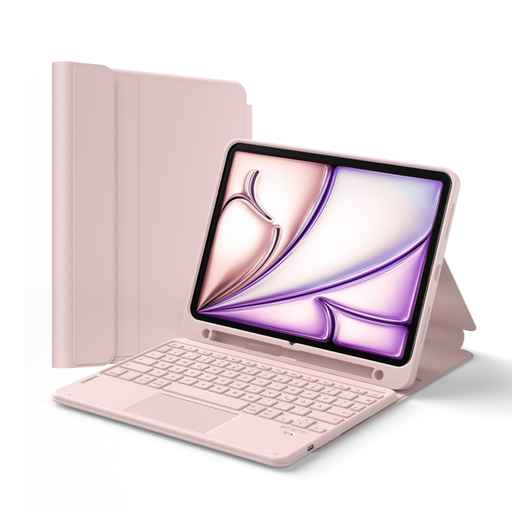
Inateck iPad keyboard case N0001, pink, QWERTZ
A keyboard case with a touchpad for using a compatible iPad model and adding cursor control.
Detachable QWERTZ keyboard; touchpad; three-position stand; Pencil holder. Listed as compatible with iPad (A16, 2025), iPad 10th generation, iPad Air 11-inch (M4, M3, M2), iPad Air 5 and 4, and iPad Pro 11-inch.
View at Joybuy
 No image available
NAXSIR foldable Bluetooth keyboard with magnetic stand
A foldable Bluetooth keyboard for typing on the go, with a detachable stand to suit your device.
Rechargeable; magnetic stand and storage case; listed as compatible with Windows, iOS, Android and HarmonyOS according to the product information.
View at Joybuy
Frequently asked questions
Can a keyboard open or share project drawings by itself?
No. You’ll need a suitable device, a plan app and the necessary project permissions. Autodesk describes mobile PDF annotations in its Forma app; unpublished annotations aren’t initially visible to all project members.
What should I set up before an appointment without reliable internet?
If you use Autodesk Forma, download the project and relevant plans to your iOS or Android device beforehand, then check the sync status. Autodesk describes working offline after downloading; this doesn’t automatically apply to other plan apps.
How do I connect a multi-device keyboard?
Follow the instructions for your specific model. For the Samsung Smart Keyboard Trio 500, Samsung says to hold down a Bluetooth key—F7, F8 or F9—for three seconds, then pair your mobile device. This key sequence won’t automatically apply to other keyboards.
What should I know about power and faults?
Depending on the model, make sure you have a way to charge it or the right batteries. Germany’s Verbraucherzentrale distinguishes between the statutory consumer guarantee and a voluntary warranty; if there’s a fault, contact the seller first. For business purchases, check separately which rules apply to that specific purchase.
What are the rules for wireless products and disposing of old keyboards in Germany?
For wireless products covered by the rules on the German market, the Bundesnetzagentur lists CE marking and documentation of conformity among the checks to make. The CE mark is a declaration by the manufacturer, not an independent quality mark. According to the Umweltbundesamt, old electrical equipment must not go in household rubbish. Removable batteries should be taken separately to a battery collection point.


