People editing study notes
If you edit longer passages of text while out and about, look for a familiar layout and easily accessible keys for special characters and navigation.


First, choose a keyboard that suits your writing device and has the keys you need when editing. If you’ll be working for a while without access to a power socket, also consider whether you can take spare batteries or charge the battery beforehand. A separate Bluetooth keyboard can be used with several devices, while an iPad keyboard case combines a keyboard and screen stand but is limited to specific iPad models.
If you edit longer passages of text while out and about, look for a familiar layout and easily accessible keys for special characters and navigation.
If you’ll be writing for a long time away from a charging point, compare replaceable batteries, a pre-charged battery and a keyboard case designed for your iPad.
If you edit notes on several devices, check that the connection, operating system and key layout are suitable for your devices.
Compare keyboards based on what matters most to you: familiar keys for editing, power without a socket, device compatibility or a compact size for carrying around.
| What matters when buying | What to look for | Who will find this most important? |
|---|---|---|
| Key layout and editing | Check the layout of the specific version, along with its special characters and the navigation keys you need. | When editing longer study notes, I want to reach characters and navigation keys without having to adjust to a new layout. That’s why around 28% of consumers put key layout and text editing first. |
| Writing without mains power | Check the power supply for the exact version. If it has a rechargeable battery, make sure you can charge it before setting off. | Without a power socket, I want to know whether spare batteries will be enough or if I need to charge the battery beforehand. That’s why around 28% of consumers prioritise power for the time they’ll be writing. |
| Connecting to your devices | Check the operating system and connection type. If you’re choosing an iPad case, make sure it fits your exact iPad model. | When switching between a tablet and a laptop, I need a connection and key layout that work with both devices. Around 22% of consumers put device compatibility first. |
| Portability and space | Check how the keyboard and writing device fit in the space you plan to use, and whether a case or stand is included. | When space is limited, I want to position my keyboard and writing device comfortably and protect the keys in my bag. That’s why around 22% of consumers prioritise portability and space at their writing spot. |
The CHERRY KW 7100 MINI BT is available in versions with US and US International QWERTY layouts. The model name alone won’t tell you whether the key layout is right for writing in German.
Before buying, check the physical layout of the specific version rather than relying on the model name alone.
A connection lets you enter text, but it doesn’t guarantee that shortcuts and special functions will work in the same way in every app and operating system. CHERRY notes some limitations for Android and Chrome OS with the KW 7100 MINI BT.
Check your device and operating system, and make sure the specific keyboard version supports the editing shortcuts you need.
Replaceable batteries and a rechargeable battery need different preparation if you’ll be writing away from a power socket. The CHERRY KW 9200 MINI charges via cable.
Before setting off, check the charge level or take suitable spare batteries. If you have a rechargeable model, make sure you have the right charging cable and access to a power source.
The KW 7100 MINI BT and KW 9200 MINI offer different connectivity and power options in compact keyboards.
The Pebble Keys 2 K380s is a separate compact keyboard for switching between devices, while the Keys-To-Go 2 Universal is designed for portability.
Magic Keyboard models and the Magic Keyboard Folio are designed for specific compatible iPads, combining a keyboard with a screen stand.
Here you’ll find mobile keyboards, some of them foldable, for tablets, smartphones or computers, as well as a keyboard case for specific iPad models. For each version, check the stated layout and compatibility with your writing device.
 No image available
The explicitly stated QWERTZ layout may be useful for notes in German. Also check that it’s compatible with your device.
 No image available
The QWERTZ layout and number pad are useful if you edit notes in German and often enter numbers.
 No image available
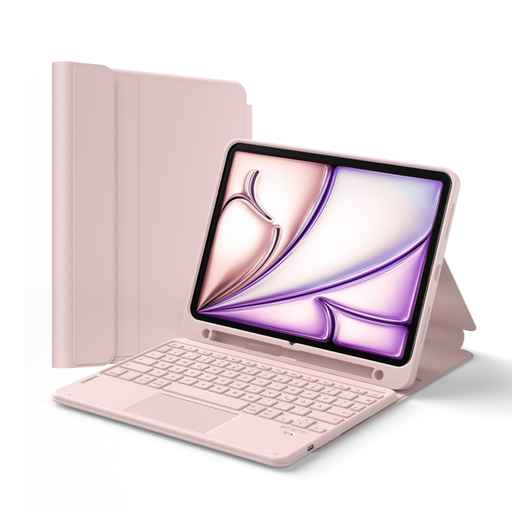
This case may suit you if you want to edit notes on one of the specifically listed iPad models. Check your exact model before buying.
 No image available
This foldable design is described as suitable for use on the go. Before choosing it, check that the stated connection works with your writing device.
 No image available
The stated QWERTZ layout is useful for notes in German. Check that it’s supported by your specific writing device.
First, check the layout and compatibility with your writing device, then make sure the power supply will last for your planned writing time. If it takes batteries, make sure you can get suitable spares; if it has a rechargeable battery, you’ll need to be able to charge it beforehand.
Put the keyboard into pairing mode and select it in your iPad’s Bluetooth settings. First, check that the specific keyboard supports your iPad and its operating system.
According to Apple, the Magic Keyboard for compatible iPad Pro and iPad Air models doesn’t need to be paired, switched on or charged separately. This doesn’t apply to every other keyboard called Magic Keyboard.
No, compatibility depends on the specific iPad model. Check your iPad’s model name against the list for the case before deciding.
In Germany, the seller is generally responsible for ensuring the goods are free from defects at the time of purchase or delivery; the Verbraucherzentrale gives a period of two years. The statutory warranty is separate from a voluntary guarantee.