What should you consider when buying?
Choose based on what’s most likely to limit you on the go: space, navigating your list, connecting to your device, typing noise or power.
| What matters |
What to check |
Who it matters to |
| Packed size and space at your seat |
Check the dimensions when folded and unfolded, and make sure there’s room for both your screen and keyboard. |
If I have limited space in my bag and at my seat, I still want to be able to set up my keyboard and screen comfortably. Around 26% of consumers would put packed size first. |
| Navigating your list |
Try editing several rows and fields in your own inventory app; if you need a touchpad, check the specific model. |
If I’m correcting lots of entries, the right keyboard layout and, if needed, a touchpad matter more to me than the smallest possible packed size. Around 21% of consumers would prioritise editing their list. |
| Device compatibility |
Check the operating system, exact device model and connection you need, then try typing in your inventory app. |
If I open the same list on several devices, I want to know in advance whether the keyboard works with them and my app. Around 26% of consumers would put device compatibility first. |
| Being considerate when typing |
Listen to the typing noise yourself if possible; don’t treat descriptions such as ‘quiet’ as the result of a comparative test. |
If I’m typing in a shared or quiet area of the train, I want to disturb others as little as possible. Around 16% of consumers would prioritise being considerate when typing. |
| Battery and charging |
Check the battery type or charging port, charge level and any accessories needed for the specific model. |
If I want to avoid interruptions caused by flat batteries or having to charge, power is important to me. Around 11% of consumers would put this first. |
Mobile keyboards at Joybuy
This selection of Joybuy products includes separate Bluetooth and foldable keyboards, as well as a keyboard case for specific iPad models – options to consider for checking and updating your inventory list on the go.
 Image unavailable
Inateck KB01003G Bluetooth keyboard, QWERTZ
A separate keyboard for people who edit their list on several devices and prefer a German layout.
The product description lists three Bluetooth connections and compatibility with iPad Pro/Air/Mini, Windows, Android and iOS. Check the connection and try typing with your specific device and app.
View at Joybuy
 Image unavailable
Inateck N0153BK foldable mini keyboard with touchpad, QWERTZ
A foldable option for people who want to navigate their list without a separate mouse.
The product description lists a touchpad, three Bluetooth channels and a QWERTZ layout, as well as compatibility with iPadOS, Android and Windows. Check how the features work with your inventory app.
View at Joybuy
 Image unavailable
Inateck N0158BK foldable keyboard with numeric keypad, QWERTZ
For people who want a numeric keypad for entering figures and a combined set-up for their screen and keyboard.
The product description lists Bluetooth 5.3, QWERTZ, a numeric keypad and a set with a mouse, adjustable stand and carry case. Check that the complete set-up fits on the surface at your seat.
View at Joybuy
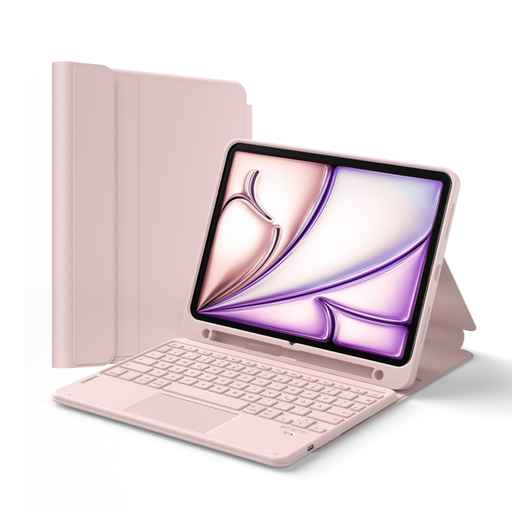 Image unavailable
Inateck N0001 Pink keyboard case with touchpad, QWERTZ
A case option for people who want to set up their keyboard and screen together on a specifically compatible iPad.
The product description lists a detachable keyboard, touchpad and stand, as well as compatibility with iPad 11 (A16 2025), iPad 10th Gen., iPad Air 11-inch M4/M3/M2 (2026/2025/2024), Air 5/4 and Pro 11. Check your exact model before buying.
View at Joybuy
 Image unavailable
NAXSIR foldable Bluetooth keyboard, rechargeable, Grey
A foldable keyboard for people who want to use a magnetic stand for their smartphone or tablet when travelling.
The product description lists an aluminium case, a rechargeable battery and a magnetic stand. Check that your device works with the set-up you have in mind.
View at Joybuy
Questions about using a mobile keyboard on the train
How do I pair a separate Bluetooth keyboard before my train journey?
Put the keyboard into pairing mode following its instructions. Apple Support explains how to connect an iPad through ‘Settings’ and ‘Bluetooth’; on Android, select ‘Pair new device’ in the settings. Then try typing directly in your inventory app.
Do I need to pair the Magic Keyboard Folio via Bluetooth or charge it with a separate cable?
For a compatible iPad Folio, Apple doesn’t list any separate pairing or charging for the keyboard. This is different from standalone Bluetooth models. Before buying, check that your iPad model is supported and that iPadOS 18.3 or later is installed.
Can I rely on train Wi-Fi when checking my list?
Not to the same extent on every connection or journey. Deutsche Bahn says Wi-Fi is available across its entire ICE fleet, but only on parts of its Intercity fleet and selected regional trains. Speeds may depend on factors including the route and other passengers. If your inventory app offers offline access, check it before you set off.
What should I know about faults, and how do I dispose of a keyboard or batteries in Germany?
If a product is faulty, the statutory warranty is the seller’s responsibility and is separate from any voluntary guarantee, as explained by the Verbraucherzentrale. Electrical waste must be collected separately. The Federal Ministry for the Environment says used device batteries can be returned free of charge to retailers or local authority collection points. Additional size and retailer conditions apply when returning electrical waste without buying a replacement.
What should I look for in a Bluetooth keyboard’s product compliance?
When monitoring the market for Bluetooth products, the Bundesnetzagentur considers factors including CE marking, product identification, manufacturer details, German-language instructions and conformity documents. CE marking is not an independent assessment of typing feel or ease of use.


