For debugging a mobile layout at a shared desk, a fixed QHD monitor with the right connections for your laptop is an obvious choice if you want to keep your code, DevTools and preview visible at the same time. If desk space is limited, a more compact model may be a better fit. If you need to clear the desk after every session, consider a portable second monitor, although it gives you less screen space. Check that your laptop supports USB-C video and that the monitor provides enough power for it. A desktop simulation is no substitute for testing on actual mobile hardware.
Who these options are for
Laptop users who move between shared desks
If you often reconnect your laptop, a compatible video connection and enough power for your computer are important. Dell lists USB-C with 90 W for the P2725DE. Whether it works with your laptop depends on its connections and power requirements.
Developers working with several debugging windows
If you want to keep your code, DevTools and mobile preview visible at the same time, you’ll need to weigh screen space against the space available on your desk. Chrome for Developers describes Device Mode as a simulation of mobile use, not as running on a mobile device.
People who need to clear their workspace
If you need to put your screen away after a session, a portable model could work as a second display. ASUS lists the ZenScreen MB16ACV at around 0.9 kg; according to the manufacturer, this model has no height adjustment.
What to look for at a shared desk
Fixed 27-inch QHD monitor
A good fit if: You want to view several debugging windows side by side and regularly connect your laptop.
The trade-off: A larger screen takes up more desk space. Dell lists 90 W over USB-C for the P2725DE; whether that’s enough also depends on your laptop.
Compact 23.8-inch FHD monitor
A good fit if: Desk space matters more than having as much room as possible for windows side by side.
The trade-off: Lenovo lists 15 W over USB-C for the ThinkVision T24-40. This shouldn’t be confused with the charging power of a laptop dock.
Portable second monitor
A good fit if: You want to clear your desk after a session and take an extra preview screen with you.
The trade-off: ASUS lists the ZenScreen MB16ACV as 15.6 inches with a resolution of 1920 × 1080 pixels. DisplayPort Alt Mode is required to transmit a video signal over USB-C. The model has no height adjustment.
27-inch 4K monitor with docking features
A good fit if: Alongside layout debugging, you need high native resolution and features for switching between computers.
The trade-off: EIZO lists USB-C docking, KVM and up to 94 W from the USB-C upstream port for the FlexScan EV2740X. These features aren’t essential for straightforward viewport testing; also check that the scaling suits you.
| What you’re looking for |
What to check before buying |
Who it’s relevant to |
| A compatible laptop connection |
Check that your laptop supports video over USB-C; compare the charging power and connections available for peripherals. |
I often switch laptops and want to connect my screen, peripherals and—if compatible—power supply easily. Around 36% of consumers prioritise finding a suitable connection. |
| Room for several windows |
Compare screen size and native resolution; try arranging your editor, DevTools and preview on your own desk. |
If I want to keep an eye on code, DevTools and preview at the same time, having the right amount of screen space matters. Around 29% of consumers say this is their main priority. |
| A compact set-up |
Measure the available desk width and depth; check the stand and adjustment options on the specific model. |
When shared desk space is limited, I need a screen that fits the space available. Around 21% of consumers prioritise a compact, adjustable set-up. |
| Putting it away after a session |
Check the dimensions, weight and stand options; make sure the laptop connection you plan to use supports video. |
If the space needs to be clear after every session, I want to be able to put the second display away easily. Around 14% of consumers say storage is their main priority. |
Common buying mistakes
-
Assuming “has USB-C” means “one cable does everything”
A USB-C port alone doesn’t tell you whether it supports video or provides enough power for your laptop. Lenovo lists 15 W for the ThinkVision T24-40, while Dell lists 90 W for the P2725DE.
Check the specific monitor’s details against your laptop’s video support and power requirements. You may still need to use your laptop’s separate power adapter.
-
Taking a mobile simulation for a complete device test
Chrome for Developers explains that Device Mode simulates mobile use, but doesn’t run the code on a mobile device.
Use the simulation to check layouts and breakpoints. If you need to see how something behaves on actual mobile hardware, test it on the device too.
-
Choosing a portable monitor as your main screen just because it takes up less space
According to ASUS, the ZenScreen MB16ACV is 15.6 inches and has no height adjustment. This can make positioning an important consideration for longer sessions.
Decide whether you need a portable second display or a main screen for everyday use. You may need extra accessories to position it comfortably.
Brands to consider
Dell
The P2725DE is an example of a fixed 27-inch QHD monitor with a USB-C hub.
- Dell lists a resolution of 2560 × 1440 pixels and 90 W power delivery over USB-C for the P2725DE.
- Whether a single-cable connection will work depends on your laptop’s connections and power requirements.
Lenovo
The ThinkVision T24-40 is a more compact 23.8-inch FHD option.
- Lenovo lists a resolution of 1920 × 1080 pixels and a USB hub for this model.
- The listed 15 W over USB-C shouldn’t be confused with the charging power of a higher-powered laptop dock.
ASUS
The ZenScreen MB16ACV is a portable second display that you can put away after a session.
- ASUS lists a 15.6-inch screen, Full HD resolution and a weight of around 0.9 kg for this model.
- According to ASUS, the MB16ACV has no height adjustment. Its USB-C video signal requires DisplayPort Alt Mode.
EIZO
The FlexScan EV2740X is a 27-inch 4K option for a permanent workstation that needs docking features and the ability to switch between computers.
- EIZO lists USB-C docking, KVM and up to 94 W from the USB-C upstream port for this model.
- Extra docking features aren’t essential for straightforward mobile viewport testing; the right display size also depends on scaling.
Philips
The 27E1N5600AE/00 is an example of a 27-inch QHD monitor with a USB-C connection.
- Philips describes video, data transfer and charging over a USB-C connection for a compatible device.
- The manufacturer’s specifications don’t prove it will suit every laptop or describe the features of other Philips models.
Related products at Joybuy
This selection includes fixed 27-inch monitors for working with several windows, a 24-inch option for limited desk space and a portable second monitor. Check the connections and available space against your specific set-up.
 No image available
ASUS ROG Strix WOLED XG27AQWMG, 27-inch WQHD
The 27-inch WQHD screen could give you room to view code, DevTools and a preview side by side.
The product name lists a resolution of 2560 × 1440 pixels and a USB hub. Check which connections your laptop needs for the set-up you want.
Joybuy
 No image available
Philips 276B9, 27-inch QHD IPS
The 27-inch QHD screen could be a good fit if you want to arrange several debugging windows at a fixed workstation.
The product name lists a resolution of 2560 × 1440 pixels, 75 Hz, USB-C with 65 W Power Delivery and a USB hub. Check the listed charging power against your laptop’s requirements.
Joybuy
 No image available
Acer Vero B247YGbmiqprx, 24-inch
The listed size could suit a desk where a larger display would take up too much room.
The product name lists a 24-inch screen. Compare the actual monitor and stand dimensions with the space available.
Joybuy
 No image available
MSI PRO MP275QPDGDE, 27-inch WQHD
The 27-inch WQHD screen could work well for keeping several debugging windows visible at once.
The product name lists USB-C with 98 W Power Delivery, KVM and daisy chaining. Check in advance that your laptop and connected devices support the connection you want.
Joybuy
 No image available
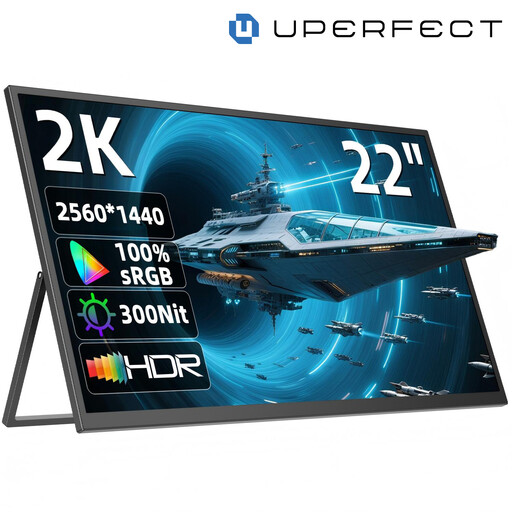
UPERFECT, portable 22-inch QHD monitor
A portable display could be a good option if you want to put your extra preview screen away after a session.
The product name lists a resolution of 2560 × 1440 pixels, an IPS panel, an adjustable stand and USB-C and Mini HDMI inputs. Check which input you can use with your laptop.
Joybuy
Frequently asked questions
Can a large monitor replace testing on a smartphone?
No, not if you need to assess how something behaves on actual mobile hardware. Chrome for Developers describes Device Mode as a simulation that doesn’t run the code on a mobile device. For these checks, test on the device or use remote debugging too.
What should I check when connecting a portable monitor?
Check whether the laptop connection you plan to use can transmit the video signal for that specific monitor. For the ASUS ZenScreen MB16ACV, ASUS lists USB-C with DisplayPort Alt Mode; according to the manufacturer, the model has no height adjustment.
What are my rights when buying a monitor online as a private customer?
For distance purchases from a business seller, European Union consumer information generally provides a 14-day right to cancel from the date of delivery; exceptions and return costs may apply. Faulty goods are covered by a legal guarantee from the seller for at least two years. These details don’t necessarily apply to business purchases or purchases from private individuals.
Does ASR A6 apply to every private shared desk?
ASR A6 covers screen-based work within its defined scope, including screen-based workstations in workplaces and telework workstations. A desk used purely at home doesn’t automatically fall within this scope; check the relevant requirements for a workstation set up by an employer.
How should I dispose of an old monitor?
In Germany, old monitors should be taken to designated collection and return points for electrical waste, not put in household rubbish. The German Environment Agency lists local collection points and, subject to certain conditions, retailers and online retailers as return options.


