What should you look for when buying?
Prioritise the factors that have the biggest impact on accessing your work inbox: reception at your pitch, power supply, security and suitable tariff terms.
| Buying priority |
What to check before you buy |
Who should pay particular attention? |
| Mobile reception |
Coverage from your chosen provider at the pitch; router compatibility with your SIM. |
If reception at my pitch is uncertain, I want to know whether my network actually works there, rather than relying solely on general coverage information. Around 36% of consumers put mobile reception first. |
| Power supply |
Battery and charging port; available power source at the pitch. |
If there’s no mains socket, I need a battery-powered hotspot for my working hours and a way to recharge it. Around 29% of consumers prioritise power supply. |
| Work account security |
Your company IT requirements for the device and connection; router access protection and updates. |
If I’m accessing confidential work data, the connection must comply with my employer’s rules; a VPN feature on the router alone doesn’t confirm that it does. Around 21% of consumers put account security first. |
| SIM and tariff |
SIM format and activation; data allowance and terms for using the router and travelling. |
If I want to access my inbox while travelling, I need a suitable data tariff and must understand its terms of use. Around 14% of consumers prioritise data allowances and tariff terms. |
Joybuy products for mobile internet access
This selection includes mobile LTE hotspots with batteries, as well as mobile network routers powered via USB-C or an external power supply. Before you decide, check the power source at your pitch, network compatibility and your company IT requirements.
 No image available
AVM FRITZ!Box 6825 4G LTE
For LTE access with a suitable SIM, if a compatible USB-C power source is available at your pitch.
Cat 6 with 300 Mbps; Wi-Fi 6 AX 600 Mbps; 1× Gigabit LAN; Nano-SIM. Requires a USB-C power source; no built-in battery life is specified.
The FRITZ!Box 6825 LTE is a different model from the FRITZ!Box 6850 LTE; the external antenna option described for the 6850 model is not confirmed for this one.
View at Joybuy
 No image available
MERCUSYS MT110 4G LTE Mobile Wi-Fi
For short mobile work sessions without a mains socket, provided you have a compatible Nano-SIM with an active data tariff.
Portable LTE hotspot with a 2200-mAh battery and Nano-SIM; product information states up to 10 hours of use and up to 10 connected devices.
View at Joybuy
 No image available
TP-Link M7000 Mobile WiFi Router
For mobile LTE access without a permanent mains socket, if you have a suitable Nano-SIM and a way to recharge it.
4G/LTE; 2000-mAh battery; Nano-SIM; product information states up to 8 hours of operation and up to 10 connected devices. Battery life is a manufacturer’s figure.
View at Joybuy
 No image available
ASUS 4G-AX56
For LTE access with a Nano-SIM, if a suitable socket for the power adapter is available at your pitch.
Wi-Fi 6; dual-band; Nano-SIM; Gigabit Ethernet ports. Product information states that the router requires a power adapter plugged into a suitable socket.
View at Joybuy
 No image available
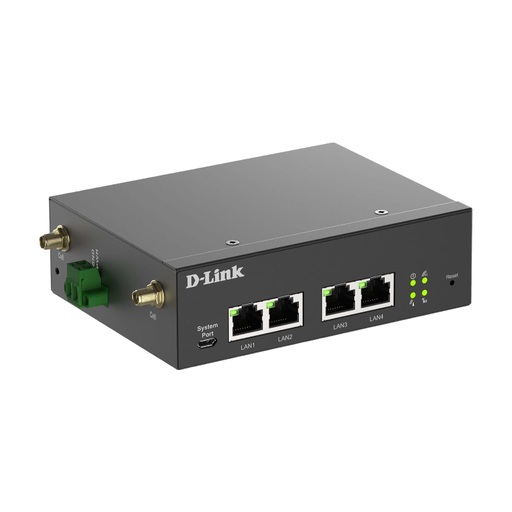
D-Link DWM-314-G Mobile Router
For a longer-term pitch setup with an external power supply and a need for additional networking features.
Product information lists 5G NR and 4G LTE, Dual-SIM, and OpenVPN and WireGuard client modes. The router is designed to use an external DC power supply. VPN features are not a substitute for approval from your company IT team.
View at Joybuy
Frequently asked questions
Does a mobile coverage map guarantee reception at my pitch?
No. Germany’s Federal Network Agency map shows predicted outdoor coverage; reception and the connection you can use may differ at the actual location. If possible, check the network you plan to use at the site itself.
How do I set up the router to access my work inbox?
Use a suitable SIM, set up the router according to its model instructions and secure the administrator account. Your company IT requirements also apply to work accounts; a VPN feature on the router alone doesn’t confirm that these requirements have been met.
Will my German data tariff work in the same way at a campsite elsewhere in the EU?
Not necessarily. Germany’s Federal Network Agency explains the roaming rules for the EU, as well as Iceland, Liechtenstein and Norway, and notes that exceptions, fair-use rules and tariff-dependent restrictions may apply. Before travelling, check your available data allowance and the terms of your contract.
What should I check regularly on my router?
Check for available security updates and secure the administrator account. Germany’s Federal Office for Information Security recommends these steps; always refer to the manufacturer’s documentation for your specific model and hardware version.
Do I need to verify my identity before using a prepaid data SIM in Germany?
For prepaid mobile services, Section 172 of the German Telecommunications Act (TKG) has required verification of subscriber details against certain identity documents since 30 July 2016. Your provider can tell you which verification methods are available.


