Mobile routers at Joybuy
This selection includes mobile LTE routers with SIM support, as well as a 5G/LTE gateway that has specific power and mounting requirements. Before travelling, check in particular that the SIM, tariff and power supply suit the way you plan to use it.
 No image available
4G router with SIM card slot, 2.4 GHz Wi-Fi
Provided you have a suitable SIM and mobile reception, this model could be an option for mobile internet access.
- 4G router with SIM card slot
- 300 Mbit/s and 2.4 GHz Wi-Fi, according to the product name
View at Joybuy
 No image available
AVM FRITZ!Box 6825 4G LTE
Nano-SIM and USB-C power are useful features if you’re planning mobile LTE access; check that you can power the device during your journey.
- LTE Cat 6, up to 300 Mbit/s
- Wi-Fi 6 on the 2.4 GHz band, up to 600 Mbit/s according to the product name
- 1 × Gigabit LAN; USB-C power supply
- Nano-SIM
View at Joybuy
 No image available
MERCUSYS MT110 4G LTE Mobile Wi-Fi
This portable LTE hotspot could be an option if you want several devices to share a connection while travelling. You’ll need a suitable Nano-SIM, tariff and mobile reception.
- Up to 150 Mbit/s according to the product name
- Nano-SIM slot
- 2200-mAh battery
View at Joybuy
 No image available
TP-Link M7000 mobile 4G/LTE Wi-Fi router
For mobile LTE access on your journey, you’ll need a suitable Nano-SIM, tariff and mobile reception along the route.
- Up to 150 Mbit/s download and 50 Mbit/s upload, according to the product name
- 2000-mAh battery
- The stated battery life is a maximum; actual battery life depends on how you use the device.
View at Joybuy
 No image available
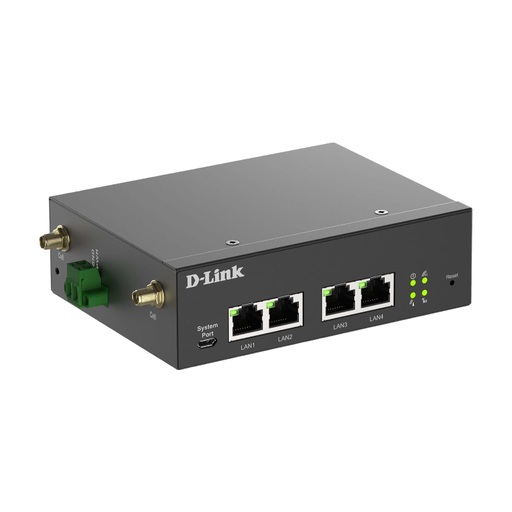
D-Link DWM-314-G mobile router/gateway
This model is only suitable for mobile use on a coach if you can arrange the required power supply and mounting.
- Required power supply: 9–36 V DC
- Designed for industrial mounting
- Mobile access requires a suitable SIM, tariff and reception.
View at Joybuy
Frequently asked questions
Can a mobile router load my travel documents when there’s no signal?
No. A router with a SIM still needs mobile reception. Germany’s Federal Network Agency coverage map shows coverage outdoors; it doesn’t guarantee reception in a particular seat on a moving coach. To be on the safe side, keep important documents securely available on your device.
How should I prepare my router and documents before setting off?
Activate and test the right SIM, connect your devices and check the battery level. The BSI recommends keeping your router’s firmware up to date and using secure login details. Access your documents through the booking portal you trust, and carry encrypted or password-protected digital copies.
Will my German data tariff stay the same when my coach travels through other countries?
Not necessarily. According to Germany’s Federal Network Agency, roaming at domestic rates applies in the EU, as well as Iceland, Liechtenstein and Norway, provided your contract includes roaming; exceptions may apply. Different contract conditions may apply in other countries. Before setting off, check every country on your route and the terms of your tariff.
Which SIM do I need for a mobile router?
You’ll need an activated SIM that’s compatible with your router and mobile tariff. Also check that your tariff covers the way you plan to use the router and the countries you’ll travel through; without mobile reception, even a suitable SIM won’t give you a connection.
Will having my own router keep my travel documents safe?
No. A router alone won’t protect your device, saved documents or booking account. The BSI recommends using secure login details, keeping your firmware up to date and accessing documents through a provider you trust. Also save important documents securely so you can access them without a connection.


