Who might benefit from a separate router?

Travellers with large uploads

If you regularly upload photos or videos to your travel diary while on the move, consider data allowance, mobile upload speeds and coverage along your route together. The Federal Network Agency notes that actual mobile coverage can vary depending on your location, contract, device and network congestion.

Travellers with several devices

If your phone, laptop or fellow travellers’ devices will share the same connection, check how many devices the router can support at once and how it is powered. Figures such as the number of devices and battery life quoted apply to specific models and come from the manufacturers.

Occasional and cross-border travellers

If you only upload occasionally or travel across national borders, first weigh up the benefits of an additional router against your phone’s hotspot, and check the terms of your data plan. The Federal Network Agency can provide information about roaming in the countries you visit.

What should you look for when buying?

Phone hotspot

Suitable if: You only upload occasionally from another device and your data plan and phone battery can handle it.

Things to consider: You won’t need an additional device, but you will use your phone’s battery. Signal and network congestion can also affect uploads.

Battery-powered LTE router

Suitable if: Several devices need to share the same mobile connection regularly and LTE is available along your route with your tariff.

Things to consider: You get a separate battery and shared Wi-Fi, but you’ll also have another device to carry and may need an additional data plan.

Battery-powered 5G router

Suitable if: You transfer larger files across several devices and your route and tariff support 5G.

Things to consider: 5G capability is no substitute for network coverage or a suitable data allowance, and it does not guarantee faster uploads on a coach.

Purchase priority What to check before buying Who it matters most to
Signal along the route Check the network operator’s coverage along your route, as well as the device’s supported mobile technology and SIM compatibility. If I need a usable connection while travelling, I check the route and tariff together. Around 25% of consumers put signal coverage first.
Uploads and data allowance Check the exact model’s mobile upload speed separately from its Wi-Fi or download speed, and review your data allowance and plan terms. If you regularly upload larger diary entries, you’ll want to know whether the upload speed and data allowance are up to the job. Around 25% of consumers put this first.
Power supply Compare the stated battery life with the journey time, and check the charging options and connector on the exact model. On a longer journey, I want to know that the router will stay powered while I upload. Around 20% of consumers focus particularly on battery life.
Connecting several devices Compare the number of devices you actually need with the manufacturer’s figure; all devices share the same mobile connection. If my laptop and phone, or fellow travellers’ devices, need to be online at the same time, the number of supported devices matters. Around 15% of consumers prioritise shared Wi-Fi.
Tariff and cross-border travel Compare your existing phone hotspot with a separate SIM router, and check your contract terms for every destination country before travelling abroad. If you only upload occasionally or travel across borders, you’ll want to check whether your existing plan is enough and what terms apply to your SIM. Around 15% of consumers put this check first.

Common misconceptions

  • Confusing Wi-Fi or download speeds with upload speeds on a coach

    Wi-Fi, download and mobile upload speeds are different measures. The connection you actually get also depends on your route and local conditions.

    Check the upload speed for the exact model, your tariff and network coverage separately. Manufacturers’ maximum figures are not a guarantee of performance while travelling.

  • Focusing on the device and overlooking the SIM connection

    A SIM router needs a compatible SIM and an active data plan. For cross-border journeys, the terms of your contract and the countries you visit will apply.

    Before buying, check whether your phone’s hotspot is already enough. If you’re travelling abroad, compare your plan’s terms with those for every destination country.

  • Assuming a model name tells you exactly what the listing includes

    A model name alone does not confirm the specifications or device details included with a particular listing.

    Check the full model name, SIM format, what’s in the box and the device information relevant to your intended market on the product listing.

Key brands at a glance

TP-Link

The M7350 is a specific LTE option to consider for straightforward shared uploads.

  • TP-Link states that the M7350 supports up to ten devices, mobile upload speeds of up to 50 Mbit/s and up to eight hours of battery life.
  • These figures apply to the model listed and are not measurements taken on a coach journey.

D-Link

The DWR-933, Revision B1, is an LTE hotspot whose battery life, SIM format and device status are worth comparing.

  • For this revision, D-Link states support for up to ten Wi-Fi devices, mobile upload speeds of up to 50 Mbit/s and up to 14 hours of battery life. It takes a USIM or Micro-SIM.
  • Battery life is a manufacturer’s estimate. Wi-Fi speed is not the same as mobile upload speed.

NETGEAR

The Nighthawk M3 MH3150 is a 5G hotspot for several devices and more frequent, data-intensive use.

  • NETGEAR states that this model supports up to 32 devices and offers up to 13 hours of battery life.
  • 5G and the manufacturer’s figures guarantee neither a signal nor a particular upload speed on a coach; your route and tariff need to support them.

GL.iNet

The Mudi V2 GL-E750V2 is an LTE travel router with configurable VPN features.

  • GL.iNet lists built-in VPN features and up to eight hours of use per charge.
  • The usefulness of these extra features depends on how you set them up; they do not improve signal or upload speeds on a coach.

Joybuy products

This selection includes LTE routers and 5G gateways. Pay particular attention to whether the power supply, intended use and set-up suit a coach journey.

AVM FRITZ!Box 6825 4G LTE wireless router

AVM FRITZ!Box 6825 4G LTE Wireless Router

Described as a compact LTE router powered via USB-C; check whether a suitable power source will be available while you’re travelling.

Specifications include LTE Cat 6, Nano-SIM and upload speeds of up to 50 Mbps. Wi-Fi 6, one Gigabit LAN port and USB-C power are also listed.

Joybuy

MERCUSYS MT110 4G LTE mobile Wi-Fi

MERCUSYS MT110 4G LTE Mobile Wi-Fi

A portable LTE hotspot with a battery, for sharing one connection across several devices while you’re on the move.

Specifications include Nano-SIM, support for up to ten connected devices, LTE upload speeds of up to 50 Mbps and up to ten hours of stated battery life. It charges via Micro-USB.

Joybuy
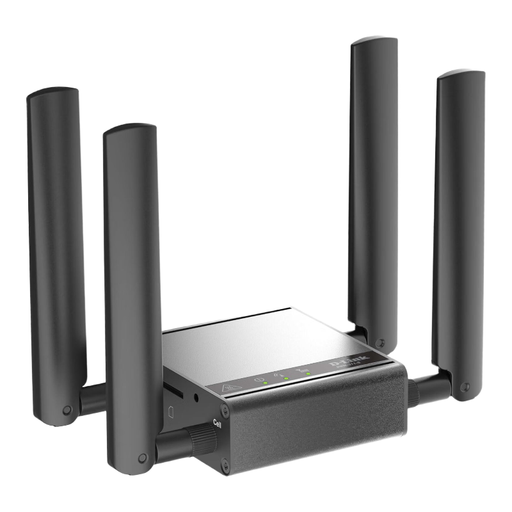
D-Link DWM-311-G mobile router, gateway and modem

D-Link DWM-311-G Mobile Router/Gateway/Modem

The description specifies this device for indoor M2M applications; it is not presented as a straightforward wireless option for use on a coach journey.

Specifications include 5G NR, external mobile antennas and a 2.5GbE port. The description lists Ethernet as the connection type.

Joybuy

TP-Link M7000 mobile Wi-Fi router

TP-Link M7000 Mobile WiFi Router

A battery-powered LTE router for travelling, if you need to connect several devices. Check that your tariff and SIM are suitable for how you plan to use it.

Specifications include Nano-SIM, LTE upload speeds of up to 50 Mbps, support for up to ten devices and up to eight hours of stated battery life. It charges via Micro-USB.

Joybuy
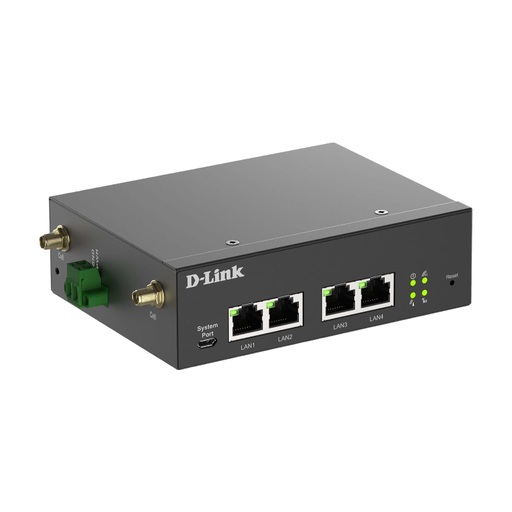
D-Link DWM-314-G mobile router, gateway and modem

D-Link DWM-314-G Mobile Router/Gateway/Modem

The description lists an industrial gateway with DC power and Ethernet set-up, so check that the power supply and installation method suit your needs.

Features include dual SIM, 5G NR with LTE fallback, LTE Cat 19 and four Gigabit Ethernet ports. The input is listed as 9–36 V DC; the description specifies a minimum distance of 20 cm between the antennas and people.

Joybuy

Frequently asked questions

Will a 5G router reliably make uploads faster on a coach?

No. 5G alone does not guarantee faster uploads. The Federal Network Agency describes its coverage map as a prediction for outdoor areas; your location, the vehicle, your device and network congestion can all affect the connection. Check coverage and your tariff for your route.

What do I need to set up a SIM hotspot?

You’ll need a compatible SIM and an active data plan. Check which SIM format the exact router takes and follow your network operator’s set-up instructions. With the NETGEAR Nighthawk M6/M6 Pro, the APN may be set up automatically or manually, depending on your operator.

How do I secure and maintain the router?

The German Federal Office for Information Security recommends changing default passwords, using a strong Wi-Fi password and keeping the firmware up to date. Check what update options are available for the exact model.

Will my German data plan work on a cross-border coach journey?

It depends on the countries you visit and the terms of your contract. According to the Federal Network Agency, if roaming is included, ‘roam like at home’ generally applies within the EU and in Iceland, Liechtenstein and Norway. Exceptions and fair-use rules may apply, so check your contract terms for every country you visit.

What device information should I check before buying?

Check the specific listing for details such as the CE mark, whether the device can be identified, German-language instructions and a declaration of conformity. The Federal Network Agency lists these as part of its market surveillance; a model name alone does not confirm them for the device being offered.