Travel bloggers dealing with weak coverage
If you want to publish from a remote holiday home, first check which mobile network is available at your location. The Federal Network Agency notes that its map shows predicted coverage outdoors.


If the holiday home’s Wi-Fi or a smartphone hotspot permitted by your tariff uploads your files reliably, you don’t need an additional router. For regular uploads across several devices, a dedicated LTE or 5G router could be a good fit. What matters is coverage at the specific location, the upload speed you can actually get, your data allowance and the power supply – not just the advertised maximum speed.
If you want to publish from a remote holiday home, first check which mobile network is available at your location. The Federal Network Agency notes that its map shows predicted coverage outdoors.
For large or frequent uploads, the available upload speed and data allowance matter more than a high download speed. A router’s technical maximum speeds don’t tell you what connection speed you’ll get at the holiday home.
If you want to connect a laptop, tablet and smartphones, you can weigh up the existing Wi-Fi, a smartphone hotspot, a battery-powered router or a mains-powered device. The right option also depends on whether several devices need to be online at the same time.
A good fit if: You upload occasionally from one device and the connection, tariff and power supply meet your needs.
Consider: You won’t need an extra router or a separate router SIM, but a smartphone hotspot uses your phone’s battery and data allowance.
A good fit if: LTE is available at the holiday home and you want to connect several devices independently of your smartphone.
Consider: Battery life and maximum upload speeds vary by model. Neither removes the need to test coverage or check your data allowance.
A good fit if: You often upload larger files and both the network and your tariff support 5G at the holiday home.
Consider: A peak 5G or Wi-Fi speed doesn’t prove you’ll get faster uploads at your specific location.
A good fit if: The device will usually stay in one place with a power supply, and positioning matters more than a pocket-sized design.
Consider: An independent comparison notes that the FRITZ!Box 6860 5G cannot run on its battery or a power bank.
First check coverage and the upload speed you need at your destination, then look at your tariff and power supply. The percentages indicate the relative importance of each buying priority.
| Priority | What to check before buying | Who it matters to |
|---|---|---|
| Mobile coverage at the holiday home | Check the network and supported mobile technology at the specific location; test coverage inside the building if possible. | If you want to publish from a remote holiday home, you’ll need a usable connection first. Around 36% of consumers put coverage first. |
| Upload speed and data allowance | Check your file sizes and upload frequency against your tariff; don’t assume the maximum upload speed is the speed you’ll actually get. | If you upload lots of photos or videos, make sure the speed and data allowance suit your needs. Around 29% of consumers prioritise upload speed and data allowance. |
| Power supply and portability | Consider the battery, charging options and where you plan to set up the router; stated battery life varies by model. | If you want to use the router without a mains socket or move it between locations, check the power options. Around 21% of consumers see portability and power supply as their top priority. |
| Shared and secure access | Check how many devices the specific model can connect at once, change any default passwords and keep the firmware up to date. | If you’re travelling in a group, you’ll want secure access that works for several devices. Around 14% of consumers make shared access their main priority. |
A high download or Wi-Fi speed doesn’t guarantee equally fast mobile uploads at your holiday home. Local coverage and network congestion can affect the connection you actually get.
Check upload speed, network availability and data allowance separately.
The Federal Network Agency’s mobile coverage map shows predicted coverage outdoors. Walls and windows can affect reception inside your holiday home.
If possible, test the spot where you plan to set up the router rather than assuming the map reflects indoor coverage.
The router doesn’t come with a data allowance. Roaming is subject to the terms of your contract, including any applicable exceptions.
Compare the amount you plan to upload with your available data allowance and check the roaming terms before you travel.
For the MERCUSYS MT110 V2, the manufacturer lists 2400 mAh; a Joybuy overview lists an MT110 with 2200 mAh. Without confirmed version details, these figures can’t be treated as referring to the same model. The Nighthawk M7 and M7 Pro are also different products.
Check the full model name and hardware version in the specific listing.
The M7650 and M8550 are two different types of mobile router: an LTE hotspot with a battery and a mobile 5G router.
The Nighthawk M7 Pro MR7450 is a battery-powered 5G hotspot for travellers who want to connect several devices.
The FRITZ!Box 6860 5G is an option for use mainly in a fixed location in or around a holiday home.
The MT110 is a basic mobile LTE hotspot; check the hardware version when comparing listings.
The Spitz AX GL-X3000 is a 5G mobile gateway for a location where the router will be set up for longer periods.
This Joybuy selection includes LTE routers and hotspots, as well as a 5G gateway, to suit different needs for portability, power supply and connectivity.
 No image available
For internet access over 4G LTE and Wi-Fi, provided the network and SIM work at your holiday home.
The product title lists 300 Mbps, 2.4 GHz and a SIM card slot.
 No image available
For an LTE connection using a Nano-SIM; the product details also mention USB-C power via a power bank.
Features listed include up to 50 Mbps upload speed, Wi-Fi 6 and a Gigabit LAN port. The upload speed quoted isn’t a guarantee of coverage at your holiday home.
 No image available
For mobile use with LTE and a built-in battery, provided the network and data tariff are suitable for your destination.
Details list a 2200-mAh battery, support for up to 10 connected devices and up to 50 Mbps upload speed. Check the hardware version before buying.
 No image available
For LTE access over Wi-Fi or a wired connection, provided your tariff and mobile coverage are suitable.
Product details list Wi-Fi 6, Gigabit Ethernet, Nano-SIM and up to 50 Mbps uplink speed.
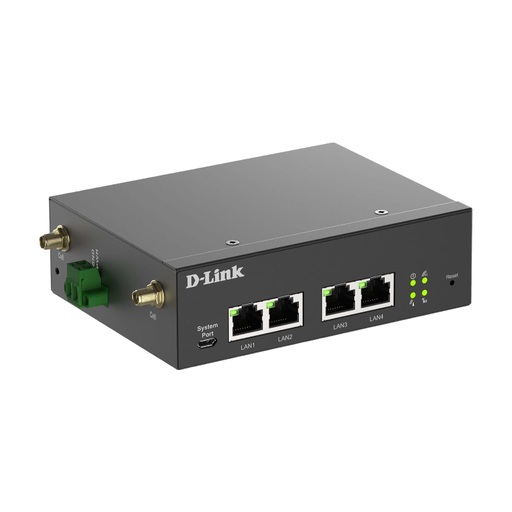 No image available
For a wired setup with a mobile uplink; the product description lists it as an indoor gateway.
Features listed include 5G-NR connectivity, a 2.5GbE port and four external mobile antennas.
No. The Federal Network Agency describes its map as a forecast for outdoor coverage; walls, windows and network congestion can affect the reception you actually get. If possible, test coverage and upload speed at the exact spot where you plan to set up the router.
The Federal Office for Information Security recommends changing the router’s default password, keeping its firmware up to date and using a long Wi-Fi password. The router’s admin password and the Wi-Fi password are separate login details.
Not automatically: the Federal Network Agency says EU roaming is charged at domestic rates when your contract includes roaming, but notes that exceptions apply. Check your available data allowance and fair use rules; different charges may apply outside the covered area.
For its own mobile connection, a router needs a usable SIM or a contract option supported by that specific model. Compare any additional tariff costs with using existing Wi-Fi or a smartphone hotspot permitted by your tariff.
The Federal Network Agency says retailers should, among other things, check that the CE marking is correct, the product is properly identified and a German-language instruction manual is provided for non-commercial users. A model appearing in a comparison or overview doesn’t confirm that a specific listing meets these requirements.