iPhone Safari debugging
You want to investigate display issues directly in Safari on an iPhone or iPad. Apple describes a Web Inspector workflow that uses a connected Mac.


Choose your computer based on the device you actually test on. For Google's remote debugging of an Android device, Windows, macOS and Linux are documented host systems; Apple's Web Inspector for a connected iPhone or iPad requires a Mac. After that, consider desk space, easily accessible ports and the specification of the exact configuration. A larger desktop only makes sense if you need its upgrade options and have room for it.
You want to investigate display issues directly in Safari on an iPhone or iPad. Apple describes a Web Inspector workflow that uses a connected Mac.
You check websites in Chrome on a real Android device. Google documents remote debugging from Windows, Mac or Linux computers. An easily accessible USB port can make it easier to connect your device at a small desk.
You mainly work with an editor and browser at a fixed workstation, and need to fit your computer, monitor, cables and possibly a test phone into a limited space.
A good fit if: You mainly check responsive layouts and Chrome on a real Android device. Google documents Android remote debugging from Windows, macOS and Linux.
Bear in mind: This computer cannot replace Apple's Mac-based Web Inspector workflow for iPhone and iPad.
A good fit if: You need to inspect Safari content directly on a connected iPhone or iPad, and your other tools are compatible with macOS.
Bear in mind: The Mac alone doesn't replace the test device or its set-up. Also check that your cables and existing peripherals are compatible.
A good fit if: You need extra internal components or a more customisable fixed setup.
Bear in mind: A larger case won't resolve an operating system incompatibility and takes up more desk space. Check the upgrade options for the specific model.
| What to consider | What to check before buying | Who should pay particular attention |
|---|---|---|
| iPhone Safari | Check whether you need Apple's Web Inspector for a connected iPhone or iPad, and whether your tools run on macOS. | If I need to inspect Safari directly on a connected iPhone or iPad, the Mac workflow matters more than having the widest choice of mini PCs. Around 33% of consumers put this debugging scenario first. |
| Android debugging | Check the host operating system and whether a USB port is easy to reach for connecting and authorising your Android device. Google documents Windows, macOS and Linux as possible host systems. | If I want to reproduce issues on a real Android device, I need a suitable phone and a working debugging set-up as well as the computer. Around 27% of consumers prioritise Android remote debugging. |
| Desk space and ports | Compare the case dimensions, mounting requirements and port locations. Remember to allow space for the power supply and cables too. MSI lists the Cubi NUC 1M as measuring 135,6 × 132,5 × 50,10 mm, with VESA 100 × 100 mm mounting. | If my desk also needs to accommodate a monitor, cables and a test phone, compact dimensions and accessible ports are important. Around 27% of consumers prioritise space and port access. |
| Configuration and what’s included | Check the exact version, the RAM, SSD and operating system actually installed, and whether a monitor and input devices are included. | If I want to use a computer without adding components or spending time setting it up, I need to check the specification carefully. Around 13% of consumers prioritise a complete configuration that meets their needs. |
Google describes Device Mode in Chrome DevTools as a first approximation. It may not help you reproduce issues that only occur on real hardware.
For these issues, use a real device and check the page on the affected platform.
Configurations within a product range can differ in their installed RAM, SSD and operating system. For the ThinkCentre neo 50q Gen 5 featured here, Lenovo lists the monitor, keyboard and mouse as optional extras, sold separately.
Before choosing, check the full model name and what’s included with the specific version.
A barebone or a configuration without peripherals means extra components and set-up work.
Mac mini: a compact macOS desktop for workflows that require Apple's Mac-based Web Inspector for connected iPhones or iPads.
Cubi NUC 1M: a compact desktop range with documented dimensions, VESA mounting options and a choice of configurations.
A5 Pro 2026 Edition: a pre-configured Windows mini PC range where the exact processor and memory version matters when choosing.
ThinkCentre neo 50q Gen 5: a compact business desktop range for a workstation with a separate monitor.
NucBox M6 Ultra: choose between a fully equipped version and one you configure yourself.
Pro Mini 400 G9: a compact business desktop range with individual models available in different specifications.
The mini PCs below are suited to Windows-based Android debugging and a space-saving workstation. For Apple's Web Inspector on iPhone or iPad, you'll need to consider the Mac workflow described above instead.
 No image available
Windows 11 is listed in the product name; Google documents Windows as a possible host system for Android remote debugging.
The product name lists 8 GB DDR4 and a 256 GB SATA SSD. The description lists two HDMI outputs, one Type-C port, four USB ports and dimensions of 105 × 113 × 45 mm.
 No image available
The description lists Windows 11 Professional, which Google documents as a possible host system for Android remote debugging.
The product name lists Ryzen AI Max+ Pro 395, 128 GB and 2 TB. The description lists USB-C, Thunderbolt 4 and Mini DisplayPort outputs, plus dimensions of 200 × 85,5 × 168 mm.
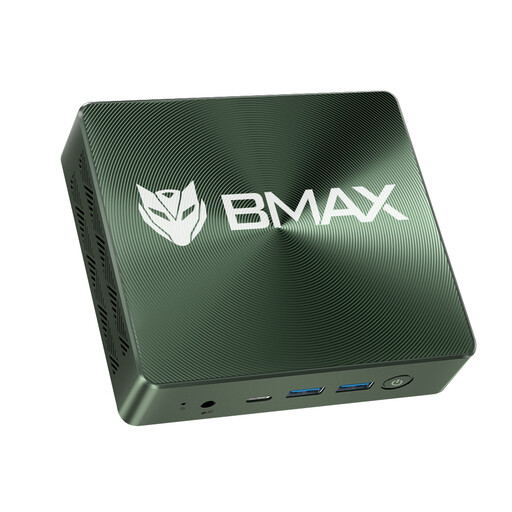 No image available
Windows 11 is listed in the product name; Google documents Windows as a possible host system for Android remote debugging.
The product name lists 16 GB RAM and a 1 TB NVMe SSD. The description lists HDMI, Type-C and several USB ports.
 No image available
Windows 11 Pro is listed in the product name; Google documents Windows as a possible host system for Android remote debugging.
The product name lists 16 GB LPDDR4X and a 256 GB M.2 2280 SATA SSD. The description lists two HDMI outputs, USB and LAN ports, and a VESA mount included in the box.
 No image available
Windows 11 Pro is listed in the product name; Google documents Windows as a possible host system for Android remote debugging.
The product name lists 8 GB LPDDR4 and a 256 GB SSD. The description lists four USB ports.
It can be useful for an initial look at viewport sizes and breakpoints. However, Google describes Device Mode as a first approximation. If an issue only occurs on real hardware, you should inspect the page on the affected device.
Following Google's instructions, enable USB debugging in Android's developer options, connect the device with a suitable USB cable and approve the debugging request on your phone. Also enable device discovery in desktop Chrome.
Not necessarily: Apple also documents a network connection. Web Inspector must be enabled on the device, and the iPhone or iPad must first have been connected to the Mac by cable. You can then set up the network connection.
When you buy as a consumer from a business seller, goods are generally covered by a statutory two-year warranty, and online purchases come with a 14-day right to cancel. There are exceptions, and these rules don't automatically apply to business purchases.