Choose a camera based on whether it can capture the model and brush tip sharply and at a large enough size from your planned tripod position – video resolution alone won’t tell you that. Interchangeable-lens cameras can be tailored with a suitable close-up lens, while a compact camera with a fixed lens can make moving shots easier but limits the framing of very small details. Also check the white balance in your window light, as well as the audio and recording conditions for longer explanations.
Which cameras suit different users?
Close-up filming at the painting desk
You want to show brush tips and small areas of a model clearly, and can tailor the camera position and lens to suit. Nikon explains that the maximum reproduction ratio depends on the lens, while the Canon Academy describes close-ups of small details as a matter of shooting distance.
Colour-focused instructors
You explain colour mixing in window light and want colours to appear consistent across different shots. The Canon Academy describes manual white balance as a way to adapt colour reproduction to different lighting conditions.
Instructors recording long takes
You talk through your work as you go and want to check in advance that the audio setup and recording conditions suit the way you teach. Nikon lists a built-in stereo microphone for the Z 30, as well as the option to use an external microphone.
What matters when filming?
First, check the framing from your planned camera position. Then look at how colours appear in your window light, followed by the audio and recording conditions for the way you teach.
| What you need |
What to look for |
Who is it important for? |
| Showing small details |
Check the maximum reproduction ratio and focusing distance of the specific lens, as well as the framing from your planned tripod position. |
If you want brush tips and small areas of a model to be clearly visible, the right close-up framing matters. Around 33% of consumers put this need first. |
| Colours in window light |
Check whether you can set the white balance manually, then test it in the actual lighting conditions. |
If you want to explain colour mixing and applied paint clearly in window light, pay particular attention to white balance. Around 27% of consumers prioritise this colour-related need. |
| Longer explanations |
Check the audio setup, power supply and the conditions that apply to the stated continuous recording times. |
If you want your explanation to run without interruption, clear audio and suitable recording conditions are important. Around 20% of consumers put this need first. |
| Getting started easily |
Check what’s included in the kit alongside the framing; with a fixed lens, pay attention to the focusing range. |
If you want to keep your setup simple, still make sure the model looks large enough in the frame from your planned position. Around 20% of consumers prioritise an easy start. |
Which misconceptions should you avoid?
-
Assuming 4K guarantees suitable macro shots
High video resolution alone doesn’t tell you how large the model will appear in the frame or whether the camera can focus from your planned working distance.
Test the framing on the model itself with the specific camera and lens combination.
Depending on your setup, you may need an additional suitable lens or a different camera position.
-
Expecting more magnification without compromising depth of field
Nikon explains that depth of field can become very shallow at high magnifications. This can make it difficult to keep the whole relevant area in focus as your hand moves or you make a brushstroke.
When testing, film an actual brushstroke as well as a stationary model.
-
Confusing a camera body with a ready-to-use kit
The EOS R50 V body sold by Canon Germany is listed without a lens, so you’ll need to buy a suitable lens separately to record video.
Check what’s included and allow for a lens that can achieve the close-up framing you want.
Which brands are worth considering?
Canon
The EOS R50 V is an interchangeable-lens camera designed with video in mind. For close-ups, the lens you choose and the framing you want are key.
- Canon lists Dual Pixel CMOS AF, 4K 60p and a vari-angle screen for the EOS R50 V.
- The body-only option doesn’t include a lens. Video resolution and autofocus alone don’t show whether a small area of a model will fill the frame.
Sony
The ZV-E10 II is an APS-C camera with interchangeable E-mount lenses. The kit described by Sony includes a 16–50 mm power zoom lens.
- Sony lists 4K 60p and the option to change lenses.
- Close-up performance depends on the lens you use, so check it with your model and intended shooting distance.
Nikon
The Z 30 is an interchangeable-lens camera for narrated recordings, with the audio setup and recording conditions planned separately.
- Nikon lists 4K UHD at 30p, along with a built-in or external microphone. The stated maximum of up to 125 minutes of continuous footage won’t necessarily apply to every setting.
- Close-ups depend on the lens. For long takes, bear in mind the conditions that apply to the stated recording time.
Panasonic
The LUMIX G100D kit pairs a Micro Four Thirds camera with a 12–32 mm zoom lens for a compact introduction to filming.
- Panasonic lists 4K/30p, USB-C charging and five audio recording modes.
- Check in advance whether the kit lens will show a very small model large enough from your planned position.
DJI
The Osmo Pocket 3 is a compact camera with a fixed lens and gimbal, making it an option if you’ll be moving around during your lesson.
- DJI lists mechanical three-axis stabilisation.
- According to the specifications, the focusing range starts at 0.2 m. Check whether the model looks large enough in the frame from this distance; the gimbal doesn’t indicate whether the camera is suitable for macro shots.
Joybuy products for compact video recording
This selection includes compact Osmo Pocket cameras and designated combo versions for filming at your painting desk. For very small details, check the framing from your intended shooting distance.
 No image available
Osmo Pocket 4P – Vlog Combo – Black
This compact gimbal camera could suit moving shots at your painting desk. For small brushstrokes, check the framing from your planned camera position.
The product description lists 20 mm f/2.0 and 4K/240fps exclusively in slow-motion mode.
It also lists 4K video and three-axis stabilisation.
Joybuy
 No image available
Osmo Pocket 4P – Standard Combo – Black
This compact camera with a gimbal could work well for filming at a table. Before you buy, check whether the fixed framing shows enough of the model.
The product description lists 20 mm f/2.0; according to the description, 4K/240fps is limited to slow-motion mode.
Other listed features include 4K resolution and three-axis stabilisation.
Joybuy
 No image available
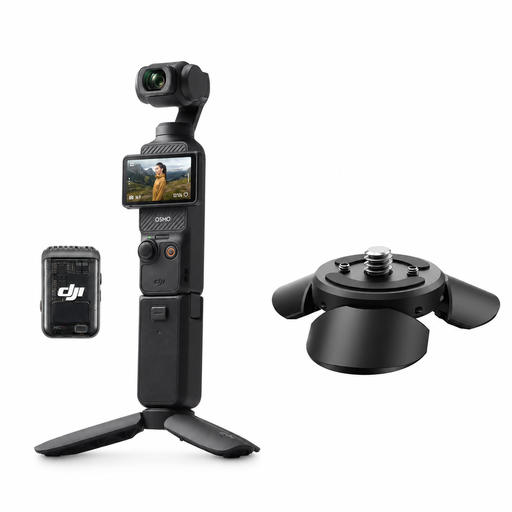
DJI Osmo Pocket 3 Creator Combo with Ulanzi Pocket 3 Mini Tripod
The included mini tripod and wireless microphone transmitter could be useful for a fixed, narrated lesson. Check whether the fixed lens frames your model well enough.
The product description lists 4K/120fps and a gimbal. DJI gives the Osmo Pocket 3 a focusing range starting at 0.2 m.
The combo also includes a wireless microphone transmitter and a mini tripod.
Joybuy
 No image available
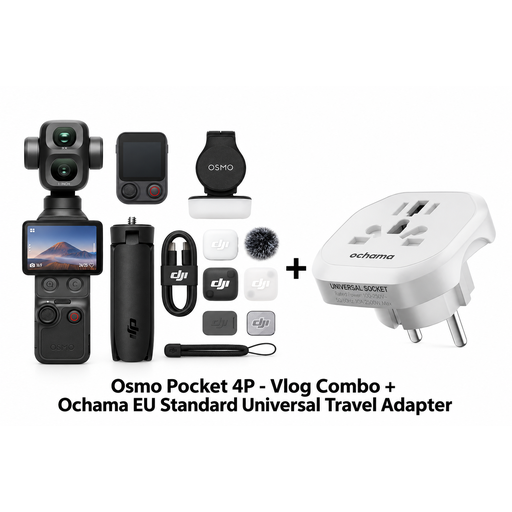
DJI Osmo Pocket 4P Vlog Combo with Ochama EU Standard Universal Travel Adapter
This combo version could suit narrated video recordings. Check whether the camera shows small details clearly enough from your shooting distance.
The product description lists a wireless microphone transmitter, a Do-it-All Handle and a Mini Control Stick.
The product title also lists an EU travel adapter.
Joybuy
 No image available
DJI Osmo Pocket 4 Standard Combo
This pocket gimbal camera is a compact option for video recording. Check whether its framing is wide enough to show small areas of a model from your planned position.
The product title lists 4K/240fps, 2× lossless zoom, 107 GB of built-in storage and a 2-inch rotating screen.
The product title also lists three-axis stabilisation.
Joybuy
Frequently asked questions
Is 4K enough to show every brushstroke?
No, 4K alone won’t tell you that. With the specific lens, check the framing and focus from your planned camera position; the maximum reproduction ratio describes how large the subject appears on the sensor.
How should I set up the camera when the window light changes?
Choose a white balance setting you can control, and check it again in the current lighting conditions. The Canon Academy describes manual white balance as a way to reproduce colours more accurately in different lighting; this doesn’t mean there’s one setting that will work in every room.
Do I need an external microphone for the explanation?
Not necessarily: Nikon lists a built-in stereo microphone for the Z 30, as well as the option to connect an external microphone. Record a voice test from your actual speaking and camera positions before planning to buy extra accessories.


