Choose your laptop only after deciding whether to use model railway management software or a spreadsheet, then test with real entries to make sure images, receipts and file links still work after copying. For a large catalogue, a screen that’s comfortable to work on, the right ports and enough storage for your actual files all matter. Back up your catalogue and source files together, and test that you can restore them.
Who this buying guide is for
Collectors with a large archive of files
If you’re linking photos, spare parts lists or receipts to lots of models, your catalogue and source files should remain easy to find and back up together. The Federal Office for Information Security recommends backing up data regularly.
Collectors who work at a desk
If you enter lots of records and compare images or documents alongside them, you’ll want a workspace where you can easily edit your catalogue fields. GS Modellbahn-Verwaltung explains how to add images and documents, while Lenovo and HP list specific 16-inch configurations.
Collectors who work at their layout
If you take your laptop to your collection, consider screen size, weight and the ports you need together. Lenovo and ASUS list these features for specific laptop models.
What to look for when buying
First decide whether you want to use model railway management software or build your own spreadsheet, then test how files and backups work. GS Modellbahn-Verwaltung explains how to add images and documents, while Microsoft Support and LibreOffice Help explain file links.
| Consideration |
What to check before buying |
Who should pay particular attention |
| Source files and backups |
Create a sample catalogue using your planned software, copy it along with its files to another location, then test the links and restore process. |
If I want to keep photos, receipts and spare parts lists linked to my records, I need to be able to move the entire set of files. Around 36% of consumers pay particular attention to keeping source files accessible and recoverable. |
| Workspace |
Check the screen size and resolution of the exact model, then see whether the catalogue and documents are easy to view while you work. |
If I often compare records with images or documents, I want to be able to work with both comfortably. Around 29% of consumers prioritise a workspace that’s comfortable to use. |
| Taking your laptop to your collection |
Compare the laptop’s dimensions, its weight including the power adapter, and the ports you need at your workspace. |
If I regularly use my laptop at my layout, I want to be able to take it with me without giving up the ports I need. Around 21% of consumers put portability first. |
| Total cost of your setup |
Check the operating system, the software licence you need, storage for your files and the backup options available. |
If I’m planning my laptop, catalogue software and data backups together, I want to allow for any additional purchases. Around 14% of consumers prioritise the total cost of their setup. |
Common buying and planning mistakes
-
Backing up only the catalogue file
If photos and documents are linked or stored as separate files, backing up only the catalogue file won’t preserve your complete setup. The Federal Office for Information Security recommends backing up data regularly.
Back up your catalogue, linked files and folder structure together, and check that you can restore the data.
You may need additional storage for backups. Regular backups and restore tests also take time.
-
Assuming a full Office licence is included
According to Dell, the specific Dell Inspiron 5620 configuration described comes with a 30-day trial version, not a Microsoft Office licence. This doesn’t apply to other devices or configurations.
Check which software and licences are included with the model actually on offer.
If you need an Office application, you may have to buy an additional licence.
-
Confusing software minimum requirements with archive storage needs
The 300 MB of free storage specified by Scout Systems is for the software, not your collection of images and documents.
Check how much space your existing files use, then separately allow for the new files you expect to add.
Relevant brands and specific models
Lenovo
The ThinkPad E16 Gen 3, model number 21ST001YGE, is a specific 16-inch Windows configuration suited to extensive data entry.
- Lenovo lists 32 GB RAM, a 1 TB SSD and a matte 1920 × 1200-pixel screen for this model.
- These specifications don’t show that the model has been tested with model railway software, or that every catalogue archive needs 1 TB of storage.
HP
The HP ProBook 4 G1i 16, model code AD2N7ET#ABD, is a specific 16-inch Windows model.
- HP lists 16 GB RAM, a 512 GB SSD, a 1920 × 1200-pixel screen, plus HDMI, USB-A and USB-C ports.
- These specifications apply to model AD2N7ET#ABD; other configurations may differ.
ASUS
According to ASUS, the ASUS Vivobook 16 X1607CA-MB045W combines a 16-inch screen with Windows 11 Home.
- For this model, ASUS lists 16 GB RAM, a 512 GB SSD, two USB-A ports, two USB-C ports and a weight of 1.88 kg.
- Check the full model code, as other X1607 models may have different specifications.
Acer
The Acer Aspire 5 A515-57, reference NX.K3JEG.007, is a specific 15.6-inch Windows configuration.
- Acer lists 16 GB RAM, a 512 GB SSD, HDMI and USB ports for this model.
- A memory card reader isn’t listed for this configuration, and these features don’t automatically apply to the entire Aspire range.
Dell
The Dell Inspiron 5620, order code bn56118, is a specific 16-inch configuration.
- Dell lists 16 GB RAM, a 512 GB SSD, Windows 11 Pro and an SD card slot for this model.
- According to Dell, this configuration comes with a 30-day trial version, not a Microsoft Office licence. This doesn’t apply to other Dell devices.
Joybuy products for catalogue work
This selection includes Windows laptops with 15- to 16-inch screens for catalogue work and storing files locally.
 No image available
Acer TravelMate TMP216-41-TCO, Ryzen 3 PRO 7335U, 16 GB, 512 GB
If you want to edit entries on a 16-inch screen and store files locally, check whether this specific configuration is right for your software and archive.
16-inch WUXGA; AMD Ryzen 3 PRO 7335U; 16 GB DDR5; 512 GB SSD; Windows 11 Pro Education; 1.80 kg. Ports: USB4, USB 3.2, HDMI 2.1 and RJ-45.
View at Joybuy
 No image available
Lenovo ThinkPad E16 Gen 3 21ST, 32 GB, 1 TB
If you want to work on catalogue fields and documents on a 16-inch screen, check that this specific model has the software compatibility and ports you need.
16-inch WUXGA; AMD Ryzen 7 250 at 3.3 GHz; 32 GB RAM; 1 TB SSD; Windows 11 Pro; 1.71 kg. Ports: USB4-C, USB-C, USB-A and HDMI 2.1.
View at Joybuy
 No image available
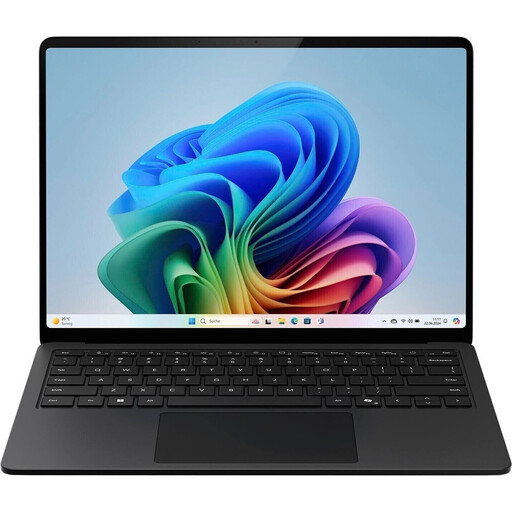
Microsoft Surface Laptop for Business, 7th Edition, Core Ultra 7 266V, 16 GB, 512 GB
If you’re considering a 15-inch model for your catalogue and documents, check that the touchscreen, ports and software suit the way you work.
15-inch touchscreen; Intel Core Ultra 7 266V; 16 GB RAM; 512 GB SSD; Windows 11 Pro; 1.66 kg. Two USB 4.0 ports and an integrated microSDXC card reader.
View at Joybuy
 No image available
Lenovo ThinkBook 16 Gen 9, Core Ultra 5 325, 32 GB, 512 GB
If you want to work on catalogue entries and documents on a 16-inch screen, check the exact port selection for your external backup drive and existing devices.
16-inch WUXGA; Intel Core Ultra 5 325; 32 GB DDR5; 512 GB SSD; Windows 11 Pro; 1.7 kg. Ports: USB4, Thunderbolt 4 and HDMI 2.1; integrated SD card reader.
View at Joybuy
 No image available
MSI Prestige N16 Flip AI+ C1XMT-027Y, 128 GB, 2 TB
If you’re considering a model with a 2 TB SSD for your local archive, check that the storage capacity suits your actual files and the software you want to use.
16-inch 2-in-1 laptop; 128 GB DDR5; 2 TB SSD; Windows 11 Pro; 1.9 kg. Ports: USB4 and USB-A.
View at Joybuy
Frequently asked questions
Do I need to buy Windows to manage my model railway collection?
Not for every cataloguing method: a spreadsheet is a different way of working. If you want to use Scout Systems software, its provider lists Windows versions as a technical requirement. Check that your chosen application and version are supported before selecting an operating system.
How can I stop links to receipts from breaking when I change devices?
Copy your catalogue and source files together to the new location, then test the links there. LibreOffice Help distinguishes between relative and absolute links, while Microsoft Support notes that Excel displays an error if it can’t reach a link’s destination. Back up the associated files as well as your spreadsheet or database.
Is the laptop’s SSD enough for a backup?
No. The Federal Office for Information Security recommends making regular backups, for example to an external storage device or the cloud. When restoring your data, also check that you can open the linked source files.
What are my rights when buying a laptop online in Germany?
When consumers buy from a business seller, a statutory warranty of at least two years from receipt of the goods generally applies. Online purchases generally come with a 14-day right to cancel; exceptions and the specific terms of the contract should be taken into account. A voluntary manufacturer’s guarantee is separate. Your Europe and the Council of the European Union explain these rights within their respective areas of application.
What should I do with my old laptop?
Take it to an appropriate electrical waste take-back point or a local authority collection site instead of putting it in your household rubbish. The Verbraucherzentrale explains how retailers take back electrical waste.


