For model railway films, the screen should be suitable for the furthest seat, and the projector needs to deliver the desired image size from its intended position. Epson recommends a viewing distance of no more than four times the image height as a guide for detail-focused viewing, not as a guarantee that details will be visible. Also consider your footage, room lighting and screen together, rather than relying on a claimed maximum image size or resolution alone.
Who is this projector setup for?
Detail enthusiasts with seats further back
If you want guests at the back to be able to make out trains and scenery, consider the furthest seat, image height and source footage together. Epson Germany recommends a viewing distance of no more than four times the image height as a guide for detail-focused viewing.
Model railway clubs using different venues
When screenings take place in different venues, the image size, projection distance and setup all need to work together each time. BenQ Germany recommends factoring room dimensions and the available distance between the projector and screen into your planning.
Presenters using a room with ambient light
If you cannot fully darken the room, assess the projector’s brightness and the projection surface together. BenQ Germany describes matte white screens as suitable for darkened rooms and ALR screens as an option for brighter settings.
What should you look for when buying?
First decide on your screen size and furthest seat. Then check where the projector can go, and finally consider the room lighting and ongoing costs.
| Priority |
What to check before buying |
Who should pay particular attention |
| Seeing details from the back row |
Furthest viewing distance and available image height, as well as the resolution of your video. |
If I want to make out trains and scenery from the back row, I’ll compare viewing distance, image height and film quality. Around 36% of consumers put the visibility of small details first. |
| Image size at the intended position |
Distance from the lens to the screen and the throw ratio of the specific model. |
If the projector has to go in a fixed or restricted space, I’ll want to know that it can produce the image size I need from there. Around 29% of consumers focus primarily on getting the setup right. |
| Screenings in a room with ambient light |
Lighting conditions during the screening, along with the brightness rating and screen suitability. |
If I can’t darken the room completely, I’ll choose a projector and screen that work together in those conditions. Around 21% of consumers say room lighting is their most important buying consideration. |
| Maintenance and running costs |
Light source, model-specific lifespan information and whether you’ll need a screen. |
If I need to factor in extra purchases and maintenance, I’ll check the light source and setup from the outset. Around 14% of consumers prioritise ongoing costs. |
Common planning mistakes
-
Assuming the maximum screen size will look good from the back row
A claimed maximum image size doesn’t, by itself, tell you whether small details will be visible from the furthest seat. For detail-focused viewing, Epson Germany recommends considering viewing distance in relation to image height.
First work out where the furthest seat will be and how much image height you have available. Then check how the image looks using a typical model railway clip.
A larger screen may be needed to create a suitable larger image.
-
Confusing viewing distance with projection distance
The distance between the audience and the screen is not the same as the distance between the projector and the screen. From its actual position, the lens needs to produce the desired image size within its projection range.
Measure the two distances separately, then check the projector distance against the throw ratio of the exact model.
An unsuitable position may mean you need a different mount or projector.
-
Trying to overcome ambient light with a high brightness rating alone
Brightness, image size and screen surface all affect the picture during a screening. A brightness rating alone doesn’t tell you how clearly details will show in your room’s lighting conditions.
If possible, assess the projector in the conditions you’ll actually use it in, and choose a screen to suit the ambient light and projection type.
Relevant brands and model ranges
Epson
The documented EB-L260F and EH-TW6250 models represent different projector approaches; the specifications below apply to these models.
- Epson quotes up to 4,600 lumens of white and colour brightness for the EB-L260F, and up to 20,000 hours for its laser light source.
- Epson quotes a 1.6x zoom for the EH-TW6250.
- Without details of your room and image size, these manufacturer specifications don’t prove that details will be visible at your screening venue.
BenQ
The W2710i is a home cinema projector. Its resolution, brightness and lens specifications can be checked as part of your planning.
- BenQ specifies 4K UHD and a throw ratio of 1.13–1.47 for the W2710i.
- Its rated brightness is 2,200 ANSI lumens, and it uses a lamp as its light source. Factor in ambient light and the possibility of needing a replacement lamp when choosing.
- The manufacturer’s specifications are not independent test results and don’t replace checking the projector against your room and screen size.
soundcore Nebula
The manufacturer describes the X1 Pro as a portable 4K projector with motorised zoom and automatic picture setup.
- The manufacturer quotes a motorised throw ratio of 0.9:1–1.5:1 for the X1 Pro.
- Its built-in audio system may offer more than you need for a model railway film screening.
- The right image size still depends on the specific projector position.
Joybuy products for screenings
The following Joybuy products are relevant to screening setups where you need to check the image size, projector position or choice of screen.
 No image available
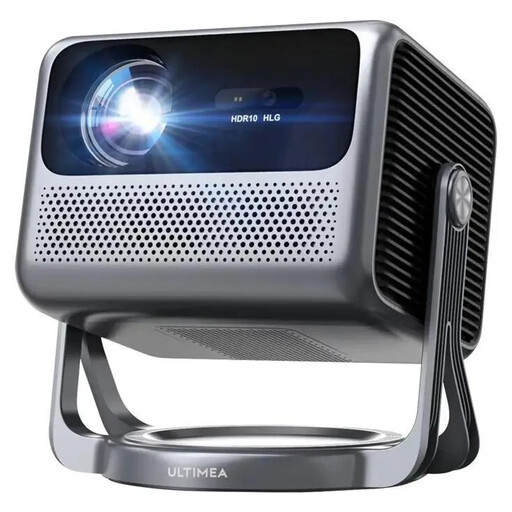
ULTIMEA Nova C40 Android TV 4K
If you’re planning a large image, compare the stated projection size and lens distance with the space available for the projector.
Specifications include an 80–120-inch projection size, a 1.25:1 throw ratio, ToF autofocus and 6D keystone correction.
The product title also states 600 ANSI lumens and 1080P Full HD.
View product at Joybuy
 No image available
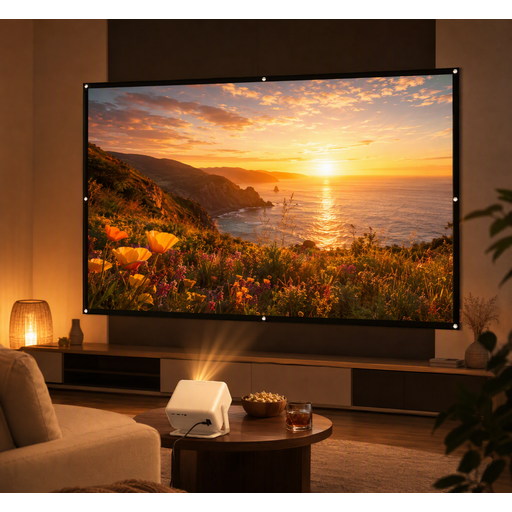
XGODY Gimbal A6 Pro projector bundle
If you’re looking for a projector and screen together, this bundle includes a screen to factor into your screening plans.
The product title lists a 100-inch projection screen as part of the bundle.
View product at Joybuy
 No image available
Philoent Smart Projector
If space between the projector and screen is limited, this model is described as an ultra-short-throw projector that produces large images in small rooms.
The title lists Wi-Fi 6 and Bluetooth 5.4; automatic keystone correction and 4K/1080P support are also mentioned.
View product at Joybuy
 No image available
XGIMI Aura 2 4K ultra-short-throw laser projector
If the projector needs to sit close to the screen, its stated ultra-short-throw projection is worth considering. Be sure to check the exact setup, though.
The product title lists a laser light source, 4K and 2,300 ISO lumens.
View product at Joybuy
 No image available
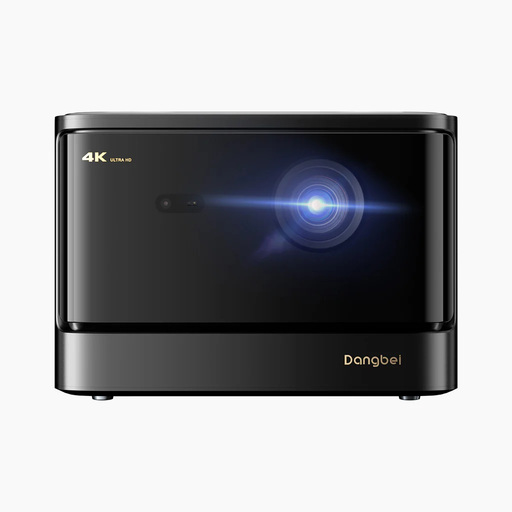
Dangbei DBOX02 4K laser projector
If a laser light source and 4K are among your priorities, compare the brightness rating and image size with your room.
The title lists 2,450 ISO lumens and a laser light source; the description also mentions automatic focus and keystone correction.
View product at Joybuy
Frequently asked questions
What’s the difference between viewing distance and projection distance?
Viewing distance is measured from the viewer to the screen; projection distance is measured from the projector to the screen. Whether you can get the image width you want from the intended position depends on the throw ratio of the specific model.
How do I set up a projector for a model railway screening?
First measure the screen area, the distance to the furthest seat and the available distance for the projector. Check the projector position and desired image width against the projection range of the specific model, then view a typical clip from the furthest seat to assess the result.
What should I consider when it comes to ambient light and screens?
Assess the projector and screen in the lighting conditions in which the screening will actually take place. BenQ Germany describes matte white screens as suitable for darkened rooms and ALR screens as an option for brighter settings; you’ll need to check whether either is right for your specific setup.
What should I know about maintenance and warranties?
Start by checking the light source and the lifespan information for the specific model. The Verbraucherzentrale distinguishes your statutory rights against the seller from a voluntary manufacturer’s warranty; Your Europe explains that goods bought in the EU are generally covered by a minimum two-year legal guarantee. This does not mean that manufacturers are automatically required to provide additional repairs for projectors.
Does the CE mark prove that a product has been independently safety-tested?
No. According to Your Europe, the CE mark indicates that the manufacturer considers the product to meet the applicable EU requirements; there is no central EU body that issues a blanket certificate. The mark alone is no substitute for checking the specific product information.


