App testers working with multiple windows
You want to assess the app you’re testing alongside development tools or documentation, and you’re weighing up extra workspace against the desk space it will take up.


A 27-inch QHD monitor can be a good fit for displaying app windows, tools and documentation side by side, provided your desk and stand have enough room. If desk space is tight, a more compact 23.8-inch FHD model is an obvious alternative. A USB-C hub is worth considering only if the video connection, cable and charging power are suitable for your laptop: Dell quotes up to 90 W for the P2425HE, while LG quotes 15 W for the 27U631A-B. And higher resolution is no substitute for testing different window sizes and, for Windows apps, DPI settings.
You want to assess the app you’re testing alongside development tools or documentation, and you’re weighing up extra workspace against the desk space it will take up.
You need a monitor whose stand and screen position will fit in your room; a flexible setup may matter more than a larger screen size.
You connect your computer frequently, so you’ll need to check the video connection, cable and, where relevant, USB-C charging power for your specific devices.
A good fit if: Desk space and flexible positioning matter more, and you usually check one view at a time. Lenovo describes the ThinkVision T24i-30 as having an adjustable stand and VESA mounting.
The trade-off: FHD has fewer native pixels than the 27-inch QHD model featured here; check your views at your preferred text size.
A good fit if: You often need app windows, a console and documentation visible side by side, and the complete setup will fit on your desk. LG lists the 27U631A-B as having a resolution of 2.560 × 1.440 pixels.
The trade-off: LG quotes 15 W USB-C Power Delivery for this model; don’t assume that will be enough to charge your laptop.
A good fit if: You often connect a compatible laptop and want to use the monitor for video or power delivery. Dell lists the 23.8-inch P2425HE as an FHD monitor with up to 90 W Power Delivery.
The trade-off: FHD has fewer native pixels than the QHD model mentioned above. Also check that video transmission, the cable and charging power are suitable for your laptop.
| Priority | What to check before buying | Who this matters most to |
|---|---|---|
| Room for apps and tools | Set up typical app, console and documentation windows at a readable text size; compare FHD and QHD, and measure the space needed, including the stand. | If I want to see the app and test tools at the same time, I focus on the usable screen area at my chosen scaling. Around 33 % of consumers prioritise space for multiple views. |
| Desk space and screen position | Measure the available desk space and check the stand’s dimensions and adjustment options; for VESA mounting, make sure the mount and installation space are suitable. | With a small desk, I want to be able to position the monitor to suit the space and my seating position. Around 27 % of consumers prioritise a compact, adjustable setup. |
| Testing window sizes and scaling | Set the test conditions you need; for Windows apps, check different window sizes and DPI settings where necessary. | If I want to find display issues in different app views, I don’t rely on the monitor’s native resolution alone. Around 20 % of consumers prioritise meaningful tests of window sizes and scaling. |
| Connecting to your computer | Match the video output and cable to the monitor input; if charging over USB-C, compare the stated power output with your laptop’s requirements. | If I often connect my laptop or want to charge it through the monitor, I check the whole connection rather than looking only for a USB-C port. Around 20 % of consumers prioritise connection compatibility. |
An app may look fine on one screen, yet show display problems at other window sizes or DPI settings. Microsoft documents this issue for Windows desktop apps that haven’t been correctly adapted to DPI changes.
Define the test configurations you need, then deliberately change the window size and, where necessary, the scaling.
Testing takes longer when you need to check several window sizes and scaling settings.
A USB-C port, video transmission and charging power are separate features. For the models considered here, Dell quotes up to 90 W Power Delivery for the P2425HE, while LG quotes 15 W for the 27U631A-B.
Check video output, the cable and charging requirements for your specific combination of devices.
Depending on the connection and power requirements, you may need a separate power supply, a suitable adapter or a compatible cable.
Stands and adjustment options vary between models. Lenovo lists a VESA option for the ThinkVision T24i-30, while LG says the 27U631A-B has a tilting stand.
Measure the available desk space and check the dimensions, stand adjustment and, where relevant, VESA mounting for the specific model.
For a wall or arm mount, you’ll need a compatible bracket.
The Joybuy page checked for the Dell P2425HE gives conflicting details: the title says three years, while a section mentions a two-year manufacturer’s warranty. A voluntary warranty is also separate from your statutory rights against the seller.
Check the terms of any voluntary warranty before buying, and don’t treat it as a replacement for your statutory consumer rights.
The Pro-Plus models considered here offer different compact working views: the P2425HE has an FHD 16:9 format, while the P2425E has an FHD 16:10 format.
The ThinkVision T24i-30 is a 23.8-inch FHD option with an adjustable setup.
The 27U631A-B combines a 27-inch screen with QHD for users looking for more native workspace.
The selection includes compact FHD monitors, larger displays and models with USB-C. Choose according to the app views you need, the space available and your computer’s connections.
 No image available
For a compact setup if you’re looking for an FHD view for app testing.
FHD resolution, IPS, 120 Hz and 99 % sRGB.
HDMI and VGA; VESA 100 × 100 mm mounting and a tilting stand.
 No image available
For a larger working view if you have room for a 27-inch display and want to try 4K.
IPS and 3.840 × 2.160 pixels; 120 Hz.
PIP and PBP for multiple sources; USB-C with 90 W Power Delivery, HDMI and DisplayPort.
The stand is height-adjustable. Check that USB-C video and charging power are suitable for your laptop.
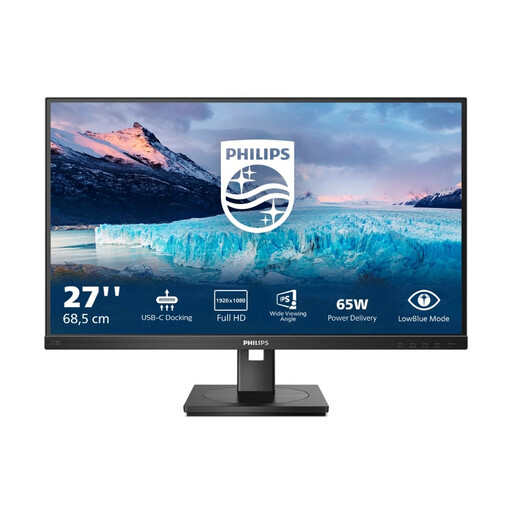 No image available
For a larger screen with docking connections if FHD is enough for your test views.
1.920 × 1.080 pixels and 75 Hz.
USB-C with 65 W, USB hub, Gigabit Ethernet, HDMI and DisplayPort.
The stand is height-adjustable, tiltable, swivel-adjustable and pivotable. Check that the charging power is suitable for your laptop.
 No image available
For a compact FHD setup if you often connect a laptop and want to use USB-C.
FHD and USB-C for video, data and power delivery; Dell quotes up to 90 W Power Delivery.
An adjustable stand is listed. Check that the charging power is suitable for your specific laptop.
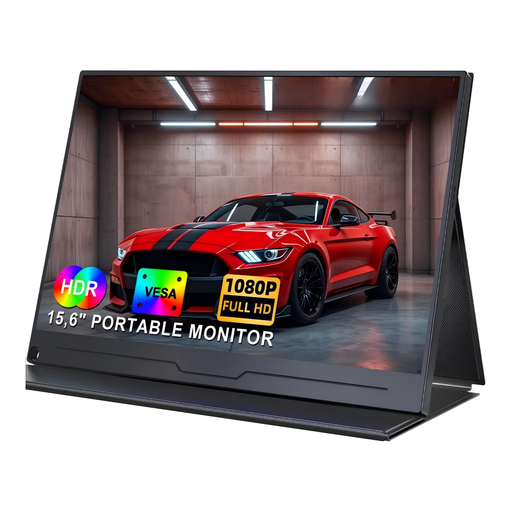 No image available
For a mobile or particularly space-saving setup; its smaller screen offers less room to display apps and tools side by side than larger monitors.
15.6 inches, IPS and 1.920 × 1.080 pixels; USB-C and VESA support are listed.
USB-C video requires a device that supports video output over USB-C.
No. A QHD monitor alone won’t cover different app views. For Windows apps, you should also check different window sizes and, where necessary, scaling or DPI settings. Microsoft distinguishes the available window space from the physical screen size and documents display problems caused by DPI changes in desktop apps that haven’t been adapted accordingly.
No, it depends on the laptop, cable and monitor. Check video output and compare the specific monitor’s Power Delivery output with your laptop’s charging requirements. Dell quotes up to 90 W for the P2425HE, while LG quotes 15 W for the 27U631A-B.
Adjust the screen position and your posture to suit your individual viewing needs, and check which adjustments the specific stand offers. The German Federal Institute for Occupational Safety and Health (BAuA) describes the relationship between screen position, individual needs and, where relevant, glasses as a guide for office work; this isn’t a general legal requirement for a private student room.
When buying online from a commercial seller, you generally have a 14-day right to cancel; exceptions and the specific terms of the contract should be taken into account. New faulty goods are covered by a statutory guarantee against the seller for at least two years. A voluntary warranty doesn’t replace these rights.
If you want to compare energy consumption, the product information for the specific models can help. EU energy labelling rules cover electronic displays, including monitors; however, the label alone won’t tell you whether a monitor is suitable for your app testing.