For mainly viewing one set of borrowing data at a time on a cramped shared desk, an adjustable 23.8-inch Full HD monitor is a suitable option. If you regularly need tables, filters and reports side by side, the 23.8-inch Dell P2425DE, with its 2560 × 1440 resolution, is one option, according to Dell Germany. When notebooks are swapped between users, check the video output and charging capabilities of each device. A KVM is relevant mainly when two computers will actually share the same input devices. If personal borrowing data is displayed, sightlines and other safeguards also need to be assessed: a monitor alone will not solve this.
Who is this choice relevant to?
People analysing borrowing figures
If you use borrowing figures, filters and reports side by side, choosing between Full HD and QHD depends on how much needs to be visible at once. Dell Germany lists 23.8-inch models with resolutions of 1920 × 1080 and 2560 × 1440 pixels.
People switching between notebooks
If several people use the same desk, check in advance how each notebook provides a video signal and power. If two computers will share input devices, a KVM function and suitable cabling are also relevant.
Data protection leads
If personal borrowing data appears on screen, factor sightlines and organisational safeguards into your planning. The European Data Protection Board stresses that safeguards must be appropriate to the context in which data is processed.
What should you look for when buying?
Check how many views need to be readable at once, which devices will be connected and how the screen can be adjusted at the shared desk.
| Consideration |
What to check before buying |
Who is it important for? |
| Room for tables |
Consider resolution and screen size together; test a typical table at the text size you plan to use. |
If I want to view borrowing figures and a report side by side, the text size needs to suit the available screen area. This is a top priority for around 31% of consumers. |
| Connections and switching devices |
Check USB-C video output, Power Delivery, charging requirements and the cable for each notebook; consider KVM only if two computers will share the same peripherals. |
If I share the desk with people who use different notebooks, I want to plan the connections around the devices actually in use. Around 31% of consumers say switching between devices is their main concern. |
| Adjustability at the desk |
Check adjustability, the stand and the space available; if the model does not come with a suitable stand, plan for an appropriate mount. |
If I use a desk shared by different people, I want to be able to adjust the screen to suit my seating position and the lighting. Around 23% of consumers put personal adjustability first. |
| Confidentiality |
Check whether personal data will be displayed. If so, assess sightlines and organisational safeguards with the relevant team. |
If my screen displays personal borrowing data, I want to prevent unauthorised people from seeing it. This particular need may not apply if only aggregated figures are shown. Around 15% of consumers put confidentiality first. |
Common misconceptions
-
USB-C automatically means video and charging over one cable
A USB-C port alone does not guarantee video transmission or suitable charging power. Philips Germany specifies DP Alt Mode as a requirement for USB-C video on the monitor described, and Power Delivery for charging.
Check DP Alt Mode, Power Delivery, power requirements and the cable for every notebook you use.
Depending on the notebook, you may also need a separate power supply or a different connection.
-
Comparing resolution without considering text size and desk space
The documented 23.8-inch QHD Dell P2425DE has more pixels than the documented Full HD models. Whether you can make use of the extra screen space while keeping text easy to read depends on your application and scaling settings.
Test a typical table with filters and a report at your intended scaling setting, and measure the space available on the desk.
-
Focusing only on the viewing angle at a shared desk
If personal borrowing data is visible, the risk of unauthorised people seeing it is a separate factor to consider, not just a question of the most comfortable screen view.
Check what type of data will be displayed, then assess sightlines and organisational safeguards with the relevant team before positioning the screen.
-
Assuming similar model names or warranty details mean the same thing
The Dell P2425HE and the Dell P2425 without “HE” are different model names. The Joybuy product page for the P2425HE also gives a three-year term in the title and a two-year term in the page text.
Check the full model number, resolution, connections, what's included and the written warranty terms against the specific listing.
An unsuitable model or a mount you need to buy separately can make setup more difficult.
Brands to consider
Dell
The P2425HE and P2425DE offer two resolution options in the 23.8-inch category.
- Dell Germany lists the P2425HE at 1920 × 1080 pixels and the P2425DE at 2560 × 1440 pixels. Both models are specified with USB-C Power Delivery of up to 90 W.
- Charging depends on the notebook and connection supporting the required features. A higher pixel count alone does not guarantee better readability at a particular scaling setting.
EIZO
The FlexScan EV2490 is a 23.8-inch Full HD model with USB-C docking, which may also be useful at a genuinely shared desk with two computers.
- EIZO specifies a KVM, a network port, up to 70 W over USB-C and a five-year warranty for this model.
- The EV2490 offers 1920 × 1080 pixels rather than QHD. Check the cabling, device compatibility and warranty terms that apply to the specific offer.
Lenovo
The ThinkVision T24m-29 is a documented 23.8-inch Full HD docking model.
- Lenovo Germany lists USB-C, a network port and a DisplayPort output for this model.
- These connections apply to the T24m-29 and cannot be assumed to be available across all ThinkVision models.
Philips
According to Philips Germany, the Business Monitor 24B1U5301H/01 combines a 23.8-inch Full HD screen with USB-C docking and conferencing features.
- Philips specifies that the connected device needs DP Alt Mode for USB-C video, and USB-C Power Delivery support for charging.
- The webcam is only relevant if you also hold conferences at the desk. Check the notebook's required features in advance.
HP
The HP E24mv G4 is a 23.8-inch Full HD conferencing monitor with a webcam and four-way adjustability.
- The HP Store Germany lists an integrated audio system and a pop-up webcam for this model.
- Conferencing features do not guarantee USB-C docking. Check the connections on the specific variant rather than assuming they are included based on the product range.
Monitors available at Joybuy
This selection includes Full HD models and USB-C docking monitors for shared workspaces. Match the resolution, screen size and connections to the tables you need to view and the notebooks actually in use.
 No image available
MSI PRO MP275QPDGDE 27-inch WQHD docking monitor
Could be suitable for viewing tables side by side and for a desk shared by two computers. Check that the notebook and cabling support the features you need.
The product name lists a 27-inch screen, WQHD, USB-C with 98 W Power Delivery, KVM, daisy chaining and an integrated webcam.
View at Joybuy
 No image available
Dell P2425HE 24-inch Full HD monitor
A compact option for viewing one set of borrowing data at a time. If you switch between notebooks, check that the device and cable support the video and charging features you need.
The product name lists a 24-inch screen, Full HD, IPS and USB-C.
View at Joybuy
 No image available
Acer Vero B247YGbmiqprx 24-inch monitor
Worth considering as a 24-inch option for a shared desk. Before choosing, check that its resolution and connections meet the needs of the workspace.
The product name identifies a 24-inch monitor model.
View at Joybuy
 No image available
MSI PRO MP245PG 23.8-inch Full HD business monitor
Could be a good fit if you need a compact Full HD view and personal adjustments at a shared desk.
The product name lists a 23.8-inch screen, Full HD and a height-adjustable stand.
View at Joybuy
 No image available
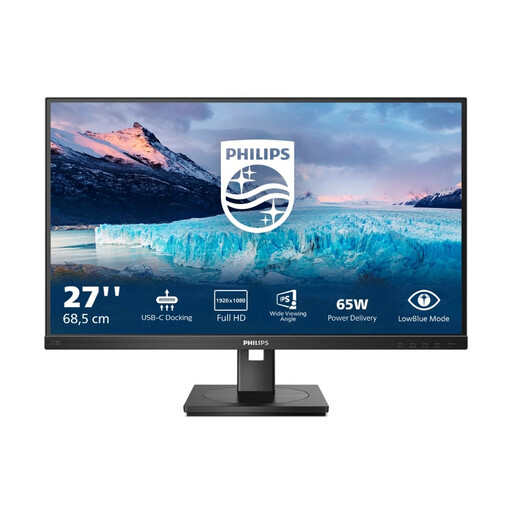
Philips 273S1 27-inch Full HD IPS monitor
A larger Full HD option for the office. If you use different notebooks, check that their connections support the USB-C features you want.
The product name lists a 27-inch screen, Full HD, IPS, 1920 × 1080 pixels, 75 Hz, USB-C with 65 W, RJ45, USB hub, HDMI, DisplayPort, a height-adjustable stand and speakers.
View at Joybuy
Frequently asked questions
Is USB-C on the monitor enough for video and charging over one cable?
No, the USB-C port alone is not enough to confirm this. Philips Germany specifies DP Alt Mode for video and USB-C Power Delivery for charging. Also check the power requirements and cable against the notebook you use.
What should I consider when setting up a shared workspace?
The screen should be adjustable to suit its users, and windows and lights should be taken into account when positioning it. Germany's Federal Institute for Occupational Safety and Health sets out requirements for screen-based work within its scope in ASR A6, as of July 2024. Whether these apply to a particular desk depends on its use as a workplace.
Will a particular monitor automatically protect personal borrowing data?
No, a monitor model alone does not guarantee adequate protection. If personal data is processed and displayed, those responsible must assess suitable technical and organisational measures, including who can see the screen.
What should I know about warranties and statutory rights?
A warranty and your statutory rights are not the same thing, so check the written terms for the specific purchase. The Verbraucherzentrale explains the difference. EIZO lists a five-year warranty for the EV2490; on the Joybuy product page for the Dell P2425HE, the warranty details in the title and page text do not match.


