If several laptops are used at the same desk, first check that the monitor and devices are compatible in terms of USB-C video output, charging power and connections. For calendar text and layouts, resolution, readable scaling and available desk space also matter. If you have specific colour requirements, the colour gamut and output workflow need to be right, too.
Who these monitors are for
Teams sharing different laptops
If several people use the same desk, USB-C connections can make it easier to switch between devices. Dell, BenQ and Philips list USB-C on the models covered here. Check the video output and charging requirements of each laptop separately.
Calendar and layout designers
If you work on appointments, text and design elements at the same time, choose a resolution and scaling that keep important details easy to read. The models from Dell, BenQ and ASUS offer different resolution options for this kind of work.
Designers working to colour requirements
If the calendar is being created for a specific digital or printed output, make sure the colour gamut and colour workflow are suitable. BenQ and ASUS list colour gamuts for the models mentioned; these manufacturer specifications alone do not guarantee a match with the final print.
What to consider when buying
Start by working out which devices will be connected at the shared desk and how much space you have. Then decide whether adjustability or a particular colour setup is also important for your calendar workflow.
| Consideration |
What to check before buying |
Especially important if |
| Switching devices and connections |
USB-C video support on your laptop, the charging power you need, and connections for display, data and, where necessary, peripherals. |
I regularly switch between laptops at a shared desk and want to connect the display, power and, if needed, peripherals appropriately. Around 31% of consumers put switching between devices first. |
| Readability and workspace |
Screen size, native resolution, text scaling and the space available on your desk. |
I need calendar details, text and design elements to remain readable at my chosen scaling. Around 25% of consumers prioritise workspace and readability. |
| Adjustability at the desk |
Height adjustment, tilt, swivel and the space taken up by the stand; also consider the lighting conditions. |
Several people use the desk and I want to adjust the screen position to suit each person’s sitting position. Around 25% of consumers prioritise this kind of adjustability. |
| Colours for the final output |
The output provider’s requirements, the colour gamut you need and a suitable colour workflow. |
I need to match the colour gamut and workflow to the specified digital or printed output for a calendar. Around 19% of consumers prioritise colour control for their intended output. |
Common misconceptions
-
USB-C doesn’t automatically mean a single-cable connection
A stated charging power doesn’t tell you whether a particular laptop can output video over USB-C or whether the power is sufficient for its charging needs.
Before buying, check each laptop you’ll actually use for USB-C video support and charging requirements, and compare these with the specifications of the specific monitor.
-
A stated colour gamut doesn’t guarantee accurate print colours
Manufacturer claims about colour gamut coverage don’t automatically prove that the entire print or output process will reproduce the colours you want.
First confirm the output format, then match your colour workflow to it.
-
Resolution alone says little about readability at your desk
QHD and 4K monitors have different native pixel counts. How easy calendar details are to read also depends on the scaling you use and how you plan to work at your desk.
Check readability at a scaling that works for you, and measure the available desk space beforehand.
Brands to consider
Dell
According to Dell, the Dell P2725DE combines QHD resolution with USB-C and hub features for a shared workspace.
- Dell lists a 27-inch screen, 2560 × 1440 pixels and 90 W power delivery over USB-C for this model.
- Check laptop compatibility and charging requirements; these specifications don’t automatically apply to other monitors.
BenQ
According to BenQ, the BenQ DesignVue PD2706U combines 4K specifications and stated colour gamuts with a KVM switch.
- BenQ lists 100% sRGB, 95% DCI-P3 and USB-C with 90 W Power Delivery and KVM for this model.
- The colour gamut figures are manufacturer specifications and don’t prove that a later print will have matching colours.
ASUS
According to ASUS, the ASUS ProArt PA279CRV is a 4K option with stated colour gamuts and a height-adjustable stand.
- ASUS lists 100% sRGB, 99% Adobe RGB, 99% DCI-P3, 96 W USB-C Power Delivery and 0–130 mm height adjustment for this model.
- ASUS notes that product specifications can vary by country. Colour gamut coverage alone doesn’t prove that the entire output process is suitable.
Philips
According to Philips’ German product page, the Philips 276B9/00 combines QHD, USB-C and a SmartErgo stand.
- The product page lists 2560 × 1440 pixels and an adjustable stand.
- This doesn’t mean the charging power will be sufficient for every laptop, or that the monitor offers professional colour calibration.
LG
According to LG, the LG UltraFine 27UP850K-W is a 27-inch 4K option with USB-C and an adjustable stand.
- LG lists 95% DCI-P3 as a typical value, along with a stand that tilts, adjusts in height and swivels.
- Manufacturer specifications aren’t an independent comparison of colour accuracy. Check that the connections and adjustment options suit your workspace.
Joybuy monitors for calendar layouts
This selection from Joybuy includes monitors you can compare for calendar layouts at a shared desk, based on their resolution and, in some cases, adjustable stands.
 Image unavailable
Z-Edge AGEX 27-inch QHD monitor
A QHD option for calendar layouts if you’d also like to adjust the screen position.
2560 × 1440 pixels; 99% sRGB according to the product description. The stand adjusts in height, tilt, swivel and rotation.
View on Joybuy
 Image unavailable
TCL 32X3A 32-inch OLED monitor, 4K UHD
The larger screen and 4K UHD resolution could suit a more detailed calendar layout. Check that the monitor will fit on your shared desk.
3840 × 2160 pixels, 99% DCI-P3, USB-C with 90 W Power Delivery and KVM, according to the product description. Before connecting, check USB-C video support and the laptops’ charging requirements.
View on Joybuy
 Image unavailable
MSI PRO MP273UPDE E6 27-inch 4K UHD IPS monitor
A 27-inch 4K option for calendar details and layouts, if the resolution suits your preferred text scaling.
60 Hz according to the product name; the product description lists 10-bit colour depth, height adjustment, swivel, tilt and pivot.
View on Joybuy
 Image unavailable
KTC H27T27 27-inch QHD office monitor
A QHD option for calendar text and layouts if a tilt-adjustable stand is all you need.
2560 × 1440 pixels, 99% sRGB and 120 Hz OC according to the product name. The product description lists HDMI and DisplayPort inputs, along with a tilt-adjustable stand.
View on Joybuy
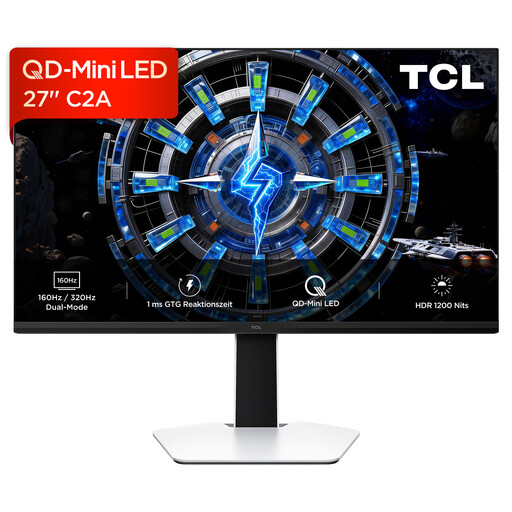 Image unavailable
TCL 27C2A 27-inch QD-Mini-LED monitor, 4K UHD
A 27-inch 4K UHD option for calendar layouts if the resolution and screen position suit your desk.
The product name lists QD-Mini-LED and 160 Hz. The product description lists an adjustable stand.
View on Joybuy
Frequently asked questions
Is USB-C alone enough for video and charging?
No. Check whether the laptop supports video over USB-C, then compare its charging requirements with the power delivery explicitly stated for the specific monitor. Dell lists 90 W for the P2725DE; this doesn’t prove compatibility with every laptop.
How should I set up the monitor if several people use the desk?
Set the screen position and lighting to suit how the desk will actually be used, and check that the stand offers the adjustment range you need. For workplace display screen equipment and home working, Germany’s Federal Institute for Occupational Safety and Health sets out requirements within the scope of its ASR A6 technical rule. A desk used at home isn’t covered solely because it’s shared.
How can I compare the running costs of different monitors?
Compare the EU energy label or product data sheet for specific models on the same basis. The European Commission includes electronic displays, including monitors, in its list of product groups covered by energy labels. Actual costs also depend on how long you use the monitor and your electricity tariff.
What are my rights if a monitor is faulty?
For a consumer purchase, statutory rights against the seller are separate from a voluntary manufacturer’s guarantee. Germany’s consumer advice centre explains that the statutory guarantee period is generally two years. Online purchases also usually come with a 14-day right to cancel if you change your mind. Conditions and exceptions apply in each case.


