Keep code and tests in view at the same time
If you want to see your editor, test output and, where relevant, a preview side by side while developing, look for a layout that suits the available screen space and your preferred text size.


Start by considering how you prefer to arrange your windows. More vertical screen space can be useful for long code files and test logs, while side-by-side windows benefit from a suitable screen width. Then check text scaling, desk space and adjustability. If you use a laptop, make sure its video output and charging requirements are compatible with USB-C. Specifications describe the features available, but don’t prove that a monitor will help you code the savings calculator faster.
If you want to see your editor, test output and, where relevant, a preview side by side while developing, look for a layout that suits the available screen space and your preferred text size.
For long files and test results, clear, readable text matters, as does being able to adjust the screen position to suit your workspace.
If you switch between working on the go and at a desk, check that the monitor supports video, power delivery and the peripheral connections you need for your laptop setup.
First decide whether you want to view code and tests side by side, or mainly need space to read longer text. Then compare readability, how well the monitor can be adjusted to suit your workspace, and the connections available on your particular computer.
A good fit if: You mainly want to read long sections of code or test logs. According to BenQ Deutschland, the BenQ RD280U has a 28.2-inch screen, a 3:2 aspect ratio and a resolution of 3840 × 2560 pixels.
Consider: Whether an editor, terminal and preview will all fit comfortably depends on window sizes and scaling. The stated refresh rate is 60 Hz over DisplayPort or USB-C.
A good fit if: You want to connect a laptop and arrange your editor alongside test output. Dell lists the P2725DE as having a resolution of 2560 × 1440 pixels and a USB-C hub.
Consider: QHD has fewer pixels than the 4K models mentioned here. Before assuming a single-cable setup will work, check your laptop’s video output and charging requirements.
A good fit if: High native resolution is important to you. The respective manufacturers list the ASUS PA279CRV and EIZO EV2740X as having a resolution of 3840 × 2160 pixels.
Consider: A 4K resolution alone doesn’t tell you how much text will remain comfortably readable at once. It comes down to the scaling and window size that work for you.
| What you need | What to check before buying | Who it matters most to |
|---|---|---|
| Space for an editor, tests and a preview | Compare window layout and aspect ratio with the space available on your desk. | If I want to see my editor, test output and preview at the same time, the usable screen area needs to suit my windows. Around 33% of consumers prioritise space for multiple work windows. |
| Readable code and test output | Match the resolution and text size to your preferred operating system and editor scaling. | When I read long files and test results, I want to be able to choose a text size that’s easy for me to read. Around 27% of consumers put readability first. |
| Adjusting the monitor to your desk and sitting position | Check the space required and the height and tilt adjustment; also consider reflections in your workspace. | When working at a screen for longer periods, I want to be able to adjust its position to suit my desk without losing sight of how much room I have. Around 20% of consumers prioritise this adjustability. |
| Laptop connections and power | Check that your particular laptop’s video output, charging requirements and peripheral connections are compatible. | When I use a laptop at my desk, I want to connect it for both picture and power using suitable connections. Around 20% of consumers focus on laptop docking. |
Native resolution tells you the number of pixels, not how much window space remains once you’ve set scaling to a level that’s comfortable to read.
Set up a realistic layout for your editor and test window, then check it with your preferred font and operating system scaling.
The monitor’s port alone doesn’t confirm that your particular laptop can output video through it or receive enough power to charge.
Before buying, compare your laptop’s specifications, video output and charging requirements with the monitor’s Power Delivery and connection details.
If the video output or charging power isn’t compatible, you may need additional connections or a separate power adapter.
A general office test rating or manufacturer description doesn’t show whether this monitor will help you programme your savings calculator faster.
Use the specifications as a guide to the features, and choose based on your window layout, readability and the connections you need.
The RD280U is a 3:2 monitor worth considering for viewing longer sections of code and test output.
According to Dell, the P2725DE combines a 27-inch QHD display with a USB-C hub.
The ProArt PA279CRV is a 27-inch 4K model with USB-C.
According to EIZO, the FlexScan EV2740X is a 27-inch 4K office monitor with USB-C docking.
The 27E1N1600AE/00 is a 27-inch QHD option with USB-C.
This selection includes monitors with wide working areas, QHD and 4K displays, several USB-C docking options, and a USB-C docking station for multi-monitor setups.
 No image available
The wide screen could be useful for viewing code and test windows side by side. Check that the format and curve suit your desk.
49 inches, 5120 × 1440 pixels, 32:9, 165 Hz and 1500R; HDMI 2.1 and DisplayPort 1.4.
The stand is listed as height-adjustable.
 No image available
If you’re looking for a 27-inch 4K screen with USB-C docking, compare its listed charging power with your laptop’s requirements.
27 inches, 3840 × 2160 pixels, USB-C with 65 W and KVM.
A single-cable setup requires your laptop to output video through the USB-C port you’re using and to have charging requirements that are compatible with 65 W.
 No image available
QHD resolution is an option if you want to arrange your editor and test output on a 27-inch screen.
2560 × 1440 pixels, 75 Hz, USB-C with 65 W Power Delivery and USB hub.
Height, tilt, swivel and pivot adjustment are listed. For a single-cable setup, your laptop’s video output and charging requirements must be compatible.
 No image available
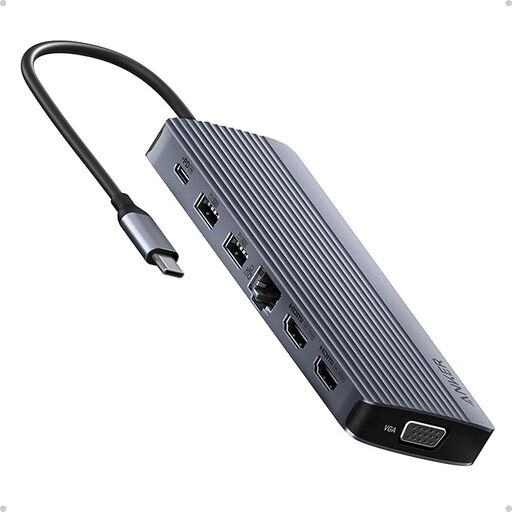
This model is described as a 14-in-1 USB-C docking station with triple-display support, making it an option for a multi-monitor desk setup.
 No image available
If you want to combine QHD display with laptop docking, check that the connections and charging power are suitable for your computer.
2560 × 1440 pixels, 100 Hz, USB-C with 98 W Power Delivery, RJ45 and KVM.
A single-cable setup requires your laptop to output video through the USB-C port you’re using and to have charging requirements that are compatible with 98 W.
Arrange your editor and test output at the sizes you actually need, and set the text to a readable size. Position the screen so the text is clear and reflections are kept to a minimum. ASR A6 applies to its defined scope in workplaces and home-working environments; it isn’t a blanket standard for every home desk.
No. Check the details for your particular laptop. Compare its video output through the port you plan to use and its charging requirements with the monitor’s specifications. BenQ lists USB-C with DisplayPort Alt Mode and 90 W for the RD280U; EIZO lists up to 94 W for the EV2740X.
Compare the energy consumption for the specific model using the EU energy label or EPREL, rather than looking only at the energy class; the European Commission includes electronic displays in this labelling system. If you buy a new product, you can generally exercise your statutory rights against the seller if it’s faulty within two years of receiving it. Verbraucherzentrale distinguishes these statutory rights from a voluntary guarantee.
Electrical and electronic waste must not go in household rubbish. The Umweltbundesamt lists municipal collection points, among other options; whether a retailer will take it back depends on the applicable requirements.