For digital collision simulations, choose a monitor based on the space available and the workspace you need. Unity and Godot handle collision detection in the physics simulation, not on the screen. A compact 23.8-inch Full HD model may fit on a small desk, while a 27-inch QHD monitor offers more pixels for multiple views, provided your desk and computer can accommodate it. A higher refresh rate affects how movement is displayed, not the accuracy of the simulation. These monitor specifications do not indicate impact resistance for physical collision tests.
Which monitor is right for you?
Students with a small desk
If you need room for a laptop and peripherals as well as your monitor, it’s worth considering a compact 23.8-inch model. COMPUTER BILD and Philips list Full HD monitors of this size as examples. Check the stand and adjustment options for the specific model.
Students working with code and measurements
If you want to view a simulation, code or outputs side by side and have more desk space, you could consider a larger display with a higher resolution. Godot Engine describes different collision objects for 2D and 3D, while Dell Germany lists the U2724DE as a 27-inch QHD monitor.
Students working with fast animations
A high refresh rate can matter when displaying moving scenes. Philips and AOC list 180 Hz for their respective models, but this figure doesn’t tell you whether the simulation calculates collisions correctly.
What should you look for when buying?
| What matters |
What to check |
Who is it important to? |
| Desk space and setup |
Overall dimensions, including the stand; adjustment options for the specific model. |
If I need room on my desk for a laptop and peripherals as well as my monitor, I compare the dimensions with the space available. Around 40% of consumers put available desk space first. |
| Readability across multiple views |
Check your preferred window layout and text size from your intended seating position. |
If I want to read a simulation, code and measurements side by side, I look for enough workspace and clearly legible text. Around 30% of consumers prioritise having multiple readable views. |
| Motion display |
Check the model’s refresh rate against the output capabilities of your computer and connection. |
If I want to view fast-moving sequences, smooth visuals matter to me; I check the collision logic separately. Around 20% of consumers put the display of moving scenes first. |
| Connections and energy consumption |
Check that the video input and any hub or charging functions you need are compatible with your laptop; look at the model’s energy label. |
If I want to connect my monitor to a laptop or take its stated energy consumption into account, I check the connections and energy label for the specific model. Around 10% of consumers prioritise connection requirements and running costs. |
Common buying mistakes
-
Assuming a higher refresh rate means more accurate collision detection
The refresh rate describes how images are displayed. Unity describes collision detection as a physics engine task; Godot also distinguishes between detecting collisions and responding to them through collision objects.
If you encounter errors, check the physics settings and test cases separately from your choice of monitor.
-
Considering only the screen size
Even monitors with the same screen size can have different stands and adjustment options. For example, COMPUTER BILD says that one AOC model it tested can only be tilted.
Measure the available desk space and compare it with the dimensions of the complete monitor, including its stand.
-
Assuming similarly named models are identical
The MSI PRO MP242 tested by COMPUTER BILD and the MSI PRO MP242DE E14A are different model names with different listed features.
Compare the full model number and key specifications rather than relying on the MP242 part of the name to identify a review or product.
Key brands at a glance
AOC
The 24G4XE is an example of a compact Full HD monitor; AOC lists a 180 Hz refresh rate for this model.
- COMPUTER BILD reports short response times for the 24G4XE it tested.
- According to COMPUTER BILD, the tested model only tilts and has no USB hub. These details apply to the 24G4XE, not all AOC monitors.
Philips
Philips Germany lists a 23.8-inch Full HD display with a 180 Hz refresh rate for the Evnia 24M2N3200A/00.
- COMPUTER BILD notes that the model it tested has speakers.
- The review notes that it has no USB hub and limited maximum brightness. Smooth image display does not prove that collision simulations are accurate.
MSI
The PRO MP242 is a compact Full HD model. MSI lists HDMI, VGA and built-in speakers.
- The listed connections and speakers apply to the PRO MP242.
- The PRO MP242 tested is not the same model as the PRO MP242DE E14A. MSI’s claims about health benefits are not independent evidence of effectiveness.
Dell
Dell Germany lists the U2724DE as a 27-inch QHD display with a Thunderbolt 4 hub.
- Dell lists a 120 Hz refresh rate, height adjustment and 90 W power delivery for this model.
- Hub and charging functions only work with compatible connected devices; the U2724DE’s specifications don’t apply to all Dell monitors.
ViewSonic
The VX2458-P-MHD is an example of a model tested in a 24-inch monitor comparison.
- ViewSonic lists DisplayPort and three HDMI inputs for this model.
- COMPUTER BILD reports that the tested device has a 144 Hz refresh rate, oversaturated colours and low contrast. This assessment shouldn’t be applied to other models.
Joybuy products for different needs
The products below include compact Full HD models and 27-inch options, including QHD monitors and models with high refresh rates. The right choice depends on your desk space, window layout and the output capabilities of your computer.
 No image available
Z-Edge AGEX, 27 inches, QHD, 144 Hz
For viewing multiple windows on a larger screen, if the monitor and stand fit on your desk.
27 inches; 2,560 × 1,440 pixels (QHD); 144 Hz; Fast IPS; height-adjustable stand.
Joybuy
 No image available
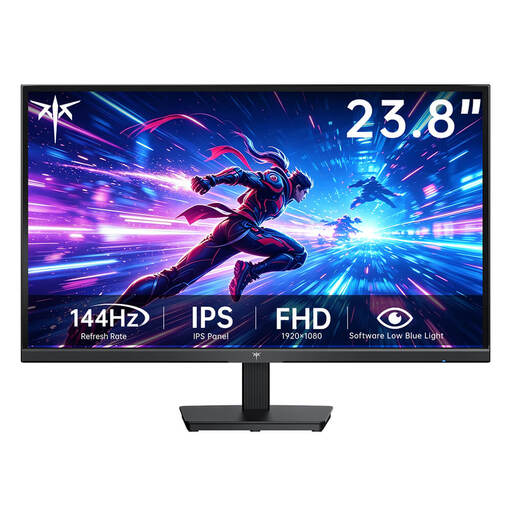
KTC H24B9S-2, 23.8 inches, Full HD, 144 Hz
A compact option for a small desk, provided Full HD is enough for your preferred window layout.
23.8 inches; 1,920 × 1,080 pixels (Full HD); Fast IPS; 144 Hz.
Joybuy
 No image available
Blackview, portable monitor, 23.8 inches, 100 Hz
For a screen you can set up flexibly; before buying, check that the connection is compatible with your device.
23.8 inches; 1,920 × 1,200 pixels; 100 Hz. Described as a portable monitor for PC, smartphone, tablet and MacBook.
Joybuy
 No image available
Gigabyte GS27QCA, 27 inches, curved QHD, 180 Hz
For viewing fast-moving images on a larger screen; take its curved design into account when planning where to put it.
27 inches; 2,560 × 1,440 pixels (QHD); 180 Hz; curved display.
Joybuy
 No image available
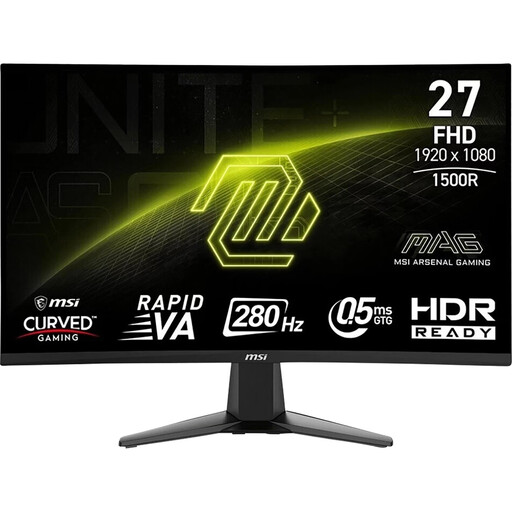
MSI MAG 276CXFDE, 27 inches, Full HD, 280 Hz
For displaying fast-moving images on a 27-inch screen. If you need multiple views, bear in mind that Full HD has fewer pixels than QHD.
27 inches; Full HD; VA panel; 280 Hz; Adaptive Sync; tilt adjustment.
Joybuy
Frequently asked questions
Can a monitor improve collision detection in my simulation?
Not simply by having a higher refresh rate. Unity describes collision detection as a physics engine process; Godot also distinguishes between detecting collisions and responding to them through collision objects. Use monitor specifications to assess how things are displayed, and check the simulation logic separately.
What should I check when setting up and connecting a monitor in a student room?
Compare the available desk space with the dimensions of your chosen monitor, including its stand, and check that its video input is compatible with your computer. For hub or charging functions, the connected device’s ports must also be compatible. According to its stated scope, the German BAuA workplace rule ASR A6 does not apply to display equipment outside workplaces or teleworking environments.
Which details can help with electricity costs and complaints?
The EU energy label and EPREL provide information about the specific monitor model. Your actual electricity costs also depend on how you use it and your electricity tariff. If goods are faulty, statutory consumer rights generally apply when dealing with the seller; in the EU, this protection lasts for at least two years from the date you receive the goods. A voluntary guarantee is separate.
Can I return a monitor bought online in Germany?
For eligible distance purchases made by consumers, there is generally a 14-day cancellation period. The terms of the specific purchase and any applicable legal exceptions determine what applies.


