What should you look for when buying?
First decide on your window layout and available desk space. Then check whether your laptop’s USB-C port supports video and provides the charging power you need.
| What matters to you |
What to look for |
Who is this especially important to? |
| Easy-to-read screen space |
Set up your usual window layout at your preferred text size, then compare the model’s screen size and native resolution. |
If I want to read my regex editor, test results and documentation at the same time, I need enough space at my usual text size; around 40% of consumers prioritise being able to read several windows side by side. |
| Desk space and positioning |
Measure the available space and check the monitor’s dimensions, height adjustment and compatibility with a suitable monitor arm. |
If desk space is tight, I need to know whether the monitor and stand will fit and can be positioned comfortably; around 30% of consumers prioritise an adjustable setup that saves space. |
| Laptop connectivity |
Compare the monitor’s USB-C video mode and charging power with your laptop’s specifications and power requirements. |
If I want to use my laptop with as few connections as possible, video and charging need to work with my device; around 20% of consumers prioritise laptop connectivity. |
| Features you actually need |
Check which features you really need for your window layout; coding modes and 4K resolution alone don’t guarantee learning success. |
If a clear, suitable set of features matters more to me than extras, I want to choose based on how I actually arrange my windows; around 10% of consumers prioritise this. |
Monitor brands worth considering
The examples below relate to specific models and product ranges, not a brand’s entire selection.
Dell
The S2725DSM is a documented example of a height-adjustable 27-inch QHD monitor.
- Dell lists a resolution of 2,560 × 1,440 pixels and height adjustment for the S2725DSM.
- QHD doesn’t mean this model includes USB-C docking; check the connections on the specific device.
EIZO
The FlexScan EV2490 combines a compact 23.8-inch screen with documented USB-C features.
- EIZO lists Full HD, a USB-C video input with DisplayPort Alt Mode and up to 70 W power delivery.
- Its native resolution is lower than that of QHD models; check whether you’ll have enough room for several windows at your chosen text size.
BenQ
According to the manufacturer, the RD320UA is a large 4K model with a flexible arm and coding modes.
- BenQ lists a resolution of 3,840 × 2,160 pixels and coding modes for this model.
- The manufacturer’s specifications don’t prove improved learning or concentration; check readability and positioning for your workspace.
ASUS
The ProArt PA279CRV is a documented 27-inch 4K model with specified colour modes.
- ASUS lists a resolution of 3,840 × 2,160 pixels, 96 W USB-C Power Delivery, height adjustment and 60 Hz.
- The colour features aren’t a proven extra benefit for learning regular expressions.
LG
The 34WR55QK-B is an example of a wide 34-inch screen for using several windows.
- LG lists a resolution of 3,440 × 1,440 pixels, height adjustment and 65 W USB-C for this model.
- LG marks the 34WR55QK-B as no longer available on its German product page; this doesn’t apply to the entire UltraWide range.
Joybuy monitors for different workspaces
The following Joybuy monitors include wide formats for using several windows, as well as 27-inch QHD and 4K options. Compare the space available, text size and any laptop connections you need with your workspace.
 No image available
INNOCN E34A1R 34-inch curved monitor
The wide format is a good option if you want to arrange several learning windows side by side.
34 inches, 3,440 × 1,440 pixels, 21:9 and a height-adjustable stand.
View at Joybuy
 No image available
INNOCN 40C1U 40-inch monitor
The large screen could suit your window layout if you want to view lots of content at once and have enough desk space.
40 inches, 5,120 × 2,160 pixels, IPS, 100 Hz and PIP/PBP.
65 W USB-C Power Delivery and a height-adjustable stand are specified in the product name.
View at Joybuy
 No image available
INNOCN CB27U1 27-inch 4K UHD monitor
A 27-inch screen gives you the option of arranging several learning materials on one display; check readability at your preferred scaling setting.
3,840 × 2,160 pixels, IPS, 120 Hz and PIP/PBP.
90 W USB-C Power Delivery and a height-adjustable stand are specified in the product name.
View at Joybuy
 No image available
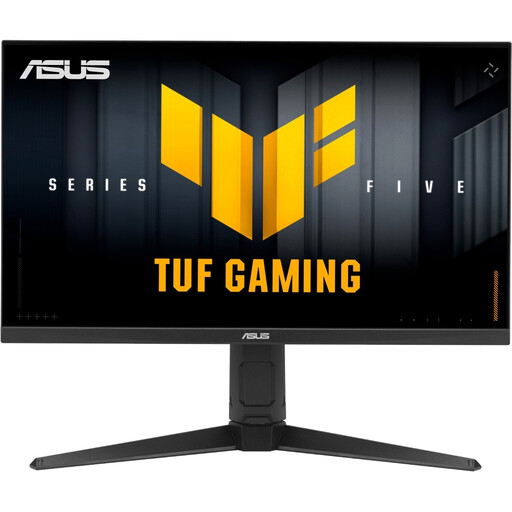
ASUS TUF Gaming VG27AQL5A 27-inch WQHD monitor
QHD on a 27-inch screen could work well if you want to view regex examples and other windows together.
WQHD at 2,560 × 1,440 pixels, Fast IPS panel and 210 Hz, according to the product name.
View at Joybuy
 No image available
GIGABYTE G27Q20 27-inch QHD monitor
QHD is one option for viewing several learning materials at once; make sure the screen position works with your workspace.
2,560 × 1,440 pixels, SS-IPS and 200 Hz, with 210 Hz in Overclocking mode.
A height-adjustable stand is specified in the product name.
View at Joybuy
Frequently asked questions
Do I need a monitor with a coding mode for regular expressions?
You don’t need to insist on a coding mode: BenQ lists these modes for the RD320UA, but the manufacturer’s specifications don’t prove improved learning. Choose based on readability, your window layout and a suitable setup.
How should I position my monitor for longer study sessions?
Adjust the screen position to suit your eyesight, any glasses you wear and your body measurements. The Federal Institute for Occupational Safety and Health recommends taking screen position, visual aids and individual needs into account together.
Can any laptop transfer video and charge at the same time over USB-C?
No. Check your laptop’s USB-C video output and power requirements. EIZO lists a USB-C video input with DisplayPort Alt Mode and up to 70 W power delivery for the EV2490; whether that suits your laptop depends on its connections and requirements.
Do German rules on screen work automatically apply to all private study at home?
No. The Workplace Ordinance defines teleworking workstations as screen-based workstations set up by an employer in an employee’s home; section 2 sets out the conditions that must be agreed. According to section 1, certain parts of the ordinance apply to teleworking workstations where they differ from the workplace at the employer’s premises.
What applies in Germany if a product is faulty or you buy online?
If new goods are faulty, consumers can generally exercise their statutory rights against the seller; the consumer advice centre specifies a two-year period from delivery or receipt. For online consumer contracts, you generally have a 14-day right to cancel, subject to the relevant conditions. This is separate from your rights concerning faulty goods.


