What to look for when buying
Start by arranging your manuscript, outline and any notes in the way you actually want to work. Then check readability, desk space and your computer’s connections.
| What matters |
What to check before buying |
Who it matters most to |
| Seeing text and the outline at the same time |
Try arranging your manuscript, outline and notes using your usual text size and display scaling. |
If I want to see my verses and section overview at the same time, I need enough usable width while keeping the text easy to read. Around 29% of consumers prioritise having multiple views open side by side. |
| Readability and screen position |
Check the text size, adjustability, reflections and the monitor’s position in your writing space. |
During long writing sessions, I want to read text clearly from my usual sitting position and be able to adjust the screen. Around 24% of consumers prioritise readability and adjustability. |
| Limited desk space |
Consider the monitor’s width, stand depth and viewing distance in the space you have available. |
If my desk is short on space, the monitor needs to fit without compromising my window layout. Around 18% of consumers say limited desk space is their main concern. |
| Connecting a laptop |
Check your laptop’s USB-C video output, charging requirements, the specific monitor’s Power Delivery rating and the cable. |
When switching between my laptop and writing space, I want to connect the display signal and, if needed, power supply in a way that works for both. Around 18% of consumers say laptop connectivity is their main concern. |
| Choosing only the features you need |
Decide on your window layout, connections and adjustability first, then compare suitable models. |
I only want to pay for features I’ll actually use when writing. Around 11% of consumers prioritise keeping their spending under control. |
Joybuy products for your writing space
The following 27-inch monitors with QHD or 4K resolution are worth considering if you want to arrange your manuscript and outline on your desk. For features such as height adjustment and USB-C, check the specifications for the individual model.
 No product image available
TCL 27P2A Pro, 27-inch QHD
The stated screen size and QHD resolution make this a possible option for viewing your manuscript and outline side by side.
27 inches; QHD (2560 × 1440); the product description lists a highly adjustable stand.
View at Joybuy
 No product image available
INNOCN 2751S PLUS, 27-inch QHD
If you want to view longer passages in portrait as well as landscape orientation, check whether the stated pivot function suits your needs.
27 inches; QHD 2K; product details list height adjustment and pivot.
View at Joybuy
 No product image available
INNOCN CB27U1, 27-inch 4K UHD
If your window layout benefits from a higher resolution, check this model against your specific laptop and connectivity requirements.
27 inches; 4K UHD (3840 × 2160); USB-C with 90 W Power Delivery; height-adjustable.
View at Joybuy
 No product image available
KTC H27D9, 27-inch QHD
The stated QHD resolution and screen size could provide a useful basis for viewing your writing side by side.
27 inches; QHD (2560 × 1440); IPS panel.
View at Joybuy
 No product image available
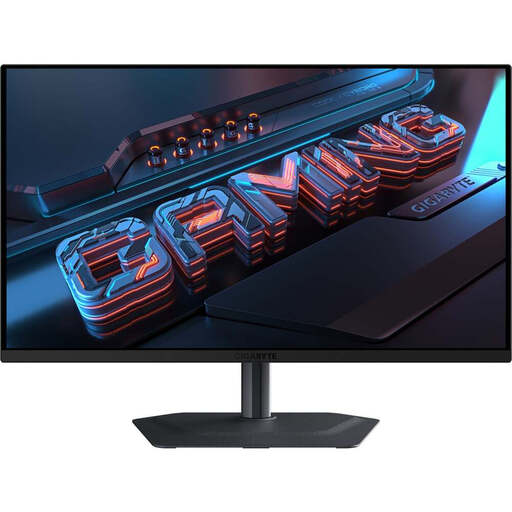
GIGABYTE MO27Q2A, 27-inch QHD QD-OLED
If you’re considering a 27-inch QHD model for your writing space, compare its stated features with what you actually need.
27 inches; QHD (2560 × 1440); QD-OLED; 240 Hz; product details list height adjustment and pivot.
View at Joybuy
Frequently asked questions
Do I need a second monitor to keep my section outline in view?
No, not necessarily. In Word for Windows, heading styles let you navigate your document using the Navigation pane; Scrivener lets you split its editor. Try the views you want on a single monitor with your preferred text size. The Word steps described apply to Windows; according to Microsoft Support, the controls are different on Mac and on the web.
How should I set up my monitor for long writing sessions?
Adjust the text size, screen position and ambient lighting so the text is easy to read from your usual viewing distance and reflections are kept to a minimum. The German BAuA rule ASR A6 sets out requirements for the types of workplaces and home-working setups it specifies; it isn’t a general requirement for writing fiction at home.
What should I bear in mind when cleaning my monitor?
Follow the care instructions for your specific model and switch the monitor off before cleaning it. Don’t use a cleaning method on a different surface without checking first, especially if the manufacturer gives different guidance.
What do withdrawal rights and the legal guarantee mean when buying online?
For a distance purchase covered by the rules, you generally have 14 days from delivery to withdraw from the contract. Under the conditions explained by the European Union, you may have to pay the return costs. If goods are faulty, you have a legal guarantee from the seller for at least two years from receipt; this is separate from any additional manufacturer’s warranty.
Does ASR A6 apply to people writing at home, and are there energy labels?
No. ASR A6 excludes screen use in private settings outside workplaces and home-working setups from its scope. According to the European Commission, electronic displays are covered by EU ecodesign and energy-labelling requirements; you can use the energy information for the specific model when comparing monitors.


