Who might benefit from the different monitor formats?

Writers working with two script views

If you compare dialogue, scenes or notes in a split editor, both panes should remain readable at your usual text size. Literature & Latte explains how to split the editor horizontally or vertically in Scrivener; check whether your own application works in a similar way.

Writers working with image references

If you regularly keep illustrated pages or references open alongside your script, you’ll need to weigh up extra width against higher detail resolution. Screen specifications apply to specific models; they are not a test of suitability for graphic novels.

Laptop users with limited desk space

If you need to make sure your desk space, screen position and laptop connections all work together, measure the available space and check the video output and charging requirements of your devices. A USB-C port alone doesn’t guarantee that the monitor will deliver the picture and charging setup you want with your laptop.

What should you look for when buying?

27-inch QHD, 16:9

A good fit if: Most of your work involves two text views, and both fit in the usable screen area at your preferred text size. Dell and BenQ offer suitable 27-inch QHD models.

The trade-off: Check the actual width of the editor panes; it will be less than on the 34-inch ultrawide considered here.

34-inch ultrawide, 21:9

A good fit if: You want your script, a second view and an image reference open side by side, and you have room for a wide monitor on your desk. LG lists the 34U640B-B as a 34-inch model with a 21:9 aspect ratio and 3440 × 1440 pixels.

The trade-off: It takes up more desk space. Extra width won’t automatically make small text or a poorly arranged set of windows easier to read.

27-inch 4K, 16:9

A good fit if: You regularly check fine details in illustrated pages alongside your script, and the interface remains readable at your chosen scaling. ASUS specifies a 27-inch panel with 3840 × 2160 pixels for the PA279CRV.

The trade-off: More pixels don’t necessarily give you more usable space for two columns of text when the display is scaled up.

Buying priority What to check Who is this most important to?
Two readable text views Check your editor layout, text size and usable screen width together. If I keep dialogue and notes open side by side, both need to be readable at my usual text size. Around 36% of consumers prioritise having two text views.
Comfortable reading during long writing sessions Check the scaling, viewing distance and adjustability of the setup. For longer writing sessions, I want to be able to adjust the text size and screen position to suit my workspace. Around 29% of consumers prioritise being able to read text clearly.
Script and image details Weigh up your window layout and the level of detail: ultrawide gives you more width, while 4K gives you more pixels. When I check illustrated pages alongside my script, screen space or fine detail matters more to me than text width alone. Around 21% of consumers prioritise checking images and details.
Desk space and laptop connections Measure the stand and desk space; check video output, cables and charging requirements. If space is limited or I have a particular laptop setup, the monitor needs to fit my workspace and work with my connections. Around 14% of consumers prioritise desk space or connection options.

Which buying mistakes should you avoid?

  • Choosing a monitor based only on screen size

    Screen size and resolution describe different things. What matters is whether your split editor works at a text size that’s comfortable for you to read.

    Check the resolution, aspect ratio and your usual layout together, rather than judging 27 or 34 inches in isolation.

  • Assuming USB-C guarantees a one-cable setup

    A monitor port alone doesn’t prove that your laptop can output a picture through it or charge at the power available.

    Check that the video mode, cable and charging requirements match the specifications for your monitor and laptop.

    Depending on your laptop and monitor, you may also need a suitable cable or a different connection solution.

  • Assuming 4K or advertised eye comfort is automatically better for writing

    More pixels and manufacturer claims about comfort are no substitute for text scaling that suits you or a well-positioned screen.

    Consider 4K mainly if you want to check image details, and test the text size separately.

Which brands are worth considering?

Dell

Dell offers the P2725DE, a 27-inch QHD model with a USB-C hub.

  • Dell specifies QHD resolution and USB-C connectivity for this model.
  • A hub doesn’t guarantee that the charging power and video output will work with every laptop, or that your editor layout will remain readable.

BenQ

The GW2790QT is a 27-inch QHD model with USB-C, as documented by BenQ.

  • BenQ promotes ergonomic features and eye-care functions on this model.
  • These are manufacturer claims, not independent evidence of health benefits. Also check that the connections work with your laptop.

LG

The LG 34U640B-B represents the 34-inch ultrawide option, with a 21:9 aspect ratio.

  • LG lists a resolution of 3440 × 1440 pixels and 65 W USB-C Power Delivery for this model.
  • The extra width takes up space, and the stated charging power needs to suit your specific laptop.

ASUS

The ProArt PA279CRV is an example of a 27-inch 4K model for checking image details.

  • ASUS specifies a resolution of 3840 × 2160 pixels and colour gamut coverage for this model.
  • These product features don’t prove that 4K is always better for writing. Consider the scaling and your actual image workflow.

Philips

The Philips 346B1C/00 adds a 34-inch B-Line ultrawide with USB-C to the selection.

  • Philips lists an ergonomic stand for this model.
  • Manufacturer claims about viewing comfort and working conditions are no substitute for checking the actual adjustability, connections and your layout.

Joybuy product selection

The Joybuy products below include 27-inch QHD monitors and one 34-inch ultrawide model. For each one, check whether your split script layout fits on the screen at your preferred text size.

ASUS ROG Strix WOLED XG27AQWMG, 27-inch, WQHD, 280 Hz

ASUS ROG Strix WOLED XG27AQWMG, 27-inch, WQHD, 280 Hz

The 27-inch WQHD format is one possible starting point for checking whether two editor views remain readable in your own layout.

  • 27-inch, WQHD (2560 × 1440), 16:9
  • WOLED panel, 280 Hz
  • DisplayPort 1.4 DSC, HDMI 2.1 and USB hub
Joybuy
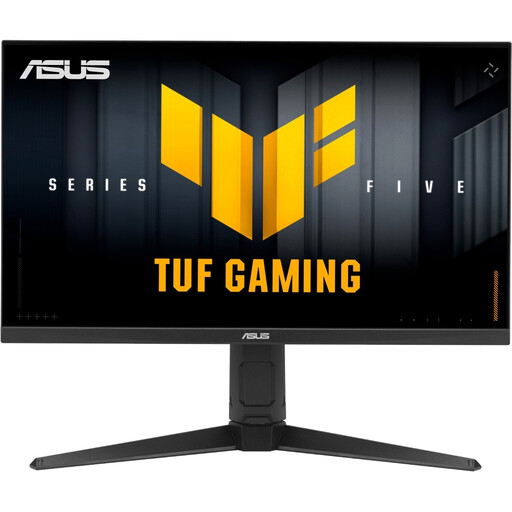
ASUS TUF Gaming VG27AQL5A, 27-inch, WQHD, 210 Hz

ASUS TUF Gaming VG27AQL5A, 27-inch, WQHD, 210 Hz

The 27-inch WQHD format is one possible setup for testing two text views on a single screen.

  • 27-inch, WQHD (2560 × 1440), 16:9
  • Fast IPS panel, 210 Hz
  • DisplayPort, HDMI and USB hub
Joybuy
Dell Pro 27 E2726DS, 27-inch, WQHD, IPS

Dell Pro 27 E2726DS, 27-inch, WQHD, IPS

As a 27-inch WQHD model, this monitor lets you check whether your script and a second editor view fit at your preferred scaling.

  • 27-inch, WQHD
  • IPS panel
  • HDMI and DisplayPort
Joybuy
GIGABYTE G27Q20, 27-inch, QHD, SS-IPS

GIGABYTE G27Q20, 27-inch, QHD, SS-IPS

The 27-inch QHD format gives you one possible starting point for trying out your script editor layout on a single screen.

  • 27-inch, QHD
  • SS-IPS panel
  • 200 Hz, overclocked to 210 Hz
Joybuy
GIGABYTE GS34WQCA, 34-inch, UWQHD, curved

GIGABYTE GS34WQCA, 34-inch, UWQHD, curved

The 34-inch ultrawide format could suit a layout with your script and another view side by side, provided you have enough desk space.

  • 34-inch, UWQHD (3440 × 1440), 21:9
  • VA panel, 1500R curvature
  • 120 Hz, overclocked to 135 Hz
Joybuy

Frequently asked questions

Do I definitely need two monitors to use two views?

No. Literature & Latte explains how to split the editor horizontally or vertically on a single screen in Scrivener. Whether both panes are readable at your chosen text size depends on your application, sidebars and the space available.

How should I set up a monitor for long writing sessions?

Adjust the text size and screen position to suit your workspace, and watch out for distracting reflections. The German Social Accident Insurance’s guide covers the design of screen and office workstations; it doesn’t mean that private graphic novel workspaces have to use a particular monitor.

Will a USB-C cable always handle both the picture and charging?

No. Check the video output, cable and power requirements of your specific laptop against the monitor specifications. LG lists 65 W USB-C Power Delivery for the 34U640B-B; that specification alone doesn’t confirm that the model is suitable for every laptop.

What rights do I have when buying a monitor online?

For consumer purchases in the EU, there is generally a minimum legal guarantee of two years, and online purchases generally come with a 14-day withdrawal period. Your Europe explains the guarantee, while the Council of the European Union covers the right of withdrawal. Check the terms of the specific offer, and distinguish these rights from a voluntary manufacturer’s guarantee.

Which labels should I look for on a monitor?

The EU energy label for electronic displays runs from A to G, as explained by the European Commission. Germany’s Federal Network Agency lists the CE marking and clear manufacturer information among the points it checks when inspecting products; these labels alone don’t tell you whether a monitor suits your script layout.

