If you want to keep several references and palettes visible alongside your canvas, a wide 21:9 display is an obvious option. For frequent close-up checks, the 27-inch 4K models considered here offer more vertical pixels. For digital output, choose a colour mode that suits your workflow; print work also depends on the specific print profile and process. Check the space available on your desk, how easy the screen is to read at your chosen scaling, and whether USB-C is compatible with your computer.
Which monitor is right for you?
Illustrators working with lots of references
If you like to keep several image references and tool palettes open while you draw, the key question is whether the screen format suits your window layout. LG lists the 34U650A-B as a 34-inch display with a 21:9 aspect ratio and a resolution of 3.440 × 1.440 pixels.
Artists who focus on fine detail
For fine lines, patterns and image crops, it’s worth considering resolution and screen size alongside your preferred scaling. BenQ lists the PD2705U and ASUS the PA279CRV as 27-inch models, each with a resolution of 3.840 × 2.160 pixels.
Illustrators creating work for print
If your work is intended for a specific print process, you’ll need a colour management workflow to match, as well as enough screen space. EIZO lists an Adobe RGB preset and hardware calibration for the CS2740; what matters is matching it to the intended print process.
What should you look for?
34-inch ultrawide for multiple references
A good fit if: You’re short on horizontal space for side-by-side windows. LG lists the 34U650A-B as a 21:9 display with a resolution of 3.440 × 1.440 pixels.
The trade-off: It has fewer vertical pixels than the 4K models mentioned, which have a resolution of 3.840 × 2.160 pixels. You’ll also need to make sure it fits on your desk.
27-inch 4K for drawing details
A good fit if: You often zoom in to check lines and image crops. BenQ and ASUS list a resolution of 3.840 × 2.160 pixels for the PD2705U and PA279CRV respectively.
The trade-off: The 16:9 format gives you less continuous width than 21:9. Also check that the controls are easy to read at your preferred scaling.
Colour management for a print process
A good fit if: You need to assess colour for a specific print process. EIZO lists an Adobe RGB preset and hardware calibration for the CS2740.
The trade-off: A wide colour gamut doesn’t replace a print profile or the need to match your paper and process. If you don’t have a specific print target, this feature set isn’t automatically a priority.
| Priority |
What to check before you buy |
Who it matters most to |
| Canvas space and references |
Compare the aspect ratio, native resolution, monitor width and your actual window layout. |
If I want to keep references and palettes open alongside my canvas, the horizontal layout matters most to me. Around 36% of consumers put space for multiple references first. |
| Fine lines and details |
Check the resolution, screen size and readability at your chosen scaling. |
When I’m checking fine lines and image crops, I need a detailed view that still leaves the controls easy to read. Around 29% of consumers prioritise drawing details. |
| Colour for digital output |
Match the colour mode and document profile to your intended screen-based workflow. |
If my illustrations are mainly going to be viewed on screens, I want to choose a colour workflow that suits them. Around 21% of consumers put on-screen colour first. |
| Colour for print |
First decide on your print target, then compare colour gamuts, colour modes and calibration options. |
If I’m preparing colours for a specific print process, I need more than a colour gamut listed on the spec sheet. Around 14% of consumers prioritise a specific print target. |
Avoid common buying mistakes
-
Assuming screen size tells you how much detail you can see
According to LG, the 34-inch LG 34U650A-B ultrawide has a resolution of 3.440 × 1.440 pixels; the 27-inch 4K models considered here have a resolution of 3.840 × 2.160 pixels. Each format lays out your workspace differently.
Set up a sample canvas with references and palettes, then check it at your preferred zoom and scaling.
-
Assuming a colour gamut guarantees print accuracy
Colour gamuts and modes are just parts of the workflow. For a print preview, you’ll also need to take the intended print profile and output process into account.
First decide whether you’re working for screens or a specific print process. Then compare the colour modes and calibration options that suit your needs.
-
Assuming USB-C will work as a one-cable solution without checking compatibility
The stated charging power varies between the models considered: ASUS lists 96 W Power Delivery for the PA279CRV, while EIZO lists a maximum of 60 W for the CS2740. That alone won’t tell you whether the connection is compatible with your computer.
Check your computer’s video output, cable and charging requirements against the specifications for the exact monitor model.
Depending on your computer and cable, you may also need a power adapter or a suitable cable.
Brands to consider
LG
The 34U650A-B is an option if you want to arrange several work windows side by side across a wide screen.
- LG lists this model as a 34-inch display with a 21:9 aspect ratio and a resolution of 3.440 × 1.440 pixels, as well as typically 99% sRGB.
- It has fewer vertical pixels than the 4K models mentioned. The sRGB figure is a manufacturer specification and doesn’t replace checking that the monitor suits your own colour workflow.
BenQ
The PD2705U is a 27-inch 4K model with sRGB-focused output.
- BenQ lists 99% sRGB and 99% Rec.709 for the PD2705U. In 2022, PRAD described features including KVM and picture-by-picture for this model.
- Its sRGB focus doesn’t replace checking whether it suits another print colour space. The features described by PRAD apply to this model, not every monitor from the brand.
ASUS
The ProArt PA279CRV combines a 27-inch screen and 4K resolution with several colour modes.
- ASUS lists sRGB and Adobe RGB modes, 96 W USB-C Power Delivery and a height-adjustable stand for this model.
- To use the charging power, you’ll need a compatible computer and connection. The manufacturer’s colour coverage figures aren’t measurements of the individual monitor you receive.
EIZO
The ColorEdge CS2740 is worth considering if you need a defined colour workflow and hardware calibration.
- EIZO lists a 26,9-inch 4K screen, an Adobe RGB preset and hardware calibration for this model.
- These features don’t remove the need to match the monitor to your specific print process. EIZO lists a maximum power delivery of 60 W for this model’s USB-C connection.
Monitors for illustration at Joybuy
This Joybuy selection includes monitors with plenty of workspace for multiple references, as well as models for fine details and on-screen colour.
 No image available
Samsung M8 M80F (2025), 32-inch, 4K UHD
The 32-inch workspace described could be useful if you want to work on a canvas alongside several references.
The product description lists a resolution of 3.840 × 2.160 pixels, 99% sRGB and USB-C with 65 W Power Delivery. The stand is height- and tilt-adjustable.
View at Joybuy
 No image available
CRUA CR320QB, 32-inch, curved, 4K
The product details list a 32-inch screen and 4K resolution, giving you a larger workspace for fine image details.
Specifications include a resolution of 3.840 × 2.160 pixels, 3000R curvature, a VA display and 100% sRGB. Check whether a curved screen suits the way you work.
View at Joybuy
 No image available
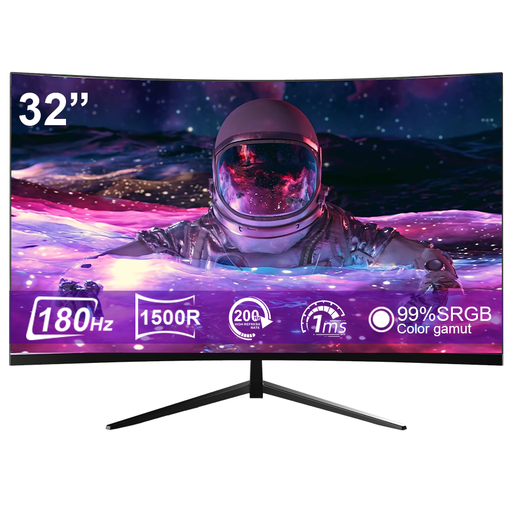
CRUA CR320ZC-H, 32-inch, curved gaming monitor
The stated screen size could be useful if you want a larger canvas with several references.
The title lists a 32-inch screen and 99,99% sRGB; the product description specifies 1500R curvature. Check whether this gaming model and its curved screen suit your illustration workflow.
View at Joybuy
 No image available
INNOCN 40C1U, 40-inch, 5K, 21:9
The 40-inch format and picture-by-picture feature could be useful for a wide workspace with multiple views.
The description lists a resolution of 5.120 × 2.160 pixels, 21:9, 99% sRGB and USB-C with 65 W Power Delivery. With the stand, the dimensions are listed as 944,1 × 573,5 × 241,1 mm; measure your available desk space first.
View at Joybuy
 No image available
INNOCN CB27U1, 27-inch, 4K UHD
This 27-inch 4K model is an option if you want to assess fine lines and image crops.
The product description lists a resolution of 3.840 × 2.160 pixels, IPS, 100% sRGB, 99% Adobe RGB and USB-C with 90 W Power Delivery. PIP and PBP are listed as features for split-screen views.
View at Joybuy
Frequently asked questions
How should I set up my monitor for long illustration sessions?
Adjust your viewing distance, screen position and workspace to suit your setup. Germany’s ASR A6 guidance from the Federal Institute for Occupational Safety and Health covers ergonomic screen-based workstations for employees within its scope; it isn’t a general purchasing requirement for home illustration setups.
Is USB-C enough to connect and charge my laptop?
The shape of the socket alone doesn’t tell you. Check video output, the cable and your laptop’s power requirements against the specifications for the exact model. ASUS lists 96 W Power Delivery for the PA279CRV, while EIZO lists a maximum of 60 W for the CS2740.
What rights do I have when buying online in Germany?
Online purchases generally come with a 14-day right to cancel. New faulty goods are generally covered by a two-year statutory warranty against the seller, starting from delivery or receipt; both are explained by the consumer advice centre. A manufacturer’s guarantee is separate.
Can I put an old monitor in household waste?
No. According to Germany’s Federal Ministry for the Environment, old electrical equipment must be taken to an authorised collection point, such as a local authority recycling centre.
Where can I compare a monitor’s energy consumption?
The European Commission provides information in EPREL about product models that require an energy label; the ‘Displays’ product group also includes monitors. Search for the exact model name so you don’t mistake details for another version.


