What should you look for when buying?
Compact Full HD monitor
A good fit if: you usually work with one editor or test window at a time. Lenovo Deutschland lists the ThinkVision T24-40 at 1,920 × 1,080 pixels; EIZO Deutschland gives the same resolution for the FlexScan EV2490.
Worth considering: When you have several views open side by side, check that the text and windows remain easy to read with your chosen scaling.
Compact QHD monitor
A good fit if: you often want to view patterns, test text and matches side by side. Dell Deutschland lists the 23.8-inch P2425DE at 2,560 × 1,440 pixels.
Worth considering: More pixels don’t guarantee larger text or improved readability, so check the display at your usual scaling.
For this study space, the main considerations are desk space, readable side-by-side views, screen positioning and the right connection for your laptop.
| Priority |
What to check before buying |
Who it matters most to |
| Desk space and positioning |
Compare the available desk width and depth with the dimensions of the model, including its stand; allow space for your keyboard and cables. |
If my desk is short on space, the stand needs to fit too, while leaving enough room for my keyboard and cables. Around 36% of consumers put desk space and positioning first. |
| Readability when comparing |
Choose a font size and scaling, then check whether your preferred window layout remains easy to read. |
If you want to read your expression, test text and matches side by side, pay particular attention to how easy the text is to read in your chosen layout. Around 29% of consumers prioritise comparing items side by side. |
| Adjustable screen position |
Check the adjustment options and stand dimensions for the specific version. |
If I need to adjust the screen to suit how I sit and see, both the range of movement and the space taken up by the stand matter. Around 21% of consumers prioritise adjustability. |
| Laptop connectivity |
Check the laptop’s video output, compatible cable and any required charging power against the monitor specifications. |
If you regularly connect and disconnect your laptop, make sure you know exactly which features the connection supports. Around 14% of consumers say laptop connectivity is their top priority. |
Joybuy products for compact study spaces
This selection features compact Full HD monitors from 18.5 to 24 inches for learners who want to fit an editor and test text on a limited desk space.
 No image available
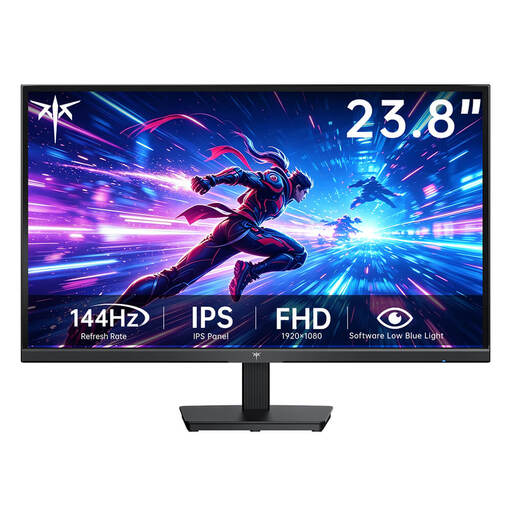
KTC H24B9S-2, 23.8-inch, Full HD, 144 Hz
The 23.8-inch format is a compact Full HD option for a study space with limited room.
- 1,920 × 1,080 pixels
- HDMI and VGA
- VESA mount: 75 × 75 mm
View at Joybuy
 No image available
KOORUI MB24V29FS4, 24-inch, Full HD IPS
A Full HD option if you want to read your editor and test text on a 24-inch IPS screen.
- 1,920 × 1,080 pixels, 120 Hz
- HDMI and VGA
- Tilt-adjustable stand; VESA mount: 100 × 100 mm
View at Joybuy
 No image available
UPERFECT portable 18.5-inch Full HD monitor
The portable 18.5-inch format is a smaller screen option for a compact study space.
- 1,920 × 1,080 pixels, IPS
- USB-C and Mini-HDMI
- VESA-compatible
- According to the product description, 120 Hz support depends on the device and cable.
View at Joybuy
 No image available
Dell P2425HE, 24-inch, Full HD IPS, USB-C
This Full HD option may suit you if you want to connect a compatible laptop to your monitor.
- 1,920 × 1,080 pixels
- USB-C with up to 90 W, according to the product description
- Integrated USB hub and height-adjustable stand
View at Joybuy
 No image available
Acer Vero B247YGbmiqprx, 24-inch, Full HD IPS
The listed adjustment options may be useful if you want to position the screen to suit your needs.
- 1,920 × 1,080 pixels
- Height adjustment up to 165 mm, pivot, tilt and swivel
- VGA, HDMI and DisplayPort
- Dimensions: 540.30 × 186.1 × 350.90 mm
View at Joybuy
Frequently asked questions
Do I need QHD to learn regular expressions?
No. If you usually read one window at a time, Full HD may be enough. For several views at once, the 23.8-inch QHD model documented by Dell Deutschland offers more pixels than the Full HD options listed here. What matters most is whether the text is easy to read at your preferred scaling.
How should I set up a monitor on a small desk?
First, measure the free space on your desk and allow for the stand. Then adjust the screen position and font size to suit how you sit and see. The Federal Institute for Occupational Safety and Health explains how screen position and individual visual characteristics relate to working at a screen; a single setting won’t necessarily suit everyone.
Will any USB-C monitor charge my laptop?
No. Lenovo Deutschland lists 15 W for the ThinkVision T24-40, while EIZO Deutschland specifies a maximum of 70 W for the EV2490’s USB-C input. Also check that your laptop and cable support the video transmission you need.
What information can help me compare energy consumption?
The European Union energy label rates electronic displays on a scale from A to G. For a model-specific comparison, you can check the label and its corresponding product entry. Your actual costs will also depend on how long you use the monitor and your electricity price.
Does the ASR A6 workplace rule apply to my home study desk?
No, if you use the monitor at home and not at a teleworking workstation. The Federal Institute for Occupational Safety and Health explicitly excludes use in private settings outside teleworking workstations from the scope of ASR A6. However, ergonomic guidance can still help you set up your workspace.


