What should you look for when choosing a monitor?
First decide which windows you need to see at the same time in your editing programme. Then compare resolution, text size and ports. Weigh up colour options according to the image workflow you actually use.
| Criterion |
What to check before buying |
Who should pay particular attention? |
| Room for long timelines |
Compare the 21:9 format and 3,440 × 1,440 pixels of the Philips 346E2CUAE/00 with a 16:9 4K layout such as the BenQ PD3205U, with 3,840 × 2,160 pixels. Try both layouts in your editing programme. |
If I want to search through long interviews, I need room for the timeline and other editing panels. Around 36% of consumers would make timeline space their main reason for buying. |
| Transcripts and subtitles |
Open the transcript, preview and timeline together, then check they’re easy to read at your chosen scaling. Adobe describes text-based editing and language settings, but you should still check dialect passages against the original audio. |
If I need to compare dialogue, transcript and picture, the windows should be arranged so they’re easy to read. Around 29% of consumers would make transcript checking their top priority. |
| Workspace and ports |
Check the space available, height adjustment and the ports you need. BenQ lists 90 W USB-C Power Delivery for the PD3205U; ASUS lists 96 W for the PA279CRV. The DGUV identifies lighting and workspace design as potential sources of strain when working at a screen. |
For long sessions, I want to adapt the height and connections to my workspace. Around 21% of consumers would make workspace comfort their main reason for buying. |
| Colour control |
Find out which colour space you need and check the modes available on the specific model. BenQ lists 99% sRGB and 99% Rec.709 for the PD3205U; ASUS lists a Rec.709 mode for the PA279CRV. These are manufacturer specifications. |
If I need to assess colour as well as edit dialogue, a suitable colour workflow matters more than screen width alone. Around 14% of consumers would make colour control their main reason for buying. |
Joybuy monitors for video editing
The Joybuy monitors below differ in screen size, resolution and aspect ratio, among other things. Check how their stated features suit your editing programme and workspace.
 No image available
TCL 32X3A 32-inch 4K UHD OLED monitor
The product title lists a 32-inch screen and 4K UHD resolution, describing the screen size and resolution for reviewing interview footage.
The title specifies 3,840 × 2,160 pixels and OLED.
Joybuy
 No image available
INNOCN 40C1U 40-inch 5K ultrawide monitor
The stated 21:9 format and 40-inch screen may suit a wide timeline layout; check how it works with your software.
The product title lists 5,120 × 2,160 pixels, IPS, 100 Hz, USB-C with 65 W Power Delivery and a height-adjustable stand.
Joybuy
 No image available
ASUS ROG Swift OLED PG32UCDMR 32-inch 4K monitor
The product title lists a 32-inch screen and 4K UHD resolution, making these useful size and resolution specifications when comparing the preview with your editing panels.
The title lists 3,840 × 2,160 pixels, OLED, 240 Hz and USB-C with 90 W Power Delivery. Check the ports you need and your computer’s charging requirements.
Joybuy
 No image available
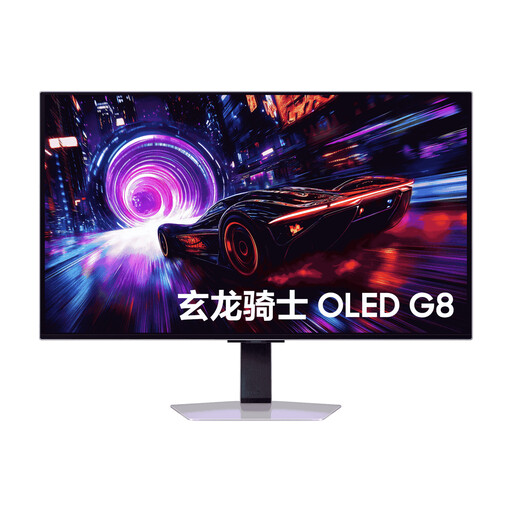
Samsung Odyssey OLED G8 G81SF 32-inch 4K QD-OLED monitor
The title lists a 32-inch screen and 4K UHD resolution, giving you a large display for reviewing interview footage.
The product title identifies this model as a QD-OLED monitor. The product description advises against displaying static images for long periods, so bear this in mind during long editing sessions with control panels left on screen.
Joybuy
 No image available
INNOCN CB27U1 27-inch 4K UHD monitor
The 27-inch format is a more compact option for your preview and text panels; check that the windows remain easy to read at your chosen scaling.
The product title lists 3,840 × 2,160 pixels, IPS, 120 Hz and USB-C with 90 W Power Delivery.
Joybuy
Frequently asked questions
Can a larger monitor automatically transcribe dialects more accurately?
No. Screen size changes how your workspace is displayed, not how accurately spoken words are recognised. Adobe describes transcription, language settings and editing in the text and timeline panels, but this doesn’t prove a particular level of accuracy for your dialect. Check any difficult passages against the original audio.
What should I check when connecting an editing laptop?
Compare your laptop’s video port and required charging power with the specific monitor. BenQ lists 90 W USB-C Power Delivery for the PD3205U; ASUS lists 96 W for the PA279CRV. Without your laptop’s specifications, one-cable compatibility can’t be guaranteed.
How should I set up my monitor for long review sessions?
Adjust the height, lighting and programme scaling to suit your sitting position, and watch out for glare. The German Social Accident Insurance (DGUV) identifies lighting and workspace design as potential sources of strain when working at a screen; this doesn’t mean there’s one screen size that’s ideal for everyone.
What are my rights in Germany if something is faulty or I buy online?
If you buy from a business seller as a consumer, you generally have statutory rights against the seller for at least two years from the date you receive the goods; an additional manufacturer’s warranty doesn’t replace them. Many distance sales are also generally covered by a 14-day right to cancel. If you’re buying for a business or your purchase falls under an exception, don’t assume these consumer rights apply without checking.


