What should you look for when buying?
27-inch QHD, 16:9
A good fit if: Two text windows fit in the available space at your chosen font size, and you don’t want to set up an especially wide monitor.
The trade-off: You’ll have less horizontal space for wide source views than with a 34-inch 21:9 model.
34-inch ultrawide, 21:9
A good fit if: You want your manuscript and sources to stay side by side, and your desk and computer can accommodate the format.
The trade-off: The monitor and stand take up space that you’ll also need to allow for paper sources.
27-inch 4K, 16:9
A good fit if: You want to assess fine details in digitised maps, photographs or page layouts as well as text.
The trade-off: The right scaling and font size still matter; the higher pixel count doesn’t give you the physical width of an ultrawide monitor.
23.8-inch Full HD
A good fit if: Paper sources take up a lot of desk space and you usually work with just one window in the foreground.
The trade-off: The EIZO EV2490’s 1,920 × 1,080 pixels offer less room for two visible views at once than the QHD and 4K models mentioned here.
For a split-screen view, window width and readable scaling go hand in hand. The percentages below refer to consumers grouped by their most important purchase consideration for this writing scenario.
| Consideration |
What to check before buying |
Who should pay particular attention? |
| Space for two windows |
Window layout at your font size; aspect ratio and stand dimensions. |
If you need to keep your manuscript and sources readable at the same time, usable width matters more than screen size alone. Around 27% of consumers rank window space as their main consideration. |
| Readability and image detail |
Test the native resolution, operating system scaling and typical scans together. |
If you’re checking text and fine details in historical documents, assess how your own content looks on screen. Readability and image detail are the top consideration for around 27% of consumers. |
| Viewing position and desk space for papers |
Measure the monitor and stand; check the adjustment options on the specific model. |
If you keep books and documents on your desk, positioning and viewing angle are part of your space planning. Workplace ergonomics are the main consideration for around 20% of consumers. |
| Laptop connection |
Check the laptop’s video output, cable and charging requirements. |
If you want to connect your writing laptop to the monitor and possibly charge it too, check the ports on both devices. Around 13% of consumers prioritise laptop connectivity. |
| Purchase price and energy use |
Compare the actual prices and EU energy labels of similar models. |
If the purchase price and ongoing energy use determine your choice, make sure any extra features suit the way you write. Cost is the main consideration for around 13% of consumers. |
Monitors for manuscripts and sources
The following Joybuy monitor options range from ultrawide formats to 27-inch QHD and 4K models for a split-screen workspace.
 No image available
INNOCN 40C1U, 40-inch 5K ultrawide monitor
The 40-inch 21:9 format is an option if you want your manuscript and sources to stay side by side. First, check that you have enough desk width.
5,120 × 2,160 pixels; IPS panel; 100 Hz; PIP/PBP; USB-C with 65 W Power Delivery; height-adjustable stand. The listed width with the stand is 944.1 mm.
Joybuy
 No image available
Philips 345B1C, 34-inch curved ultrawide monitor
The 34-inch 21:9 format is designed for side-by-side windows. Make sure you leave enough space for paper sources too.
3,440 × 1,440 pixels; 100 Hz; 180 mm height adjustment; MultiView with PIP/PBP.
Joybuy
 No image available
ASUS ROG Strix WOLED XG27AQWMG, 27-inch WQHD monitor
A 27-inch QHD option if you want two text windows to fit on screen. A 16:9 format offers less horizontal space than an ultrawide model.
2,560 × 1,440 pixels; 16:9; height adjustment, tilt, swivel and pivot.
Joybuy
 No image available
KTC M27P6, 27-inch 4K MiniLED monitor
The 27-inch 4K specification may suit a workspace with your manuscript and sources. Try out your preferred scaling and remember that it offers less horizontal width than an ultrawide.
4K UHD; Type-C with 65 W; height adjustment and swivel.
Joybuy
 No image available
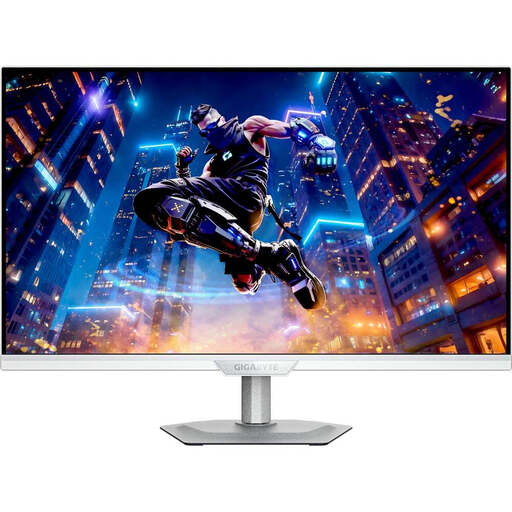
GIGABYTE M27UP ICE, 27-inch 4K UHD monitor
A 27-inch 4K option if you want to check details in source images as well as your manuscript. The horizontal space for windows is still more limited than with an ultrawide format.
3,840 × 2,160 pixels; height adjustment, tilt, swivel and pivot.
Joybuy
Frequently asked questions
Should I choose QHD or 4K for a split-screen editor?
Start by setting up two windows with the font size you actually use. The 27-inch QHD models mentioned here have 2,560 × 1,440 pixels, while the 27-inch 4K models have 3,840 × 2,160 pixels. 4K may also be worth considering if you need to check fine details in maps or scans, as long as the scaling you choose remains readable.
How should I set up a monitor for working with a manuscript and paper sources?
Measure the space you have, including the stand, choose a comfortable font size and check the adjustment options on the specific model. Pivot can be useful if you often read portrait-format pages; according to its specification sheet, the BenQ GW2790QT offers this feature. Germany’s ASR A6 provides guidance on screen work within its scope, but it does not apply universally to private use outside workplaces or teleworking environments.
Is USB-C enough for video and charging over one cable?
No. A USB-C port alone doesn’t tell you whether video and charging will work over a single cable. The BenQ GW2790QT is listed with DisplayPort Alt Mode, data and 65 W Power Delivery; for the EIZO EV2740X, the manufacturer lists DisplayPort Alt Mode and up to 94 W through the relevant port. Check your laptop’s video output, cable and charging requirements.
What consumer rights and energy information should you consider when buying a monitor in Germany?
For a distance purchase from a business seller, you generally have a 14-day right to cancel from the date of delivery; exceptions and rules on return costs apply. Faulty goods are covered by a statutory guarantee for at least two years, which is separate from a voluntary manufacturer’s warranty. Computer monitors generally fall under EU energy labelling rules, so compare the information for the specific models you’re considering.


