Detail-focused sheet music editors
If you’re editing notes, lyrics and page breaks, you can check the page view, then review the PDF or printout. The MuseScore Studio Handbook explains these views and export options.


For music worksheets, 4K isn’t automatically essential. Choose a resolution that keeps notes, text and page previews easy to read at your preferred scaling. For longer sessions, the screen’s position matters too. If you’re using a laptop, check USB-C video output and charging power separately. The MuseScore Studio Handbook highlights checking the page view, exported PDF or printout as important steps.
If you’re editing notes, lyrics and page breaks, you can check the page view, then review the PDF or printout. The MuseScore Studio Handbook explains these views and export options.
For longer sessions, make sure the screen position works for your seating position and eyesight, and take your glasses into account if needed. The Health and Safety Executive’s guidance on working with display screen equipment covers how to make these adjustments.
If you connect your laptop at your desk, check video output, the cable and the charging power you need together. Dell describes USB-C hub features for specific monitor models; BenQ explains that USB-C alone doesn’t guarantee video or charging for every device combination.
Start by checking notes and page previews at a comfortable, easy-to-read scaling. Then consider whether screen positioning, laptop connectivity or extra features matter most for your workspace.
| Buying priority | What to look for | Who it matters most to |
|---|---|---|
| Notes, text and page layout | Check your notation software at a comfortable scaling; review the PDF or printout too. | If I’m checking notes, lyrics and page breaks together, I want to see the detail without making everything uncomfortably small. Around 36% of consumers would put details in the notes, text and layout first. |
| Readability and screen position | Check the adjustment range, desk space and viewing position against your own setup. | For longer sessions, I want to position the screen to suit my seating position and eyesight. Around 29% of consumers would prioritise an easy-to-read display and suitable screen positioning. |
| Laptop connectivity | Check the video output from your laptop port, the cable and the charging power you need separately. | If my laptop stays at my desk, I want to know whether the connection I’m planning to use will support video and, if needed, charging. Around 21% of consumers would rate laptop connectivity as their top buying priority. |
| Purchase and running costs | Pay only for the features you need, and compare the energy label and product details for the specific model. | If I mainly create black-and-white worksheets, I want to weigh up the features and running costs against what I actually need. Around 14% of consumers would put total costs first. |
Using a higher scaling setting can reduce how much you can see at once. In Windows, setting a resolution below the native resolution can also make text look blurry.
Check your notation software at your preferred scaling, and assess notes, text and print preview together.
USB-C refers first and foremost to the connector type. Video output and suitable charging power depend on the laptop, monitor and cable.
Check the features of every device involved and compare the monitor’s stated power output with your laptop’s requirements.
Depending on the ports available, you may need a suitable cable or a different connection solution.
Colour specifications for a monitor don’t automatically tell you what an exported file or printout will look like.
Only prioritise extra colour features if you need them for your work, and check the output separately.
Dell’s P2725DE and P2725QE are 27-inch office monitors with USB-C hubs, offering QHD and 4K resolutions respectively.
According to ASUS, the ProArt PA279CRV is a 27-inch 4K model with an adjustable stand and specified colour modes.
The German datasheet for the FlexScan EV2740X lists a 27-inch 4K display with USB-C docking.
LG describes the UltraFine 27UP850K-W as a 27-inch 4K IPS monitor with USB-C and an adjustable stand.
The BenQ RD320UA is a 31.5-inch 4K monitor with a flexible arm, which BenQ positions for coding work.
This selection includes monitors for creating and checking music worksheets at your desk, with a range of resolutions and connectivity options.
 No image available
Could be worth considering for checking fine notation and layout details on a 27-inch screen; also check the page view and exported PDF.
3840 × 2160 pixels, IPS, 120 Hz, HDR500, FreeSync, PIP and PBP, USB-C with 90 W PD, HDMI and DP; height-adjustable.
USB-C video and the charging power you need must be compatible with your laptop and cable. Colour and HDR specifications don’t guarantee an accurate PDF or printout.
 No image available
A QHD option for editing notes and page layouts. Check that your applications remain easy to read at your preferred scaling.
2560 × 1440 pixels, USB-C hub with up to 90 W PD, height adjustment and pivot.
USB-C features and the charging power you need must be compatible with your laptop and cable.
 No image available
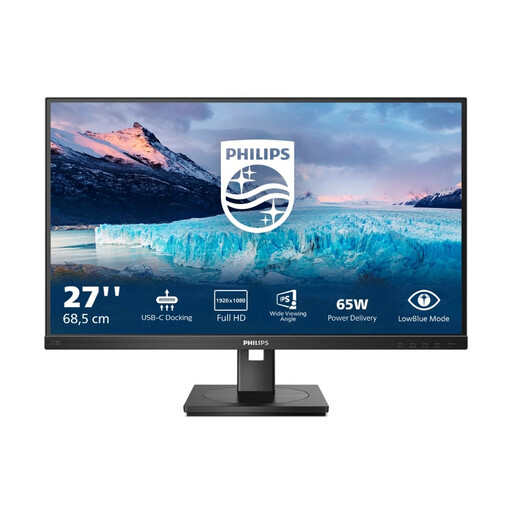
Could be a good fit if Full HD is enough for your notation software and preferred scaling. Check the text and page preview before choosing.
1920 × 1080 pixels, 75 Hz, USB-C with 65 W, RJ45, USB hub, HDMI and DisplayPort; height-adjustable with pivot.
USB-C video output and the charging power you need must be compatible with your laptop and cable.
No. The MuseScore Studio Handbook describes PDF as an export format for printable sheet music, and the page view as a way to check pages and margins. Check the exported document or a test printout; monitor resolution and output resolution aren’t the same thing.
First check whether the specific stand supports pivot. Once you’ve rotated the screen, you can change the display orientation in Windows, then check the scaling and readability in your application.
No. USB-C refers first and foremost to the connector type. The laptop, monitor and cable must support video output and the charging power you need. Compare your laptop’s power requirements with the power delivery explicitly specified for the particular monitor.
The EU energy label for monitors shows an efficiency class; you can check the corresponding model details through EPREL. According to the consumer advice service, online consumer contracts generally come with a 14-day right to cancel. Check the terms of your specific purchase and notify the retailer if you wish to cancel.
No. The German Workplace Ordinance and ASR A6 apply within their respective scopes; a designated teleworking space for an employee isn’t the same as every instance of private screen use. Whatever your setup, it can still be helpful to adjust the screen position to suit your eyesight.