Which monitor is right for you?

Newsletter writers with a small desk

If you mainly write and edit longer texts, it’s important to have a comfortable viewing position and a stand that can be adjusted to fit the space you have. Lenovo lists these features for the ThinkVision T24d-30, for example.

Anyone who works across several windows

If you often have your article draft, sources and page preview open side by side, a 27-inch QHD screen can give you more room to work. Check on your own computer that the windows remain easy to read with your preferred text scaling.

Laptop users who connect and disconnect frequently

If you often connect your laptop to a monitor, the right video output and power supply are essential. EIZO lists USB-C video and up to 70 W of power delivery for the FlexScan EV2495. Whether that’s enough depends on your laptop’s requirements.

What should you look for when buying?

Compact text monitor around 24 inches

A good fit if: You have limited desk space and mainly write or edit newsletter content.

The trade-off: A 16:10 model such as the Lenovo ThinkVision T24d-30 offers 1920 × 1200 pixels. For several large windows, a 27-inch QHD model can offer more pixels.

27-inch QHD

A good fit if: You regularly work with your draft, research and page preview side by side, and have enough desk space.

The trade-off: The larger screen takes up more space. Also check that your chosen text scaling is comfortable to read.

USB-C docking

A good fit if: You regularly connect a compatible laptop and want to use one connection for power and video.

The trade-off: Your laptop’s USB-C port must support video output, and the monitor’s power delivery must meet your charging needs. The EIZO EV2495 offers up to 70 W.

Your priority What to check Who is it important to?
Desk space and text position Measure the desk width and stand depth; check the height and readability from your usual seating distance. If you write long texts at a small desk, you need a comfortable viewing position that still fits in the space available. This is a main priority for around 33% of consumers.
Draft, sources and preview Check that a 27-inch QHD monitor fits your desk and offers comfortable text scaling. If you want to see your draft, sources and page preview at the same time, usable screen space matters more than the pixel count alone. Around 25% of consumers prioritise this.
Purchase price and power consumption Choose extra features to match your actual needs; for comparable models, check the EU energy label and product specifications. If you don’t want to pay for features you won’t use, compare specifications and energy efficiency based on how you work. Cost is the main priority for around 17% of consumers.
Laptop connection Check the laptop port’s video output, cable and required charging power against the specifications for the exact monitor model. If you frequently connect and disconnect your laptop, the video signal and power supply need to be compatible. Otherwise, you may need separate connections. Around 17% of consumers prioritise an easy laptop connection.
Colour reproduction for photos Check colour gamut coverage and colour modes; don’t assume that quoted figures guarantee measured colour accuracy. If you regularly edit newsletter photos, colour reproduction may matter more than it does for writing alone. This is a main priority for around 8% of consumers.

Avoid common buying mistakes

  • Assuming USB-C means full one-cable docking

    Whether the connection works depends on whether your laptop’s port outputs a video signal and whether the monitor’s power delivery is right for your laptop.

    Before you buy, check your laptop port, the right cable and the charging specifications of the exact monitor model. Depending on the connection, you may also need to use your laptop’s separate power adapter.

  • Assuming similar model names mean the same features

    The Dell P2725DE and P2725D are different models. You can’t assume that the connections available on one are also available on the other.

    Check the full model number and connections on the product page for the exact device.

  • Confusing colour gamut coverage with colour accuracy

    A quoted sRGB figure on its own doesn’t tell you how accurately that particular unit reproduces colours.

    For more demanding image editing, independent measurements of the exact model can be useful. If you mainly write, give appropriate priority to readability and desk space.

Key brands at a glance

Lenovo

The ThinkVision T24d-30 is a specific 24-inch, 16:10 option for working with longer texts in limited space.

  • Lenovo lists 1920 × 1200 pixels, an adjustable stand and 99% sRGB for this model.
  • Lenovo lists HDMI, DisplayPort and VGA as video connections. Check the connections on the exact model if you need USB-C video.

Dell

The Pro P2725DE is a specific 27-inch QHD model with USB-C hub features.

  • Dell lists 2560 × 1440 pixels for the P2725DE. Its USB-C features may be useful for compatible laptops.
  • The P2725DE and P2725D are different models. Check the full model number and the connections you actually need.

EIZO

The FlexScan EV2495 combines a 24.1-inch 16:10 screen with USB-C docking features.

  • According to EIZO, the model offers 1920 × 1200 pixels, USB-C video and a hub.
  • The stated power delivery through the upstream port is up to 70 W, which may not be enough for a laptop that needs more power to charge.

Philips

The Business Monitor 27B2U4601/00 is a specific 27-inch QHD option with USB-C.

  • Philips lists QHD, an IPS panel and USB-C for this model.
  • Check the connections and features of the exact model variant before comparing it with another monitor.

LG

The 27U631A-B is an example of a 27-inch QHD IPS monitor with USB-C.

  • LG lists 2560 × 1440 pixels and a quoted sRGB coverage of 99%.
  • LG marks this model as no longer available. The colour gamut figure also does not prove measured colour accuracy.

Monitors available at Joybuy

This selection includes 27-inch QHD monitors for drafts, sources and layouts. Some models also offer extra adjustment options or USB-C connections.

ASUS ROG Strix WOLED XG27AQWMG, 27-inch WQHD monitor

ASUS ROG Strix WOLED XG27AQWMG

The 27-inch QHD screen is useful for viewing a draft and preview side by side. The stand described can be adjusted for height, tilt, swivel and pivot.

The product description recommends keeping the OLED care features enabled to help extend the panel’s lifespan.

View at Joybuy
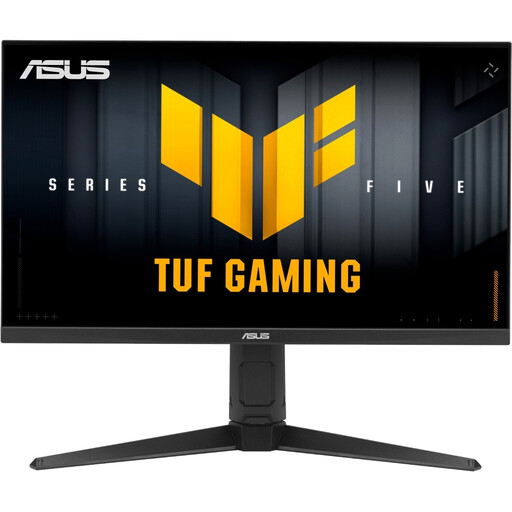
ASUS TUF Gaming VG27AQL5A, 27-inch WQHD monitor

ASUS TUF Gaming VG27AQL5A

If you want to view text, research and layout side by side on one screen, the 27-inch WQHD format could suit the way you work.

The product description lists an adjustable stand and HDMI and DisplayPort connections.

View at Joybuy

Dell Pro 27 E2726DS, 27-inch WQHD IPS monitor

Dell Pro 27 E2726DS

The 27-inch WQHD format is an option if you want to see your article and page preview at the same time.

The product name specifies an IPS panel, as well as HDMI and DisplayPort.

View at Joybuy

GIGABYTE G27Q20, 27-inch QHD monitor

GIGABYTE G27Q20

The model’s 27-inch QHD specifications are useful for viewing content side by side. The stand described can be adjusted for height, tilt, swivel and pivot.

The product name lists 200 Hz and 94% DCI-P3. These figures are no substitute for measuring the colour accuracy of the specific device.

View at Joybuy

Dell Pro Plus P2725DE, 27-inch QHD monitor with USB-C hub

Dell Pro Plus P2725DE

For layout work across multiple views, this model combines a 27-inch screen and 2560 × 1440 pixels with USB-C features for compatible laptops.

The product description lists USB-C with video and up to 90 W Power Delivery. Check that your laptop’s port supports video output and that the charging power is sufficient.

View at Joybuy

Frequently asked questions

Is 24 or 27 inches better for writing a newsletter?

If you have limited desk space and mainly work with long texts, an adjustable 24-inch model with a 16:10 aspect ratio is a sensible starting point. If you often have your draft and preview side by side, consider a 27-inch QHD monitor and check that it fits your desk and offers comfortable text scaling.

Does USB-C docking work with every laptop?

No. Your laptop and monitor need to be compatible for video output and power delivery. EIZO lists DisplayPort Alt Mode and up to 70 W for the EV2495’s USB-C input. Check your laptop’s port, the cable and your device’s charging requirements.

How should I set up a monitor in a student room?

Check at your own desk that you can adjust the height and tilt to suit your seating position, and that light doesn’t cause reflections. The Federal Institute for Occupational Safety and Health explains that ASR A6 applies to workplaces and teleworking, not generally to screen use in a private student room.

How can I compare monitors’ power consumption?

The EU energy label for electronic displays, including computer monitors, rates efficiency on a scale from A to G. Compare specific models alongside their size and resolution; the efficiency class alone won’t tell you how much your electricity will cost.

What are my rights when buying a monitor online in Germany?

For a typical online purchase by a consumer, you generally have a 14-day right to cancel from the day you receive the goods, and you must be informed of this right. If the goods are faulty, your statutory rights against the seller are separate from any voluntary guarantee. For new goods, you can exercise your statutory rights within two years. Exceptions and the terms of the contract should be checked separately.